
Exceptions in the Java Language and Virtual Machine
First published in JavaWorld, June 1998
throws clause, checked vs. unchecked exceptions, and
finally clauses.
Exceptions are the customary way in Java to indicate to a calling method that an abnormal condition has occurred. This article is a companion piece to this month's Design Techniques installment, which discusses how to use exceptions appropriately in your programs and designs. Look to this companion article for a tutorial on the nuts and bolts of what exceptions are and how they work in the Java language and virtual machine.
When a method encounters an abnormal condition (an exception condition) that it can't handle itself, it may throw an exception. Throwing an exception is like throwing a beeping, flashing red ball to indicate there is a problem that can't be handled where it occurred. Somewhere, you hope, this ball will be caught and the problem will be dealt with. Exceptions are caught by handlers positioned along the thread's method invocation stack. If the calling method isn't prepared to catch the exception, it throws the exception up to its calling method, and so on. If one of the threads of your program throws an exception that isn't caught by any method along the method invocation stack, that thread will expire. When you program in Java, you must position catchers (the exception handlers) strategically, so your program will catch and handle all exceptions from which you want your program to recover.
Exception classes
In Java, exceptions are objects. When you throw an exception, you throw an object. You can't throw just any object as an exception, however -- only those objects whose classes descend from Throwable. Throwable serves as the base class for an entire family of classes, declared in java.lang, that your program can instantiate and throw. A small part of this family is shown in Figure 1.
As you can see in Figure 1, Throwable has two direct subclasses, Exception and Error. Exceptions (members of the Exception family) are thrown to signal abnormal conditions that can often be handled by some catcher, though it's possible they may not be caught and therefore could result in a dead thread. Errors (members of the Error family) are usually thrown for more serious problems, such as OutOfMemoryError, that may not be so easy to handle. In general, code you write should throw only exceptions, not errors. Errors are usually thrown by the methods of the Java API, or by the Java virtual machine itself.
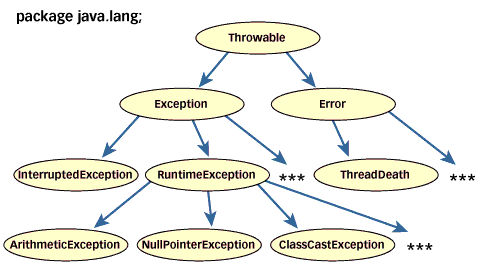 Figure 1. A partial view of the Throwable family |
In addition to throwing objects whose classes are declared in java.lang, you can throw objects of your own design. To create your own class of throwable objects, you need only declare it as a subclass of some member of the Throwable family. In general, however, the throwable classes you define should extend class Exception. They should be "exceptions." The reasoning behind this rule will be explained later in this article.
Whether you use an existing exception class from java.lang or create one of your own depends upon the situation. In some cases, a class from java.lang will do just fine. For example, if one of your methods is invoked with an invalid argument, you could throw IllegalArgumentException, a subclass of RuntimeException in java.lang.
Other times, however, you will want to convey more information about the abnormal condition than a class from java.lang will allow. Usually, the class of the exception object itself indicates the type of abnormal condition that was encountered. For example, if a thrown exception object has class IllegalArgumentException, that indicates someone passed an illegal argument to a method. Sometimes you will want to indicate that a method encountered an abnormal condition that isn't represented by a class in the Throwable family of java.lang.
As an example, imagine you are writing a Java program that simulates a customer of a virtual café drinking a cup of coffee. Consider the exceptional conditions that might occur while the customer sips. The class hierarchy of exceptions shown in Figure 2 represents a few possibilities.
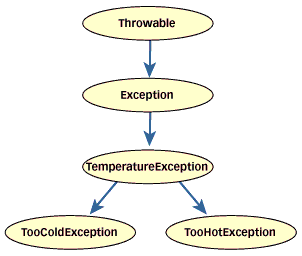 Figure 2. Exception hierarchy for coffee sipping |
If the customer discovers, with dismay, that the coffee is cold, your program could throw a TooColdException. On the other hand, if the customer discovers that the coffee is overly hot, your program could throw a TooHotException. These conditions could be exceptions because they are (hopefully) not the normal situation in your café. (Exceptional conditions are not necessarily rare, just outside the normal flow of events.) The code for your new exception classes might look like this:
// In Source Packet in file except/ex1/TemperatureException.java
class TemperatureException extends Exception {
}

// In Source Packet in file except/ex1/TooColdException.java
class TooColdException extends TemperatureException {
}

// In Source Packet in file except/ex1/TooHotException.java
class TooHotException extends TemperatureException {
}
This family of classes, the TemperatureException family, declares three new types of exceptions for your program to throw. Note that each exception indicates by its class the kind of abnormal condition that would cause it to be thrown: TemperatureException indicates some kind of problem with temperature; TooColdException indicates something was too cold; and TooHotException indicates something was too hot. Note also that TemperatureException extends Exception -- not Throwable, Error, or any other class declared in java.lang.
Throwing exceptions
To throw an exception, you simply use the throw keyword with an object reference, as in:
throw new TooColdException();
The type of the reference must be Throwable or one of its subclasses.
The following code shows how a class that represents the customer, class VirtualPerson, might throw exceptions if the coffee didn't meet the customer's temperature preferences. Note that Java also has a throws keyword in addition to the throw keyword. Only throw can be used to throw an exception. The meaning of throws will be explained later in this article.
// In Source Packet in file except/ex1/VirtualPerson.java
class VirtualPerson {

    private static final int tooCold = 65;
    private static final int tooHot = 85;

    public void drinkCoffee(CoffeeCup cup) throws
        TooColdException, TooHotException {

        int temperature = cup.getTemperature();
        if (temperature <= tooCold) {
            throw new TooColdException();
        }
        else if (temperature >= tooHot) {
            throw new TooHotException();
        }
        //...
    }
    //...
}

// In Source Packet in file except/ex1/CoffeeCup.java
class CoffeeCup {
    // 75 degrees Celsius: the best temperature for coffee
    private int temperature = 75;
    public void setTemperature(int val) {
        temperature = val;
    }
    public int getTemperature() {
        return temperature;
    }
    //...
}
Catching exceptions
To catch an exception in Java, you write a try block with one or more catch clauses. Each catch clause specifies one exception type that it is prepared to handle. The try block places a fence around a bit of code that is under the watchful eye of the associated catchers. If the bit of code delimited by the try block throws an exception, the associated catch clauses will be examined by the Java virtual machine. If the virtual machine finds a catch clause that is prepared to handle the thrown exception, the program continues execution starting with the first statement of that catch clause.
As an example, consider a program that requires one argument on the command line, a string that can be parsed into an integer. When you have a String and want an int, you can invoke the parseInt() method of the Integer class. If the string you pass represents an integer, parseInt() will return the value. If the string doesn't represent an integer, parseInt() throws NumberFormatException. Here is how you might parse an int from a command-line argument:
// In Source Packet in file except/ex1/Example1.java
class Example1 {
    public static void main(String[] args) {

        int temperature = 0;
        if (args.length > 0) {
            try {
                temperature = Integer.parseInt(args[0]);
            }
            catch(NumberFormatException e) {
                System.out.println(
                    "Must enter integer as first argument.");
                return;
            }
        }
        else {
            System.out.println(
                "Must enter temperature as first argument.");
            return;
        }

        // Create a new coffee cup and set the temperature of
        // its coffee.
        CoffeeCup cup = new CoffeeCup();
        cup.setTemperature(temperature);

        // Create and serve a virtual customer.
        VirtualPerson cust = new VirtualPerson();
        VirtualCafe.serveCustomer(cust, cup);
    }
}
Here, the invocation of parseInt() sits inside a try block. Attached to the try block is a catch clause that catches NumberFormatException:
catch(NumberFormatException e) {
    System.out.println(
        "Must enter integer as first argument.");
    return;
}
The lowercase character e is a reference to the thrown (and caught) NumberFormatException object. This reference could have been used inside the catch clause, although in this case it isn't. (Examples of catch clauses that use the reference are shown later in this article.)
If the user types Harumph as the first argument to the Example1 program, parseInt() will throw a NumberFormatException exception and the catch clause will catch it. The program will print:
Must enter integer as first argument.
Although the above example had only one catch clause, you can have many catch clauses associated with a single try block. Here's an example:
// In Source Packet in file except/ex1/VirtualCafe.java
class VirtualCafe {

    public static void serveCustomer(VirtualPerson cust,
        CoffeeCup cup) {

        try {
            cust.drinkCoffee(cup);
            System.out.println("Coffee is just right.");
        }
        catch (TooColdException e) {
            System.out.println("Coffee is too cold.");
            // Deal with an irate customer...
        }
        catch (TooHotException e) {
            System.out.println("Coffee is too hot.");
            // Deal with an irate customer...
        }
    }
}
If any code inside a try block throws an exception, its catch clauses are examined in their order of appearance in the source file. For example, if the try block in the above example throws an exception, the catch clause for TooColdException will be examined first, then the catch clause for TooHotException. During this examination process, the first catch clause encountered that handles the thrown object's class gets to "catch" the exception. The ordering of catch-clause examination matters because it is possible that multiple catch clauses of a try block could handle the same exception.
catch clauses indicate the type of abnormal condition they handle by the type of exception reference they declare. In the example above, the catch clauses declare exception type TooColdException and TooHotException. Had a single catch clause declared a TemperatureException, a thrown TooColdException or TooHotException still would have been caught, because TemperatureException is the superclass of both these classes. In the object-oriented way of thinking, a TooColdException is a TemperatureException, therefore, a catch clause for TemperatureException also will catch a thrown TooColdException. An example of this is shown below:
// In Source Packet in file except/ex2/VirtualCafe.java
class VirtualCafe {

    public static void serveCustomer(VirtualPerson cust,
        CoffeeCup cup) {

        try {
            cust.drinkCoffee(cup);
            System.out.println("Coffee is just right.");
        }
        catch (TemperatureException e) {
            // This catches TooColdException, TooHotException,
            // as well as TemperatureException.
            System.out.println("Coffee is too cold or too hot.");
            // Deal with an irate customer...
        }
    }
}
Multiple catch clauses could handle the same exception because you may, for example, declare two catch clauses, one for TooColdException and another for TemperatureException. In this case, however, you must place the catch clause for TooColdException above the one for TemperatureException, or the source file won't compile. If a catch clause for TemperatureException could be declared before a catch clause for TooColdException, the first catch clause would catch all TooColdExceptions, leaving nothing for the second catch clause to do. The second catch clause would never be reached. The general rule is: subclass catch clauses must precede superclass catch clauses. Here's an example of both orders, only one of which compiles:
// In Source Packet in file except/ex3/VirtualCafe.java
class VirtualCafe {

    public static void serveCustomer(VirtualPerson cust,
        CoffeeCup cup) {

        try {
            cust.drinkCoffee(cup);
            System.out.println("Coffee is just right.");
        }
        catch (TemperatureException e) {
            // This catches TooColdException, TooHotException,
            // as well as TemperatureException.
            System.out.println("Coffee is too cold or too hot.");
            // Deal with an irate customer...
        }
        // THIS WON'T COMPILE, BECAUSE THIS catch clause
        // WILL NEVER BE REACHED.
        catch (TooColdException e) {
            System.out.println("Coffee is too cold.");
        }
    }
}

// In Source Packet in file except/ex4/VirtualCafe.java
// This class compiles fine.
class VirtualCafe {

    public static void serveCustomer(VirtualPerson cust,
        CoffeeCup cup) {

        try {
            cust.drinkCoffee(cup);
            System.out.println("Coffee is just right.");
        }
        catch (TooColdException e) {
            System.out.println("Coffee is too cold.");
            // Deal with an irate customer...
        }
        catch (TemperatureException e) {
            // This catches TooHotException as well
            // as TemperatureException.
            System.out.println(
                "There's temperature trouble in this coffee.");
            // Deal with an irate customer...
        }
    }
}
Embedding information in an exception object
When you throw an exception, you are performing a kind of structured go-to from the place in your program where an abnormal condition was detected to a place where it can be handled. The Java virtual machine uses the class of the exception object you throw to decide which catch clause, if any, should be allowed to handle the exception. But an exception doesn't just transfer control from one part of your program to another, it also transmits information. Because the exception is a full-fledged object that you can define yourself, you can embed information about the abnormal condition in the object before you throw it. The catch clause can then get the information by querying the exception object directly.
The Exception class allows you to specify a String detail message that can be retrieved by invoking getMessage() on the exception object. When you define an exception class of your own, you can give client programmers the option of specifying a detail message like this:
// In Source Packet in file except/ex5/UnusualTasteException.java
class UnusualTasteException extends Exception {
    UnusualTasteException() {
    }
    UnusualTasteException(String msg) {
        super(msg);
    }
}
Given the above declaration of UnusualTasteException, client programmers could create an instance in one of two ways:
new UnusualTasteException()new UnusualTasteException("This coffee tastes like tea.")
A catch clause can then query the object for a detail string, like this:
// In Source Packet in file except/ex5/VirtualCafe.java
class VirtualCafe {

    public static void serveCustomer(VirtualPerson cust,
        CoffeeCup cup) {

        try {
            cust.drinkCoffee(cup);
            System.out.println("Coffee tastes just right.");
        }
        catch (UnusualTasteException e) {
            System.out.println(
                "Customer is complaining of an unusual taste.");
            String s = e.getMessage();
            if (s != null) {
                System.out.println(s);
            }
            // Deal with an unhappy customer...
        }
    }
}
When you need to embed more information into an exception object than you can represent with a String, you can add data and access methods to your exception class. For example, you could define the temperature exception classes like this:
// In Source Packet in file except/ex6/TemperatureException.java
abstract class TemperatureException extends Exception {
    private int temperature; // in Celsius
    public TemperatureException(int temperature) {
        this.temperature = temperature;
    }
    public int getTemperature() {
        return temperature;
    }
}

// In Source Packet in file except/ex6/TooColdException.java
class TooColdException extends TemperatureException {
    public TooColdException(int temperature) {
        super(temperature);
    }
}

// In Source Packet in file except/ex6/TooHotException.java
class TooHotException extends TemperatureException {
    public TooHotException(int temperature) {
        super(temperature);
    }
}
Given a TemperatureException family as defined above, catch clauses can query the exception object to find out the precise temperature that caused the problem. The temperature field of the exception object must be set when the object is created, as in:
// In Source Packet in file except/ex6/VirtualPerson.java
class VirtualPerson {

    private static final int tooCold = 65;
    private static final int tooHot = 85;

    public void drinkCoffee(CoffeeCup cup) throws
        TooColdException, TooHotException {

        int temperature = cup.getTemperature();
        if (temperature <= tooCold) {
            throw new TooColdException(temperature);
        }
        else if (temperature >= tooHot) {
            throw new TooHotException(temperature);
        }
        //...
    }
    //...
}
Wherever the exception is caught, the catch clause can easily determine the actual temperature of the coffee and act accordingly, as in:
// In Source Packet in file except/ex6/VirtualCafe.java
class VirtualCafe {

    public static void serveCustomer(VirtualPerson cust,
        CoffeeCup cup) {

        try {
            cust.drinkCoffee(cup);
            System.out.println("Coffee is just right.");
        }
        catch (TooColdException e) {
            int temperature = e.getTemperature();
            System.out.println("Coffee temperature is "
                + temperature + " degrees Celsius.");
            if (temperature > 55 && temperature <= 65) {
                System.out.println("Coffee is cooling off.");
                // Add more hot coffee...
            }
            else if (temperature > 0 && temperature <= 55) {
                System.out.println("Coffee is too cold.");
                // Give customer a new cup of coffee with the
                // proper temperature...
            }
            else if (temperature <= 0) {
                System.out.println("Coffee is frozen.");
                // Deal with an irate customer...
            }
        }
        catch (TooHotException e) {
            int temperature = e.getTemperature();
            System.out.println("Coffee temperature is "
                + temperature + " degrees Celsius.");
            if (temperature >= 85 && temperature < 100) {
                System.out.println("Coffee is too hot.");
                // Ask customer to let it cool a few minutes...
            }
            else if (temperature >= 100 && temperature < 2000) {
                System.out.println(
                    "Both coffee and customer are steamed.");
                // Deal with an irate customer...
            }
            else if (temperature >= 2000) {
                System.out.println(
                    "The coffee is plasma.");
                // Deal with a very irate customer...
            }
        }
    }
}
The program could deal with the temperature problem differently depending upon the coffee's actual temperature. If the coffee is just a little cold, the program could add more hot coffee to the cup. If the coffee is so cold that the customer's lips were instantly frozen to the cup, alternative measures could be taken.
Exceptions and the method invocation stack
Code inside a try block is in a sense surrounded by the catch clauses associated with the try block. When an exception is thrown, the surrounding catch clauses are examined in inside-out order. You can nest try blocks inside try blocks, in effect building up more and more layers of catch clauses that surround the code. When a method is invoked from within a try block, the catch clauses associated with that try block surround the code in the invoked method as well. If that method has try blocks and catch clauses, they are added as inner surrounding layers. What this means is that an exception may be thrown far up the method invocation stack before landing in a catch clause that can handle it.
As an example, consider the following exception classes, which are simpler versions of exceptions introduced in examples above:
// In Source Packet in file except/ex7/TemperatureException.java
class TemperatureException extends Exception {
}

// In Source Packet in file except/ex7/TooColdException.java
class TooColdException extends TemperatureException {
}

// In Source Packet in file except/ex7/TooHotException.java
class TooHotException extends TemperatureException {
}

// In Source Packet in file except/ex7/UnusualTasteException.java
class UnusualTasteException extends Exception {
}
When the drinkCoffee() method of class VirtualPerson is invoked, it throws one of these four exceptions, chosen at random:
// In Source Packet in file except/ex7/VirtualPerson.java
class VirtualPerson {

    public void drinkCoffee(CoffeeCup cup) throws TooColdException,
        TemperatureException, UnusualTasteException {

        try {
            int i = (int) (Math.random() * 4.0);
            switch (i) {
            case 0:
                throw new TooHotException();

            case 1:
                throw new TooColdException();

            case 2:
                throw new UnusualTasteException();

            default:
                throw new TemperatureException();
            }
        }
        catch (TooHotException e) {
            System.out.println("This coffee is too hot.");
            // Customer will wait until it cools to an
            // acceptable temperature.
        }
    }
    //...
}
If variable i in the drinkCoffee() method above happens to be set to a value of 0 the switch statement will instantiate and throw a TooHotException. Because the switch statement itself is enclosed within a try block that has a catch clause for TooHotException, execution continues at that catch clause. The program prints out:
This coffee is too hot.
If variable i in the drinkCoffee() method above happens to be set to the value of 1, the switch statement will instantiate and throw a TooColdException. When this exception is thrown, the Java virtual machine will first check the catch clauses of the try block that surrounds the switch statement. In this case, however, no catch clause matches the thrown exception.
Because the TooColdException is not caught by the drinkCoffee() method, the Java virtual machine throws the exception up the method invocation stack to the method that invoked drinkCoffee(). As used here, a method invocation stack (or call stack) is a list of the methods that have been invoked by a thread, starting with the first method the thread invoked and ending with the current method. A method invocation stack shows the path of method invocations a thread took to arrive at the current method.
A graphical representation of the method invocation stack for drinkCoffee() is shown in Figure 3. In this figure, the method invocation stack is shown on the right and the corresponding Java stack is shown on the left. The Java stack is where methods keep their state inside the Java virtual machine. Each method gets a stack frame (or frame), which is pushed onto the stack when the method is invoked and popped from the stack when the method completes. The frame is an area in memory that contains the method's local variables, parameters, return value, and other information needed by the Java virtual machine to execute the method. In Figure 3, the stack is shown growing downwards. The top of the stack is at the bottom of the picture.
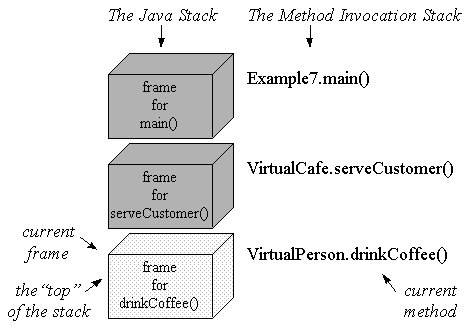 Figure 3. The method invocation stack for drinkCoffee() |
When a method completes by executing a return statement, or by successfully executing the last statement in a method declared as void, it is said to complete normally. The Java virtual machine pops the returning method's stack frame, and continues executing just after the method invocation in the calling method. The calling method becomes the current method and its stack frame becomes the current frame.
When a method throws an exception that it doesn't catch itself, it is said to complete abruptly. Methods do not return a value when they complete abruptly, though they do pass along an exception object.
For example, when the drinkCoffee() method throws a TooColdException, it completes abruptly. Because the exception isn't caught by drinkCoffee(), the Java virtual machine pops drinkCoffee()'s stack frame. It then examines the next method up the invocation stack, in this case the serveCustomer() method of VirtualCafe, to see if it has a catch clause prepared to handle the exception.
Here's the code for VirtualCafe:
// In Source Packet in file except/ex7/VirtualCafe.java
class VirtualCafe {

    public static void serveCustomer(VirtualPerson cust,
        CoffeeCup cup)throws TemperatureException,
        UnusualTasteException {

        try {
            cust.drinkCoffee(cup);
        }
        catch (TooColdException e) {
            System.out.println("This coffee is too cold.");
            // Add more hot coffee...
        }
    }
}
The serveCustomer() method above does indeed surround its invocation of drinkCoffee() with a try block that has an attached catch clause for TooColdException. So the exception stops here. The Java virtual machine makes the serveCustomer() method's stack frame current and continues execution at the first statement inside the catch clause. The program prints out:
This coffee is too cold.
If variable i in the drinkCoffee() method above happens to be set to the value of 2, the switch statement will instantiate and throw an UnusualTasteException. When this exception is thrown, the Java virtual machine will first check the catch clauses of the try block that surrounds the switch statement. In this case, no catch clause matches the thrown exception. The virtual machine will then pop drinkCoffee()'s stack frame and examine the serveCustomer() method. But in serveCustomer(), no catch clause attached to the try block matches the thrown exception either. The virtual machine will therefore pop serveCustomer()'s stack frame and examine the next method up the invocation stack: the main() method of class Example7.
Here's the code for Example7:
// In Source Packet in file except/ex7/Example7.java
class Example7 {
    public static void main(String[] args)
        throws TemperatureException {

        // Create a new coffee cup.
        CoffeeCup cup = new CoffeeCup();

        // Create and serve a virtual customer.
        try {
            VirtualPerson cust = new VirtualPerson();
            VirtualCafe.serveCustomer(cust, cup);
        }
        catch (UnusualTasteException e) {
            System.out.println("This coffee has an unusual taste.");
        }
    }
}
This main() method was farsighted enough to surround its invocation of serveCustomer() with a try block that includes a catch clause for UnusualTasteException. Thus, the Java virtual machine will make the main() method's stack frame current and will continue execution at the first statement in the catch clause. The program will print:
This coffee has an unusual taste.
In the UnusualTasteException case, both drinkCoffee() and serveCoffee() methods completed abruptly. The Java virtual machine popped two frames from the Java stack, stopping its popping only when it reached the main() method.
The last case in this example occurs if the variable i in the drinkCoffee() method gets set to a value greater than 2. In this case, the switch statement will instantiate and throw a TemperatureException. When this exception is thrown, the Java virtual machine will go through its usual procedure of examining methods for catch clauses and popping frames for methods that can't handle the exception. The virtual machine will examine drinkCoffee(), pop its frame, examine serveCustomer(), pop its frame, examine main(), and pop its frame. At this point, however, the virtual machine has run out of frames. It can't go any further up the method invocation stack because main() was the first method invoked by the thread.
Because none of the methods on the invocation stack is prepared to handle the TemperatureException, the exception is "uncaught." It will be handled by a default handler and result in the death of the thread. Because this is the main thread of the Example7 application and the application didn't fire off any other threads that are still running when the main thread dies, the application terminates. (A dead thread doesn't always cause the death of its application, only when a dying thread is the last "non-daemon" thread running inside the application.) In most Java runtime environments, the default handler for an uncaught exception will print out a stack trace when a thread dies. For example, the java program from JDK 1.1.1 prints the following when the main thread of Example7 dies due to an uncaught TemperatureException:
TemperatureException
        at VirtualPerson.drinkCoffee(VirtualPerson.java:20)
        at VirtualCafe.serveCustomer(VirtualCafe.java:9)
        at Example7.main(Example7.java:12)
The throws clause
As you may have guessed from the examples above, the Java language requires that a method declare in a throws clause the exceptions that it may throw. A method's throws clause indicates to client programmers what exceptions they may have to deal with when they invoke the method.
For example, the drinkCoffee() method of class VirtualPerson, shown below, declares three exceptions in its throws clause: TooColdException, TemperatureException, and UnusualTasteException. These are the three exceptions that the method throws but doesn't catch. The method also may throw TooHotException, but this exception doesn't appear in the throws clause because drinkCoffee() catches and handles it internally. Only exceptions that will cause a method to complete abruptly should appear in its throws clause.
// In Source Packet in file except/ex7/VirtualPerson.java
class VirtualPerson {

    public void drinkCoffee(CoffeeCup cup) throws TooColdException,
        TemperatureException, UnusualTasteException {

        try {
            int i = (int) (Math.random() * 4.0);
            switch (i) {
            case 0:
                throw new TooHotException();

            case 1:
                throw new TooColdException();

            case 2:
                throw new UnusualTasteException();

            default:
                throw new TemperatureException();
            }
        }
        catch (TooHotException e) {
            System.out.println("This coffee is too hot.");
            // Customer will wait until it cools to an
            // acceptable temperature.
        }
    }
    //...
}
In the drinkCoffee() method above, each exception declared in the throws clause is explicitly thrown by the method via a throw statement. This is one of two ways a method can complete abruptly. The other way is by invoking another method that completes abruptly.
An example of this is VirtualCafe's serveCustomer() method, shown below, that invokes VirtualPerson's drinkCoffee() method. The serveCustomer() method contains no throw statements, but it does declare two exceptions in its throws clause: TemperatureException and UnusualTasteException. These are two of three exceptions that may be thrown by drinkCoffee(), which serveCustomer() invokes. The third exception, TooColdException, doesn't appear in the throws clause because serveCustomer() catches and handles it internally. Only those exceptions that will cause the serveCustomer() method to complete abruptly appear in its throws clause.
// In Source Packet in file except/ex7/VirtualCafe.java
class VirtualCafe {

    public static void serveCustomer(VirtualPerson cust,
        CoffeeCup cup)throws TemperatureException,
        UnusualTasteException {

        try {
            cust.drinkCoffee(cup);
        }
        catch (TooColdException e) {
            System.out.println("This coffee is too cold.");
            // Add more hot coffee...
        }
    }
}
Although a throws clause lists exceptions that may cause a method to complete abruptly, the list is not necessarily complete. Not everything that can be thrown by a method need be put in a throws clause.
Checked vs. unchecked exceptions
There are two kinds of exceptions in Java, checked and unchecked, and only checked exceptions need appear in throws clauses. The general rule is: Any checked exceptions that may be thrown in a method must either be caught or declared in the method's throws clause. Checked exceptions are so called because both the Java compiler and the Java virtual machine check to make sure this rule is obeyed.
Whether or not an exception is "checked" is determined by its position in the hierarchy of throwable classes. Figure 4 shows that some parts of the Throwable family tree contain checked exceptions while other parts contain unchecked exceptions. To create a new checked exception, you simply extend another checked exception. All throwables that are subclasses of Exception, but not subclasses of RuntimeException are checked exceptions.
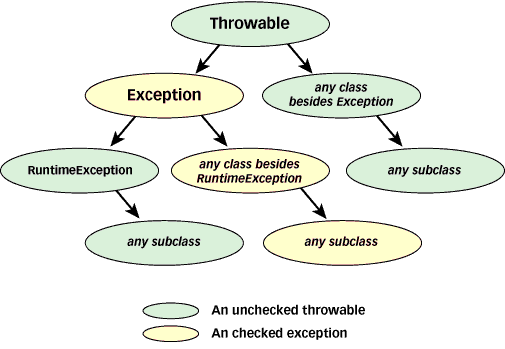 Figure 4. Checked and unchecked throwables |
The conceptual difference between checked and unchecked exceptions is that checked exceptions signal abnormal conditions that you want client programmers to deal with. For instance, because the drinkCoffee() method allocates memory with the new operator, it could potentially complete abruptly by throwing an OutOfMemoryError. This is not a checked exception, because it's not a subclass of Exception. It's a subclass of Error. Conceptually, OutOfMemoryError isn't a checked exception because you don't want client programmers to have to deal directly with the fact that drinkCoffee() could complete abruptly due to low memory.
When you place an exception in a throws clause, it forces client programmers who invoke your method to deal with the exception, either by catching it or by declaring it in their own throws clause. If they don't deal with the exception in one of these two ways, their classes won't compile. For example, because the drinkCoffee() method declares three exceptions in its throws clause, the serveCustomer() method, which invokes drinkCoffee(), has to deal with those three exceptions. In this case, serveCustomer() catches one exception, TooColdException, but not the other two. If serveCustomer() hadn't declared in its throws clause the other two exceptions, TemperatureException and UnusualTasteException, the VirtualCafe class would not have compiled.
Most unchecked throwables declared in java.lang (subclasses of Error and RuntimeException) are problems that would be detected by the Java virtual machine. Errors usually signal abnormal conditions that you wouldn't want a program to handle. Problems with linking, such as NoClassDefFoundError, or memory, such as StackOverflowError, could happen just about anywhere in a program. In the rare cases in which they happen, it is usually reasonable that the thread terminate.
Although most runtime exceptions (members of the RuntimeException family) also are thrown by the Java virtual machine itself, they usually are more an indication of software bugs. Problems with arrays, such as ArrayIndexOutOfBoundsException, or passed parameters, such as IllegalArgumentException, also could happen just about anywhere in a program. When exceptions like these are thrown, you'll want to fix the bugs that caused them to be thrown. You won't, however, want to force client programmers to wrap every invocation of a method that uses arrays with a catch clause for ArrayIndexOutOfBoundsException.
You can throw and catch unchecked exceptions just like checked exceptions, but the Java Language Specification advises against throwing errors. It is intended that errors be thrown only by the Java runtime. You may, however, reasonably throw runtime exceptions. You can throw a runtime exception declared in java.lang or declare your own subclasses of RuntimeException.
To decide whether to throw a checked exception or an unchecked runtime exception, you must look at the abnormal condition you are signalling. If you are throwing an exception to indicate an improper use of your class, you are signalling a software bug. The class of exception you throw probably should descend from RuntimeException, which will make it unchecked. Otherwise, if you are throwing an exception to indicate not a software bug but an abnormal condition that client programmers should deal with every time they use your method, your exception should be checked.
The finally clause
Once a Java virtual machine has begun to execute a block of code -- the statements between two matching curly braces -- it can exit that block in any of several ways. It could, for example, simply execute past the closing curly brace. It could encounter a break, continue, or return statement that causes it to jump out of the block from somewhere in the middle. Or, if an exception is thrown that isn't caught inside the block, it could exit the block while searching for a catch clause.
Given that a block can be exited in many ways, it is important to be able to ensure that something happens upon exiting a block, no matter how the block is exited. For example, if you open a file in a method, you may want to ensure the file gets closed no matter how the method completes. In Java, you express such a desire with a finally clause.
To use a finally clause, you simply: (1) Enclose the code that has multiple exit points in a try block; and (2) place the code that must be executed when the try block is exited in a finally clause.
Here's an example:
try {
    // Block of code with multiple exit points
}
finally {
    // Block of code that must always be executed when the try block
    // is exited, no matter how the try block is exited
}
At least one clause, either catch or finally, must be associated with each try block. If you have both catch clauses and a finally clause with the same try block, you must put the finally clause after all the catch clauses, as in:
// In Source Packet in file except/ex8/VirtualPerson.java
class VirtualPerson {

    public void drinkCoffee(CoffeeCup cup) {

        try {
            int i = (int) (Math.random() * 4.0);
            switch (i) {
            case 0:
                throw new TooHotException();

            case 1:
                throw new TooColdException();

            case 2:
                throw new UnusualTasteException();

            default:
                System.out.println("This coffee is great!");
            }
        }
        catch (TooHotException e) {
            System.out.println("This coffee is too hot.");
        }
        catch (TooColdException e) {
            System.out.println("This coffee is too cold.");
        }
        catch (UnusualTasteException e) {
            System.out.println("This coffee is too strong.");
        }
        finally {
            System.out.println("Can I please have another cup?");
        }
    }
    //...
}
If during execution of the code within a try block, an exception is thrown that is handled by a catch clause associated with the try block, the finally clause will be executed after the catch clause. For example, if a TooColdException exception is thrown during execution of the try block above, the program would print the following:
This coffee is too cold.
Can I please have another cup?
If an exception is thrown that is not handled by a catch clause associated with the try block, the finally clause is still executed. The Java virtual machine will execute the code of the finally clause before it continues searching elsewhere for an appropriate catch clause. There is no way to leave a try block without executing the code of its finally clause.
You can do anything inside a finally clause that you can do elsewhere, including executing break, continue, or return statements, or throwing exceptions. Such actions inside a finally clause, however, can have some surprising effects. For example, consider a finally clause that is entered because of an uncaught exception. If the finally clause executes a return, the method would complete normally via the return, not abruptly by throwing the exception. The exception would have in effect been handled by the finally clause instead of a catch clause.
As another example, consider a finally clause that is entered because a return true; statement was executed inside the try block. If the finally clause executes a return false; statement, the method will return false.
Conclusion
Java goes to great lengths to help you deal with error conditions. Java's exception mechanisms give you a structured way to perform a go-to from the place where an error occurs to the code that knows how to handle the error. These mechanisms also enable you to force client programmers (those who use your code by calling your methods) to deal with the possibility of an error condition encountered by your code. But Java's mechanisms do not force you to design your programs to take advantage of these capabilities. In the end, if you want your programs to handle error conditions in a structured, methodical way, you must use the exception mechanisms correctly.
For advice on how to put the exception mechanisms described in this article to use in your programs and designs, see this month's Design Techniques column, "Designing with exceptions."
- Source packet that contains the example code used in this article
http://www.artima.com/flexiblejava/code.html - An applet that demonstrates how exceptions work inside the JVM
http://www.artima.com/insidejvm/applets/PlayBall.html - An applet that demonstrates how finally clauses work inside the JVM
http://www.artima.com/insidejvm/applets/HopAround.html - The Exceptions chapter of the Java Language Specification
http://java.sun.com/docs/books/jls/html/11.doc.html - An explanation of try-catch-finally blocks from the Java Language Specification
http://java.sun.com/docs/books/jls/html/14.doc.html#79311 - Exceptions from the perspective of the JVM
http://java.sun.com/docs/books/vmspec/html/Concepts.doc.html#22727
This article was first published under the name Exceptions in Java in JavaWorld, a division of Web Publishing, Inc., June 1998.
Talk back!
Have an opinion? Be the first to post a comment about this article.
About the author
Bill Venners has been writing software professionally for 12 years. Based in Silicon Valley, he provides software consulting and training services under the name Artima Software Company. Over the years he has developed software for the consumer electronics, education, semiconductor, and life insurance industries. He has programmed in many languages on many platforms: assembly language on various microprocessors, C on Unix, C++ on Windows, Java on the Web. He is author of the book: Inside the Java Virtual Machine, published by McGraw-Hill.

Artima provides consulting and training services to help you make the most of Scala, reactive
and functional programming, enterprise systems, big data, and testing.
2070 N Broadway Unit 305
Walnut Creek CA 94597
USA
(925) 918-1769 (Phone)