
Build a JFC-Based Application for Browsing and Launching Jini Services
First published in JavaWorld, March 2001
In October 1999, Bill Venners first introduced readers to a working draft of the ServiceUI specification for attaching user interfaces to Jini services. In the year and a half since then, the ServiceUI project at Jini.org, largely due to Venners's efforts, has released a 1.0 specification and reference implementation.
In this article, I'll explain how to attach an interface to a simple Jini service, and then walk you through building an application to browse those services using Swing components and the ServiceUI framework.
Project Requirements
Before starting any development project, it's important to define what you're trying to build. If you're learning to program on your own, that may only consist of notes on scraps of paper. If you're a developer working within a team, however, that often entails rigorous documentation garnered from multiple whiteboard-intensive meetings. Here I'll briefly describe our goals for the project and the tasks ahead of us.
The Time Service
The Jini service Time is intended to demonstrate how to attach a graphical user interface (GUI) to a service. The service itself will be extremely simple: it's sole purpose is to provide a way to retrieve the current time and date.
The GUI attached to that service should provide a time display retrieved from the service, and a way for the user to update the display.
The Jini TaskBar
A Jini service with a user interface is useless if you have no way to view the UI. To that end, we'll design an application that can discover Jini services on the network and display associated UIs. While finding network services involves a certain amount of complexity, the application should try to hide that complexity from the user. Therefore, we'll model our application after one of the most common application browsing and launching systems: the TaskBar.
Getting Started
Before we get too far along in the development process, you should first make sure that your development environment is properly set up. While Jini is compatible with J2SE 1.2.2 and above, I recommend using JDK 1.3 from Sun on either Linux or Windows 2000.
You'll also need the Jini Technology Starter Kit 1.1. We'll be using the jini-core.jar and jini-ext.jar libraries for development. In addition, you'll need a Jini lookup server somewhere on your network.
Finally, our project will use the ServiceUI 1.0 API from the Jini.org community, as well as a utility class from the Jini-Tools project. Check out the Resources section for locations of these items.
TimeService Interface
The most important component of any Jini service is its interface. The interface provides a layer of abstraction, under which services can choose varying implementations, while clients only need to know how to operate on an instance of the interface.
Designing truly generic service interfaces is not a simple matter. As a rule of thumb, check first with the Jini.org community to see if others have crafted an interface that suits your needs. If they have not, you may want to start a community project, working with others to craft a pseudostandard interface or set of interfaces that provide a generic API for services such as yours. There may be times when a proprietary interface is the best course of action, but if you plan to introduce a service that others could use, keep the community in mind.
That said, our service here offers little practical use, so we will be crafting a proprietary interface. Below is the code for our interface:
 public interface TimeService extends java.io.Serializable{
     public java.util.Date getTime() throws java.rmi.RemoteException;
 }
That interface declares a single method, getTime(), which returns an instance of java.util.Date.
You'll notice that the interface extends java.io.Serializable instead of java.rmi.Remote. For that example, we'll use a specific type of Jini service in which the entire service is contained within the proxy. However, we've already made sure to declare that our single method may throw java.rmi.RemoteException. That is done so that we may later implement a remote version of the service, while still allowing client code to interact with the TimeService interface. Although we won't be using it in this example, I'll define the interface for the remote version of TimeService below:
 public interface RemoteTimeService extends TimeService, java.rmi.Remote{

 }
That interface defines no new methods (although it could), and simply extends both the TimeService interface and java.rmi.Remote. If a service were to implement that interface, the RMI stub would be substituted as a proxy when registered with the Jini lookup service.
TimeService Implementation
Implementing theTimeService interface is equally as simple:
 public class TimeServiceImpl extends java.lang.Object
              implements TimeService{

    public TimeServiceImpl() {
       //Nothing to do here
    }

    public java.util.Date getTime() {
       return new Date();
    }

    ...
Since that object needs no resources, there is nothing to do in a constructor. Our single method inherited from the TimeService interface instantiates and returns a new Date object, which is initialized by default to the current system time.
Now we'll get into the code for the user interface. While I will typically define more complex user interfaces as distinct classes, I've chosen to implement the UI as a static inner class.
The code below declares a new class, TimeJFrame, which extends javax.swing.JFrame and implements java.awt.event.ActionListener. The constructor takes a net.jini.core.lookup.ServiceItem as the sole parameter. From the ServiceItem, we extract the service proxy and store it as an instance variable. The constructor also creates two Swing components, a JButton and a JLabel, and adds them to its content pane. The class registers itself to receive events from the button, so that we may respond and update the UI with the current time from the service:
    protected static class TimeJFrame extends JFrame implements ActionListener{
       protected TimeService jini_Time_Service;
       protected JLabel      comp_Time_Label;
       protected JButton     comp_Time_Button;
       protected SimpleDateFormat util_Date_Format;

       public TimeJFrame(ServiceItem item){
          super("Time Service UI");
          jini_Time_Service=(TimeService)item.service;

          util_Date_Format = new SimpleDateFormat();

          comp_Time_Button = new JButton("Update Time");
          comp_Time_Button.addActionListener(this);
          comp_Time_Label = new JLabel();
          comp_Time_Label.setBorder( BorderFactory.createTitledBorder(
             BorderFactory.createEtchedBorder(),"Time is:"));

          getContentPane().setLayout(new BorderLayout());
          getContentPane().add(comp_Time_Label,BorderLayout.CENTER);
          getContentPane().add(comp_Time_Button,BorderLayout.SOUTH);
          pack();
          setSize(250,250);
       }
       public void actionPerformed(ActionEvent evt){
          try{
             Date d = jini_Time_Service.getTime();
             comp_Time_Label.setText(util_Date_Format.format(d));
          }catch(RemoteException e){
             e.printStackTrace();
          }
       }
    }
|
The view of a TimeJFrame when launched |
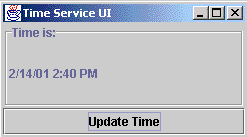
The actionPerformed() method responds to button clicks by retrieving the current time from the service and updating the UI with a formatted text string representing the time. Since we declared the getTime() method in TimeService to throw an exception, we have enclosed the code within a try-catch block. We should take action to tell the user that an exception has occurred, but for now we will simply print out the stack trace. Since our implementation is not a remote object, the exception should never be thrown, but we need to take caution in case the implementation changes.
Service Registration
Finally, we are ready to examine the code that will perform the registration of our service with the Jini lookup service. Some static methods will help perform that for us.
The first method to be called is initialize_Security_Manager(). That method sets the system security manager and makes sure that the security policy file has been set. We'll examine the policy in more detail when we run the service.
The next method called is initialize_Codebase_Server(). One of the most common mistakes developers make when working with Jini is forgetting to provide a Web server for dynamic class downloading. That procedure utilizes an embedded HTTP server, which can load and serve class files from the JVM's classpath. In exchange for the minimal overhead of a few extra threads, we gain tremendous flexibility in deployment. The utility class used here, dreamBean Software's DynaServer, can load any class or resource that is available to the local ClassLoader implementations offered to the server. DynaServer has been contributed by its author, Rickard Öberg, under an open source license to the Jini-Tools project lead by Iain Shigeoka.
That procedure is especially useful when developing ServiceUI-based services, which may use images, sounds, or other resources that need to be loaded on the client side. Instead of specifying a static location from which classes and resources should be loaded, we let the server decide how to set the java.rmi.server.codebase property and, on the client side, we can use the RMIClassLoader to get resources for us. While we're not loading any resources in our UI, here is an example on how you can load an image:
 java.net.URL resourceURL = getClass().getResource("/images/logo.gif");
 JButton logoButton = new JButton(new ImageIcon(resourceURL));
As long as the service has the images directory located within its classpath (or in a jar included in the classpath), the client-side code will be able to dynamically locate the resource and load it from the CodebaseServer.
Finally, we're ready to instantiate the service and register it with the lookup service. The registration step is what differentiates a Jini service from a simple RMI remote object, and since that is where we link the service with the ServiceUI, it is that much more of a crucial step. We'll walk through the initialize_Service() method a step at a time:
    protected static void initialize_Service(TimeServiceImpl proxy){
       try {
          UIDescriptor jini_Service_UI_Descriptor = getUIDescriptor();
          Entry[] jini_Service_Attributes = { new Name("Time Service Example"),
                                              jini_Service_UI_Descriptor };
          ...
First, that static method takes an instance of our proxy. You'll notice that the method's entire body is enclosed within a try-catch block. Next, we initialize the attributes, which will be attached to the service when we register it with the lookup service. There we are attaching a net.jini.lookup.entry.Name, which contains a String-based human-readable name of the service. We are also attaching a net.jini.lookup.entry.UIDescriptor, which is the primary means for attaching a UI to a service.
The UIDescriptor object we create is part of the ServiceUI framework. That object is a subclass of the net.jini.entry.AbstractEntry class, and it contains a description of our UI, as well as all the code necessary to instantiate the UI. The getUIDescriptor() method takes care of creating the object for us:
    public static UIDescriptor getUIDescriptor() throws IOException{
       UIDescriptor desc = new UIDescriptor();
       desc.role = MainUI.ROLE;
       desc.toolkit = JFrameFactory.TOOLKIT;
       desc.attributes = new HashSet();
       desc.attributes.add(
          new UIFactoryTypes(
             Collections.singleton(JFrameFactory.TYPE_NAME)));
       desc.factory = new MarshalledObject(new Factory());
       return desc;
    }
The role and toolkit fields contain strings describing the UI. Because they are public fields, the client may request services from the lookup service by specifying template entries to be matched. The ServiceUI 1.0 specification defines three core roles: MainUI, AdminUI, and AboutUI. The role system is extensible, so that as service designers, we may choose to add a new role if we have a UI type that does not match one of the predefined types.
The toolkit field describes the resources needed by the UI. For this example, you need the javax.swing toolkit available, but you might imagine a service intended for a J2ME MIDP device, which does not have AWT or Swing toolkits available. A resource-constrained device might search only for services with UIs that use the available toolkit, and not use precious memory examining services that it cannot use.
Finally, the attributes field is a java.util.Set that contains a UIFactoryTypes object. UIFactoryTypes is intended to describe the type of factory object contained within the UIDescriptor. The set can also contain other descriptive information about the UI, including the preferred size or location of the JFrame.
The last field in the UIDescriptor is the Factory object. That field does not actually describe the UI, but it contains an object that is capable of instantiating the UI. That Factory object is wrapped in a MarshalledObject, so that the client can examine the UIDescriptor without requiring it to download all the classes associated with the UI.
The Factory design pattern is used here because with many UI toolkits, component instantiation is closely tied to the local JVM. For instance, when creating an AWT frame, a native peer is created that builds the actual window on the hosting OS. For that reason, you cannot simply create the window within the service JVM and serialize it across the network to the client. Instead, you create an object on the service side that knows how to instantiate the UI. You then serialize that Factory object and attach it to the service. The client can then download that Factory, and instantiate the UI within the local JVM's context. That is a fundamental feature of the ServiceUI framework.
Our Factory is a JFrameFactory type, meaning that the object we return implements the JFrameFactory interface and by contract implements the getJFrame() method. When getJFrame() is called, the Factory object calls the constructor of the TimeJFrame class and returns it to the client. The code for our Factory is listed below:
    private static class Factory implements JFrameFactory{
       public JFrame getJFrame(Object roleObject){
          try {
             return new TimeJFrame((ServiceItem)roleObject);
          }catch (ClassCastException e) {
             throw new IllegalArgumentException("ServiceItem for TimeService required");
          }
       }
    }
Returning to our initialize_Service(...) method, all the core components of our ServiceUI example are now built. The next few steps are common to the registration of all Jini services. We'll be using some utility classes provided by Sun in the Jini 1.1 release:
          ...
          LookupDiscoveryManager jini_Lookup_Discovery =
             new LookupDiscoveryManager( null,
                new LookupLocator[0],
                null);
          LeaseRenewalManager jini_Lease_Manager = new LeaseRenewalManager();
          JoinManager jini_Join_Manager = new JoinManager(proxy,
                 jini_Service_Attributes,
                 new ServiceIDListener(){
                     public void serviceIDNotify(ServiceID id) {
                         System.out.println("Got ServiceID: "+id);
                     }
                 },
                 jini_Lookup_Discovery,jini_Lease_Manager);
          System.out.println("Registered service");
       }catch (Exception e){
             e.printStackTrace();
             System.out.println("Problem registering service");
       }
    }
The LookupDiscoveryManager class locates Jini lookup services for us. We have configured it to find lookup services on the local area network, in any group. The next class needed in service registration is the LeaseRenewalManager, which will maintain the service's lease with the lookup service. Finally, the JoinManager works in conjunction with those two classes to register and maintain the registration with all lookup services.
The Jini TaskBar
The implementation of our TaskBar will use a combination of Swing components and Jini utilities to present the user with a list of Jini services. Our ServiceUI client application will be responsible for reacting to the user and instantiating the appropriate user interface for a selected Jini service.
Throughout the following code, all instances of objects are prefixed according to the type of class they represent:
jini_: Jini utilities, entries, and other classes relating to servicescomp_: Swing componentsutil_: Utility classeshybrid_: Classes that combine Swing and Jini functionality
Our client application has been designed as a Swing component. That lets us potentially reuse the component we have designed in another application. While we could directly subclass a JWindow or JFrame, we instead subclass JPanel and have the flexibility of adding our component to any container.
We will use a number of fields throughout our JiniTaskbar class, so we will define them as instance variables:
 public class JiniTaskBar extends javax.swing.JPanel implements ActionListener{
    protected JButton                   comp_Start_Button;
    protected JPopupMenu                comp_Start_Menu;
    protected JToolBar                  comp_Active_Service_ToolBar;
    protected LookupCache               jini_Lookup_Cache;
    protected ServiceDiscoveryManager   jini_Service_Discovery;
    protected LookupDiscoveryManager    jini_Lookup_Discovery;
    protected LeaseRenewalManager       jini_Lease_Manager;
    protected ServiceUIFilter           jini_ServiceUI_Filter;
    protected ServiceMenu               hybrid_Service_Menu;
Our constructor will delegate responsibility for building the service to other methods that we have defined. That lets you create a functional grouping of steps in creating our client application:
    public JiniTaskBar() {
       initialize_Security_Manager();
       initialize_Codebase_Server();
       initialize_Components();
       initialize_Hybrid_Components();
       initialize_Lookup();
    }
The first two method calls should look familiar. They are identical to the methods in TimeServiceImpl, with the exception that here they are not declared static.
Next, we begin the creation and layout of components that will form the majority of our user interface. We will create three main components here:
comp_Start_Button: This is the entry point for users to interact with our application.comp_Start_Menu: ThisJPopupMenuwill provide a menu of functions from which users can select, as well as the submenu for launching our ServiceUI services.comp_Active_Service_ToolBar: While we won't be using this component, I've included aJToolBarso that in the future you can manage the windows associated with active services.
Here's the code:
    protected void initialize_Components(){
       comp_Start_Button = new JButton("Jini");
       comp_Start_Menu   = new JPopupMenu("Jini");
       comp_Active_Service_ToolBar=new JToolBar();

       comp_Start_Button.setActionCommand("START_BUTTON_ACTION");
       comp_Start_Button.addActionListener(this);
       comp_Active_Service_ToolBar.setFloatable(false);

       JMenuItem comp_Exit_Menu_Item = new JMenuItem("Shutdown");
       comp_Exit_Menu_Item.setActionCommand("EXIT_MENU_ITEM_ACTION");
       comp_Exit_Menu_Item.addActionListener(this);

       comp_Start_Menu.addSeparator();
       comp_Start_Menu.add(new JMenuItem("Settings"));
       comp_Start_Menu.add(new JMenuItem("Search"));
       comp_Start_Menu.addSeparator();
       comp_Start_Menu.add(comp_Exit_Menu_Item);

       setLayout(new GridBagLayout());
       GridBagConstraints gbc = new GridBagConstraints();
       //Configure layout constraints
       ...
       add(comp_Start_Button,gbc);
       //Configure layout constraints
       ...
       add(comp_Active_Service_ToolBar,gbc);

       setBorder(BorderFactory.createRaisedBevelBorder());
    }
Our next step is to initialize the JMenu subclass that we have designed to display available Jini services. The method we call, initialize_Hybrid_Components(), is itself fairly simple. It creates a ServiceMenu, which it adds as the first item in comp_Start_Menu:
    protected void initialize_Hybrid_Components(){
       hybrid_Service_Menu = new ServiceMenu("Jini Services");
       comp_Start_Menu.add(hybrid_Service_Menu,0);
    }
The ServiceMenu class has a single method, reload(), which contains the bulk of its added functionality -- the rest is inherited from JMenu. That class also implements net.jini.lookup.ServiceDiscoveryListener to notify it when the set of available Jini services changes. The three methods (serviceAdded(), serviceRemoved(), and serviceChanged()) implemented from the ServiceDiscoveryListener interface call reload().
Notice that because those three methods will be called from threads other than the AWT event queue, we're using the javax.swing.SwingUtilities class to make sure that our operations on Swing components are performed on the proper thread.
I've designed that class as an inner class so that it has access to instance variables inside JiniTaskBar, but you can rewrite the class with minor effort to be used as a standalone class:
    protected class ServiceMenu extends JMenu
                                implements ServiceDiscoveryListener{
       public ServiceMenu(String name){
          super(name);
       }
       protected synchronized void reload(){
          ServiceItem[] items = jini_Lookup_Cache.lookup(jini_ServiceUI_Filter,
                                                         Integer.MAX_VALUE);
          this.removeAll();
          if(items.length==0) add(new JMenuItem("No Services Available"));
          for(int i = 0; i<items.length; i++){
             ServiceUIMenuItem hybrid_Service_Menu_Item = new ServiceUIMenuItem(items[i]);
             add(hybrid_Service_Menu_Item);
          }
       }
       public void serviceAdded(net.jini.lookup.ServiceDiscoveryEvent evt) {
          SwingUtilities.invokeLater(new Runnable(){
             public void run(){
                reload();
             }
          });
       }
       public void serviceChanged(net.jini.lookup.ServiceDiscoveryEvent evt) {
          SwingUtilities.invokeLater(new Runnable(){
             public void run(){
                reload();
             }
          });
       }
       public void serviceRemoved(net.jini.lookup.ServiceDiscoveryEvent evt) {
          SwingUtilities.invokeLater(new Runnable(){
             public void run(){
                reload();
             }
          });
       }
    }
|
JiniTaskBar showing a list of available |
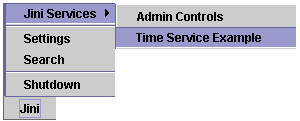
When reload() is called, it removes all items from the menu and then adds any item in the jini_Lookup_Cache. The jini_Lookup_Cache is an instance of net.jini.lookup.LookupCache, which is a utility class used to maintain a local list of services discovered on the network. The method we call here, lookup(), takes an instance of net.jini.lookup.ServiceItemFilter and the maximum number of items to return.
Our filter checks to make sure that the service has at least one UIDescriptor. If the ServiceItem being checked does not have an associated UIDescriptor entry, our filter returns false, and the service will not be included in the list returned by lookup().
    protected class ServiceUIFilter implements ServiceItemFilter{
       public boolean check(net.jini.core.lookup.ServiceItem item) {
          Entry[] entries = item.attributeSets;
          for(int i = 0; i<entries.length; i++){
             if(entries[i] instanceof UIDescriptor) return true;
          }
          return false;
       }
    }
Once we have our list of services, we can construct the menu that will display them to the user. We'll be wrapping each ServiceItem with another hybrid component, the ServiceUIMenuItem. The ServiceUIMenuItem is a subclass of JMenuItem. Each instance is passed a ServiceItem into the constructor from which it gets the name and the UIDescriptor:
    protected class ServiceUIMenuItem extends JMenuItem
                                      implements ActionListener{
       protected ServiceItem   jini_Service_Item;
       protected String        jini_Service_Name="Unnamed Service";
       protected UIDescriptor  jini_Service_UI_Descriptor;
       public ServiceUIMenuItem(ServiceItem item){
          super("Unknown Service");
          jini_Service_Item = item;
          Entry[] entries = jini_Service_Item.attributeSets;
          for(int i = 0; i<entries.length; i++){
             if(entries[i] instanceof Name){
                net.jini.lookup.entry.Name name = (Name)entries[i];
                jini_Service_Name=name.name;
                setName(jini_Service_Name);
                setLabel(jini_Service_Name);
             }else if(entries[i] instanceof UIDescriptor){
                jini_Service_UI_Descriptor=(UIDescriptor)entries[i];
             }
          }
          addActionListener(this);
       }
       public void actionPerformed(ActionEvent evt){
          if(jini_Service_UI_Descriptor!=null)try{
             MarshalledObject marshalled_Factory = jini_Service_UI_Descriptor.factory;
             Object unmarshalled_Factory = marshalled_Factory.get();
             if(unmarshalled_Factory instanceof JFrameFactory){
                JFrameFactory frame_Factory = (JFrameFactory)unmarshalled_Factory;
                JFrame service_Frame = frame_Factory.getJFrame(jini_Service_Item);
                service_Frame.show();
             }else{
                System.out.println("Unsupported UI Type");
             }
          }catch(Exception e){

          }
       }
    }
The ServiceUIMenuItem class also implements java.awt.event.ActionListener and registers to receive events. When the user selects a ServiceUIMenuItem from the service menu, the actionPerformed() method is called. That method retrieves the Factory object from the UIDescriptor entry. The Factory is wrapped in a java.rmi.MarshalledObject, and it must be unwrapped by first calling the get() method.
Once we have the Factory object, we check to see what kind of factory it is. Currently, we are only dealing with JFrameFactory instances, but it should be a simple exercise to implement handling code for other types of ServiceUI factories.
With the Factory now available to us, we can call getJFrame(), passing in the ServiceItem as an argument. The ServiceUI 1.0 spec refers to that argument as the role object, and suggests that the ServiceItem for the service be passed in for MainUI and AdminUI roles. getJFrame() constructs and returns an instance of a JFrame or a subclass of JFrame. The only step left at that point is to call show() on the returned UI.
You should be aware that the process of unmarshalling the Factory and instantiating the UI could result in loading a number of classes from the service's codebase. Since we are reacting to an ActionEvent, the actionPerformed() method is being called on the AWT event thread. That means that while we are loading classes and instantiating them, the JVM will be unable to react to other requests. For that example system, that is acceptable, but for any production system, you should be performing complex tasks on a separate thread and then calling show() on the AWT event queue.
Lookup Initialization
The final method called by the constructor is initialize_Lookup(). That method performs a number of steps that allow the application to find Jini services on the network. That process is similar to the registration process we implemented for TimeServiceImpl.
    protected void initialize_Lookup(){
       try{
          jini_Lookup_Discovery = new LookupDiscoveryManager(null,
                                                  new LookupLocator[0],
                                                  null);
          jini_Lease_Manager = new LeaseRenewalManager();
          jini_Service_Discovery = new ServiceDiscoveryManager(jini_Lookup_Discovery,
                                                  jini_Lease_Manager);

          jini_ServiceUI_Filter=new ServiceUIFilter();
          jini_Lookup_Cache = jini_Service_Discovery.createLookupCache(null, null, hybrid_Service_Menu);

       }catch(Exception e){
          e.printStackTrace();
       }
    }
The first two classes used, LookupDiscoveryManager and LeaseRenewalManager, are common to both service registration and lookup. The next class, ServiceDiscoveryManager, is also part of the Jini 1.1 utility suite, and provides a simplified mechanism for discovering services. As part of that mechanism, you can create a LookupCache object, which maintains a local list of services available. The createLookupCache() method takes three arguments:
ServiceTemplate: This parameter lets you specify a matching pattern for services based onServiceID, entries, or the interfaces implemented.ServiceItemFilter: This parameter lets you specify an object that will be responsible for filtering results from the lookup after retrieving them from the lookup services.ServiceDiscoveryListener: This parameter provides a means for specifying a callback object to be notified when the set of items in the cache has been changed.
At this point, we will not restrict the set of services in the lookup cache, but instead we will use the ServiceUIFilter when retrieving items from the cache (as you saw in ServiceMenu above). That design decision allows us to, in the future, work with services that may not have an associated ServiceUI, without needing to create another LookupCache.
Another subtlety to note is that in the ServiceMenu method reload(), we reference jini_Lookup_Cache and jini_ServiceUI_Filter, although when we create the ServiceMenu, neither of the objects exist. We are safe, however, from throwing NullPointerExceptions because reload() is only called by the ServiceDiscoveryListener methods. Since we are not registering our ServiceMenu with the lookup cache until now, the fields should never be null when reload() is called.
Conclusion
In this article you've learned how to create a simple ServiceUI-based Jini service and how to use services with such ServiceUI-based GUIs from a Swing-based application. We've encountered and examined some of the intricacies of mixing Jini services and Swing applications, and made design decisions based upon them.
The ServiceUI 1.0 specification defines the de facto standard for attaching user interfaces to Jini applications. It is a simple yet powerful framework for developing user-oriented distributed services and applications and, when combined with the Jini service metaphor, it has the potential to change how we view application development in a networked world.
Resources
- Download the complete source code to this article:
http://www.javaworld.com/jw-03-2001/jini/jw-0309-jiniology.zip
- Check out the ServiceUI project homepage for the draft specification, and binary and source files for ServiceUI 1.0:
http://developer.jini.org/exchange/projects/serviceui/
- Download the Jini Technology Starter Kit:
http://www.sun.com/software/communitysource/jini/download.html
- Download the Jini-Tools utility suite:
http://jini-tools.sourceforge.net
- Visit dreamBean Software's Website to find
DynaServerand other utilities:
http://www.dreambean.com
- Visit the Sun Jini Network Technology page:
http://www.sun.com/jini
- Visit Bill Venners's comprehensive Jini resource page, "Jini Corner":
http://www.artima.com/jini
- Read past Jiniology columns:
http://www.javaworld.com/javaworld/topicalindex/jw-ti-jiniology.html
- The Java Object Serialization Specification:
http://java.sun.com/j2se/1.3/docs/guide/serialization/spec/serialTOC.doc.html
- The Java Remote Method Invocation Specification:
http://java.sun.com/j2se/1.3/docs/guide/rmi/spec/rmiTOC.html
- Section 10.3.1 describes codebase annotation:
http://java.sun.com/j2se/1.3/docs/guide/rmi/spec/rmi-protocol4.html
- Section 3.4 describes dynamic class loading:
http://java.sun.com/j2se/1.3/docs/guide/rmi/spec/rmi-arch5.html
- Section 7.4.9 describes the
MarshalledObjectclass:
http://java.sun.com/j2se/1.3/docs/guide/rmi/spec/rmi-activation5.html
- The Jini Architecture Specification 1.1:
http://www.sun.com/jini/specs/jini1.1html/jini-title.html
- Jini Technology Glossary:
http://www.sun.com/jini/specs/jini1.1html/glossary-title.html
- The Jini Core Platform Specification:
http://www.sun.com/jini/specs/jini1.1html/core-title.html
- The Java 2 SDK Standard Edition 1.3:
http://www.javasoft.com/products/j2se/1.3/
- Explore the JavaWorld/Flashline Component Guide for a searchable component database:
http://www.flashline.com/javaworld/
- Sign up for the JavaWorld This Week free weekly email newsletter and keep up with what's new at JavaWorld:
http://www.idg.net/jw-subscribe
- Chat about Server-Side Java in ITworld.com's Java Forum:
http://forums.idg.net/webx?50@@.ee6b80a
"Browse User Interfaces for Jini Services" by Jeffrey Peden was originally published by JavaWorld (www.javaworld.com), copyright IDG, March 2001. Reprinted with permission.
http://www.javaworld.com/javaworld/jw-03-2001/jw-0309-jiniology.html
Talk back!
Have an opinion? Be the first to post a comment about this article.
About the author
-

Artima provides consulting and training services to help you make the most of Scala, reactive
and functional programming, enterprise systems, big data, and testing.
2070 N Broadway Unit 305
Walnut Creek CA 94597
USA
(925) 918-1769 (Phone)