
How to Customize
Suite Execution by Overriding
execute
Suite subclass so that it executes tests by interpreting a script written in a custom test language.
In the Artima SuiteRunner API, an org.suiterunner.Suite (Suite) represents a conceptual suite, or collection, of tests. A Suite is responsible for executing the tests it contains. To ask a Suite to execute its tests, you invoke its execute method. Class Suite provides a default implementation of execute that discovers test methods via reflection, invokes the test methods, and invokes execute on each of its sub-Suites.
The most common way to create a suite of tests with Artima SuiteRunner is to subclass Suite, define test methods, and/or add sub-Suites. (See Resources). When execute is invoked on such a Suite subclass, the execute implementation inherited from superclass Suite will ensure the test methods are invoked and sub-Suite's executed.
In Artima SuiteRunner's API contracts, "test" is used abstractly. A test method is one kind of test, but not the only kind. Executing test methods, as performed by Suite's implementation of execute, is one way to execute tests -- but not the only way. To execute tests in a different way, Suite subclasses can override execute. When execute is invoked on such a Suite subclass, its own execute implementation can execute tests in a custom way.
This article shows an example of a Suite subclass whose execute method:
- Reads in a file, written in a simple custom scripting language, that contains test commands
- Interprets the commands in the file, and executes the requested tests
- Invokes
executeon each sub-Suite
A Test Scripting Language for Class Account
The Artima SuiteRunner distribution ZIP file includes several simple examples, most of which revolve around a very simple Account API in package com.artima.examples.account.ex6. The Account API includes two types, Account and InsufficientFundsException. Starting with release 1.0beta6, the distribution ZIP file also includes an example in package com.artima.examples.scriptdriven.ex1. This package contains two classes:
ScriptDrivenAccountSuite-- aSuitesubclass that tests the Account API'sAccountclass by interpreting test commands in a test script and executing the requested tests.ScriptGenerator-- a Java application that generates a test script containing a command-line specified number of test commands for testing classAccount.
The purpose of the scripting language shown in this article's example is to demonstrate how to customize test execution by overriding execute in a Suite subclass. Although in real-world projects, it will rarely be useful to create a scripting language devoted to testing a single class, you may in some cases want to devise a more generic test scripting language for your system. A custom scripting language may, for example, be useful if you want non-Java programmers to write tests, or to provide a quicker way for Java programmers to write tests.
In addition, you may find it beneficial to automatically generate script- or data-based tests to replace or supplement tests written by hand in Java. You could, for example, create a Suite subclass that reads in automatically generated data in a table or XML format, and executes tests based on that data. The ScriptGenerator application included in this example generates a test script for class Account by making random deposits and withdrawals and checking for the expected result. By automating the generation of test data or script commands, you can broaden the coverage of your tests compared to hand-written tests.
A Test Scripting Language for Class Account
ScriptDrivenAccountSuite tests class Account, a simple example class included in the Artima SuiteRunner distribution ZIP file. Once you unzip the distribution ZIP file, you'll find the source code for ScriptDrivenAccountSuite in the suiterunner-[release]/example/com/artima/examples/scriptdriven/ex1 directory. You can also view the complete listing in HTML. Because ScriptDrivenAccountSuite.java is released under the Open Software License, you can use it as a template when overriding execute your own custom Suite subclass.
Aside from a no-arg constructor that initializes the account balance to zero, class Account has three methods in the public interface: deposit, withdraw, and getBalance. The contract for these methods is shown in Figure 1.
Figure 1. The Account Class
com.artima.examples.account.ex6Account |
public class AccountRepresents a bank account. |
| Constructors |
public Account()Construct a new Account with a zero balance. |
| Methods |
public void deposit(long amount)Deposits exactly the passed amount into the Account. |
public long getBalance()Gets the current balance of this Account. |
public long withdraw(long amount) throws InsufficientFundsExceptionWithdraws exactly the passed amount from the Account. |
Class ScriptDrivenAccountSuite consumes a test script, a file containing a sequence of commands for testing class Account. Each line of the file can contain at most one test command, and each test command can occupy only a single line. Blank lines are ignored. A pound sign (#), and any characters appearing after it to the end of the line, are also ignored, allowing for comments.
The four test commands are:
newAccountgetBalancedepositwithdraw
The newAccount Command
The newAccount commands causes ScriptDrivenAccountSuite to:
- Invoke
testStartingon theReporter. - Create a new
Accountinstance on which all subsequent commands (until the nextnewAccount) will operate. - If the constructor returns normally, invoke
testSucceededon theReporter. - Else (the constructor throws an exception), invoke
testFailedon theReporter.
newAccount command in a script file:
newAccount
The getBalance Command
The getBalance command takes one argument, a long expected return value. This command causes ScriptDrivenAccountSuite to:
- Invoke
testStartingon theReporter. - Invoke
getBalanceon theAccountinstance (created by the most recentnewAccountcommand), and compare the return value with the expected value specified as the first argument to thegetBalancecommand. - If the values are equal, invoke
testSucceededon theReporter. - Else, invoke
testFailedon theReporter.
Here's an example of a getBalance command in a script file:
getBalance 100
The deposit Command
The deposit command has two forms. The first form takes one argument, a long amount to deposit. This command will cause ScriptDrivenAccountSuite to:
- Invoke
testStartingon theReporter. - Invoke
depositon theAccountinstance, passing in the specified amount to deposit. - If
depositreturns normally, invoketestSucceededon theReporter. - Else (
depositthrows an exception), invoketestFailedon theReporter.
Here's an example of the first form of the deposit command in a script file:
deposit 10
The second form of the deposit command has two arguments, a long amount to deposit and the fully qualified name of an expected exception. This command will cause ScriptDrivenAccountSuite to:
- Invoke
testStartingon theReporter. - Invoke
depositon theAccountinstance, passing in the specified amount to deposit. - If
depositthrows exactly the exception specified in the second argument, invoketestSucceededon theReporter. - Else, invoke
testFailedon theReporter.
Here's an example of the second form of the deposit command in a script file:
deposit 1000 java.lang.ArithmeticException
The withdraw Command
Like deposit, the withdraw command has two forms. The first form takes one argument, a long amount to withdraw. This command will cause ScriptDrivenAccountSuite to:
- Invoke
testStartingon theReporter. - Invoke
withdrawon theAccountinstance, passing in the specified amount to withdraw. - If
withdrawreturns normally and the returned amount is equal to the passed amount, invoketestSucceededon theReporter. - Else (either
withdrawthrows an exception or returns the wrong amount), invoketestFailedon theReporter.
Here's an example of the first form of the withdraw command in a script file:
withdraw 20
The second form of the withdraw command has two arguments, a long amount to withdraw and the fully qualified name of an expected exception. This command will cause ScriptDrivenAccountSuite to:
- Invoke
testStartingon theReporter. - Invoke
withdrawon theAccountinstance, passing in the specified amount to withdraw. - If
withdrawthrows exactly the exception specified in the second argument, invoketestSucceededon theReporter. - Else, invoke
testFailedon theReporter.
Here's an example of the second form of the withdraw command in a script file:
withdraw 10 com.artima.examples.account.ex6.InsufficientFundsException
A Hand-Written Account Test Script
Here's a complete hand-written script that performs basic testing of class Account:
# Test Account's constructor
newAccount
getBalance 0 # Constructor should initialize balance to zero.

# Test Account's deposit method
newAccount
deposit 20
getBalance 20
deposit 20
getBalance 40
deposit -1 java.lang.IllegalArgumentException

newAccount
deposit 9223372036854775807 # Deposit Long.MAX_VALUE
getBalance 9223372036854775807

newAccount
deposit 100
deposit 9223372036854775807 java.lang.ArithmeticException

# Test Account's withdraw method
newAccount
deposit 20
withdraw 10
getBalance 10
withdraw 10
getBalance 0
withdraw 10 com.artima.examples.account.ex6.InsufficientFundsException

newAccount
withdraw -1 java.lang.IllegalArgumentException
Selecting the Script File
Class ScriptDrivenAccountSuite contains two private instance variables:
scriptFileName-- the path name of the script file containing the test commands to executeaccount-- the currentAccountinstance, created for the most recentnewAccountcommand, on which thedeposit,withdraw, andgetBalancecommands will operate.
Here are ScriptDrivenAccountSuite's instance variables:
public class ScriptDrivenAccountSuite extends Suite {

    private static String DEFAULT_SCRIPT_FILE = "script.txt";
    private static String scriptFileName;

    private Account account = new Account();
ScriptDrivenAccountSuite's no-arg constructor sets the scriptFileName to the value of the system property ScriptFile. If ScriptFile is not set, the constructor initializes scriptFileName to its default: "script.txt".
Here's ScriptDrivenAccountSuite's no-arg constructor:
    /**
     * Construct a new <code>ScriptDrivenAccountSuite</code>. If
     * the <code>ScriptFile</code> system property is set, the
     * value of that property will be used as the script file
     * name. Else, <code>script.txt</code> will be used.
     */
    public ScriptDrivenAccountSuite() {
        scriptFileName = System.getProperty("ScriptFile");
        if (scriptFileName == null) {

            scriptFileName = DEFAULT_SCRIPT_FILE;
        }
    }
Overriding getTestCount
If you override execute, executeTestMethods, or executeSubSuites in a Suite subclass, you will likely also want to override getTestCount. The getTestCount method returns the number of tests the Suite expects to execute when its execute method is invoked. Artima SuiteRunner's graphical Reporter uses the return value of this method to determine how to draw the red or green progress bar that shows the progress of the running suite of tests. If you are unable to determine the exact number of tests that will run when execute is invoked, return your best guess, or if you have no idea, return 1.
In ScriptDrivenAccountSuite, the expected number of tests equals the number of test commands in the script file, plus the number of tests in each sub-Suite. Since every test command must reside alone on its own line in the script file, ScriptDrivenAccountSuite's getTestCount method simply opens the script file and reads each line into a String. It removes any comments from the String and trims off any white space at either end of the String. Any String that is non-zero length after that process is counted as a test command. Finally, the getTestCount method gets a List of sub-Suites from the superclass by invoking getSubSuites on itself. For each sub-Suite in the List, it invokes getTestCount, adding to its total test count the amount returned from each sub-Suite's getTestCount method.
Here's ScriptDrivenAccountSuite's getTestCount method:
    /**
     * Get the total number of tests that are expected to run
     * when this suite object's <code>execute</code> method is invoked.
     * This class's implementation of this method returns the sum of:
     *
     * <ul>
     * <li>the number of test commands contained in the script file
     * <li>the sum of the values obtained by invoking
     *     <code>getTestCount</code> on every sub-<code>Suite</code>
     *     contained in this suite object.
     * </ul>
     */
    public int getTestCount() {

        int testCount = 0;

        // Each newAccount, deposit, withdraw, and getBalance command
        // in the file is an expected test, so open the file and count these.
        BufferedReader reader = null;
        try {
            FileInputStream fis = new FileInputStream(scriptFileName);
            InputStreamReader isr = new InputStreamReader(fis);
            reader = new BufferedReader(isr);
        }
        catch (FileNotFoundException e) {
            // Runner will report this RuntimeException as with suiteAborted
            // method invocation on the Reporter
            throw new RuntimeException("Unable to open " + scriptFileName
                + ". " + e.getMessage());
        }

        try {
            String line = reader.readLine();
            while (line != null) {

                line = trimLine(line);

                // Count any non-empty line as a test
                if (line.length() != 0) {

                    ++testCount;
                }
                line = reader.readLine();
            }
        }
        catch (IOException e) {
            // Runner will report this RuntimeException as with suiteAborted
            // method invocation on the Reporter
            throw new RuntimeException("Unable to read a line from script file "
                + scriptFileName + ". " + e.getMessage());
        }
        finally {

            try {
                reader.close();
            }
            catch (IOException e) {
                throw new RuntimeException("Unable to close script file " +
                    scriptFileName + ". " + e.getMessage());
            }
        }

        // Count the tests in each sub-Suite too
        Iterator it = getSubSuites().iterator();
        while (it.hasNext()) {

            Object o = it.next();

            Suite subSuite = (Suite) o;

            testCount += subSuite.getTestCount();
        }

        return testCount;
    }
Here's the trimLine method:
    // Trim comments and white space from line.  Comments begin with
    // a '#' character and extend to the end of the line
    private String trimLine(String line) {

        // First, remove any comments from the line, then trim the
        // whitespace off both ends.
        int poundSignPos = line.indexOf('#');
        if (poundSignPos >= 0) {
            line = line.substring(0, poundSignPos);
        }
        line = line.trim();

        return line;
    }
Overriding execute
Class Suite's implementation of execute simply invokes executeTestMethods and executeSubSuites, in that order. Suite's executeTestMethods implementation discovers test methods through reflection and invokes them. Suite's executeSubSuites implementation invokes execute on each of its sub-Suites. ScriptDrivenAccountSuite execute method provides an alternate way to execute its own tests, but uses the default way of executing sub-Suites. ScriptDrivenAccountSuite's execute method:
- Opens and reads lines from the script file.
- For each line, invokes
processLine, passing theReporter, theStringline, and the line number. (The line number is sent so that it can be included in messageStrings sent to theReporter.) - Before processing each line, checks to see whether a stop has been requested. If so, returns immediately. (The user can request a stop by pressing the Stop button of Artima SuiteRunner's graphical user interface.) ca
- Finally, after completing all test commands from the script file, invokes
executeon each sub-Suite.
Here's ScriptDrivenAccountSuite's execute method:
    /**
     * Execute this suite object.
     *
     * <P>This class's implementation of this method
     * executes the test commands contained in the script file,
     * then invokes <code>executeSubSuites</code> on itself,
     * passing in the specified <code>Reporter<code>.
     *
     * @param reporter the <code>Reporter</code> to which results will be reported
     * @exception NullPointerException if <CODE>reporter</CODE> is <CODE>null</CODE>.
     */
    public void execute(Reporter reporter) {

        if (reporter == null) {
            throw new NullPointerException("reporter is null");
        }

        BufferedReader reader = null;
        try {
            FileInputStream fis = new FileInputStream(scriptFileName);
            InputStreamReader isr = new InputStreamReader(fis);
            reader = new BufferedReader(isr);
        }
        catch (FileNotFoundException e) {
            // Runner will report this RuntimeException as with suiteAborted
            // method invocation on the Reporter
            throw new RuntimeException("Unable to open " + scriptFileName
                + ". " + e.getMessage());
        }

        try {
            int lineNum = 1;
            String line = reader.readLine();
            while (line != null) {
                if (isStopRequested()) {
                    return;
                }
                processLine(reporter, line, lineNum);
                line = reader.readLine();
                ++lineNum;
            }
        }
        catch (IOException e) {
            // Runner will report this RuntimeException as with suiteAborted
            // method invocation on the Reporter
            throw new RuntimeException("Unable to read a line from script file "
                + scriptFileName + ". " + e.getMessage());
        }
        finally {

            try {
                reader.close();
            }
            catch (IOException e) {
                throw new RuntimeException("Unable to close script file " +
                    scriptFileName + ". " + e.getMessage());
            }
        }

        executeSubSuites(reporter);
    }
The processLine Method
ScriptDrivenAccountSuite's execute method invokes processLine for each line it reads from the script file. The processLine method first removes any commments and trims any white space from either end of the line by passing the line to trimLine. If the trimmed line is empty, processLine simply returns. Otherwise, processLine attempts to interpret the trimmed line as test command.
processLine invokes getTokens, which breaks the line into its white space-separated tokens. getTokens returns a List of the tokens, which will contain Longs for long values specified in the command, Strings for commands and exception names appearing in the line.
Finally, processLine looks at the first token in the List returned by getTokens, which should be one of the four valid test commands: newAccount, getBalance, deposit, or withdraw. processLine passes control to one of four methods, each of which is responsible for processing one kind of command:
- If the first token is
newAccount,processLineinvokesprocessNewAccount. - Else if the first token is
getBalance,processLineinvokesprocessGetBalance. - Else if the first token is
deposit,processLineinvokesprocessDeposit. - Else if the first token is
withdraw,processLineinvokesprocessWithdraw.
When formatting Strings to send to the Reporter, the methods of ScriptDrivenAccountSuite (including processLine) pass the raw String and current line number to addLineNumber. The addLineNumber method incorporates the current line number into the message sent to the Reporter. Similar to a compiler supplying both raw information and a line number when reporting compilation errors, the script file line number helps users of ScriptDrivenAccountSuite track down reported problems in the original script file.
Here's the processLine method:
    private void processLine(Reporter reporter, String line, int lineNum) {

        line = trimLine(line);

        // Ignore blank lines
        if (line.length() == 0) {
            return;
        }

        List tokensList = getTokens(line, lineNum);

        // First token must be a string with the value of "newAccount",
        // "getBalance", "deposit", or "withdraw".
        Object token = tokensList.get(0);
        if (token instanceof String) {

            String command = (String) token;

            if (command.equals("newAccount")) {
                processNewAccount(reporter, lineNum);
            }
            else if (command.equals("getBalance")) {
                processGetBalance(reporter, tokensList.subList(1,
                    tokensList.size()), lineNum);
            }
            else if (command.equals("deposit")) {
                processDeposit(reporter, tokensList.subList(1,
                    tokensList.size()), lineNum);
            }
            else if (command.equals("withdraw")) {
                processWithdraw(reporter,
                    tokensList.subList(1, tokensList.size()), lineNum);
            }
            else {

                // Runner will report this RuntimeException as with suiteAborted
                // method invocation on the Reporter
                String msg = addLineNumber("Initial token in line must be one of "
                    + "\"newAccount\", \"getBalance\", \"deposit\", or \"withdraw\". "
                    + " Problem token: " + token.toString(), lineNum);
                throw new RuntimeException(msg);
            }
        }
        else {

            // Runner will report this RuntimeException as with suiteAborted
            // method invocation on the Reporter
            String msg = addLineNumber("Initial token in line must be one of "
                + "\"newAccount\", \"getBalance\", \"deposit\", or \"withdraw\". "
                + " Problem token: " + token.toString(), lineNum);
            throw new RuntimeException(msg);
        }
    }
Here is the addLineNumber method:
    private String addLineNumber(String raw, int lineNum) {
        return "Script file line " + Integer.toString(lineNum)
            + ": " + raw;
    }
Here is the getTokens method:
    // Returns a List of Strings and/or Longs. For example, for the line:
    //
    // deposit 20 java.lang.ArithmeticException
    //
    // This method will return a List containing Strings and Longs with the values:
    //
    // "deposit"
    // 20L
    // "java.lang.ArithmethidException"
    //
    private List getTokens(String line, int lineNum) {

        List tokensList = new ArrayList();

        int pos = 0;

        // Eat any white space at the beginning
        while (pos < line.length()) {

            while (pos < line.length()
                && Character.isWhitespace(line.charAt(pos))) {

                ++pos;
            }

            // Recognize '-' as the start of a negative long value
            if (Character.isDigit(line.charAt(pos)) || line.charAt(pos) == '-') {

                int nextWhiteSpacePos = pos + 1;
                while (nextWhiteSpacePos < line.length()
                    && !Character.isWhitespace(line.charAt(nextWhiteSpacePos))) {

                    ++nextWhiteSpacePos;
                }

                String longString = line.substring(pos, nextWhiteSpacePos);

                try {
                    tokensList.add(new Long(longString));
                }
                catch (NumberFormatException e) {
                    // Runner will report this RuntimeException as
                    // with suiteAborted method invocation on the Reporter
                    throw new RuntimeException(
                        addLineNumber("Invalid long integer: "
                        + longString + ".", lineNum));
                }

                pos = nextWhiteSpacePos;
            }
            else {

                int nextWhiteSpacePos = pos + 1;
                while (nextWhiteSpacePos < line.length()
                    && !Character.isWhitespace(line.charAt(nextWhiteSpacePos))) {
                    ++nextWhiteSpacePos;
                }

                String wordString = line.substring(pos, nextWhiteSpacePos);

                tokensList.add(wordString);

                pos = nextWhiteSpacePos;
            }
        }

        return tokensList;
    }
The processNewAccount Method
The processNewAccount method simply:
- Invokes
testStartingon theReporter. - Creates a new
Accountinstances, and assigns its reference to theaccountinstance variable. - If the
Accountconstructor returns normally, invokestestSucceededon theReporter. - Else (the constructor throws an exception), invokes
testFailedon theReporter.
Here's the processNewAccount method:
    // Process a "newAccount" command from the script
    private void processNewAccount(Reporter reporter, int lineNum) {

        Report report = new Report(this, "ScriptDrivenAccountSuite.processNewAccount",
            addLineNumber("About to create a new Account object.", lineNum));
        reporter.testStarting(report);

        try {
            account = new Account();

            report = new Report(this, "ScriptDrivenAccountSuite.processNewAccount",
                addLineNumber("Created a new Account object.", lineNum));
            reporter.testSucceeded(report);
        }
        catch (Exception e) {
            String msg = addLineNumber("Account constructor threw an exception.",
                lineNum);
            report = new Report(this, "ScriptDrivenAccountSuite.processNewAccount",
                msg, e);
            reporter.testFailed(report);
        }
    }
The processGetBalance Method
The processGetBalance method:
- Extracts a
longexpected balance from the passed tokensList, and stores it in theexpectedBalancelocal variable. - Invokes
testStartingon theReporter. - Invokes
getBalanceon the currentAccountinstance, and assigns the return value to thebalancelocal variable. - If the
balanceis equal toexpectedBalance, invokestestSucceededon theReporter. - Else (the
expectedBalanceandexpectedBalancevalues are unequal, orgetBalancemethod throws an exception), invokestestFailedon theReporter.
Here is the processGetBalance method:
    // The getBalance command has two tokens, "getBalance" and a long integer
    // expected return value, as in:
    //
    // getBalance 20
    //
    private void processGetBalance(Reporter reporter, List tokens, int lineNum) {

        if (tokens.size() != 1) {


            // Runner will report this RuntimeException as with suiteAborted
            // method invocation on the Reporter
            String msg = addLineNumber("getBalance commands must have 1 "
                + "argument, a long expected balance.", lineNum);
            throw new RuntimeException(msg);
        }

        long expectedBalance = -1;

        // The getBalance command has two tokens, a long value and an error message
        Object o = tokens.get(0);
        if (o instanceof Long) {
            expectedBalance = ((Long) o).longValue();
        }
        else {

            // Runner will report this RuntimeException as with suiteAborted
            // method invocation on the Reporter
            String msg = addLineNumber("The first argument of a getBalance "
                + "command must be a Long expected balance.", lineNum);
            throw new RuntimeException(msg);
        }

        String msg = addLineNumber("About to process a getBalance command. "
            + "Expecting getBalance to return " + Long.toString(expectedBalance)
            + ".", lineNum);
        Report report = new Report(this, "ScriptDrivenAccountSuite.processGetBalance",
            msg);
        reporter.testStarting(report);

        long balance = account.getBalance();

        if (balance == expectedBalance) {

            msg = addLineNumber("The getBalance method returned "
                + Long.toString(expectedBalance) + ", as expected.", lineNum);
            report = new Report(this, "ScriptDrivenAccountSuite.processGetBalance",
                msg);
            reporter.testSucceeded(report);
        }
        else {

            msg = addLineNumber("The getBalance method returned "
                + Long.toString(balance) + ", when "
                + Long.toString(expectedBalance) + " was expected.", lineNum);
            report = new Report(this, "ScriptDrivenAccountSuite.processGetBalance",
                msg);
            reporter.testFailed(report);
        }
    }
The processDeposit Method
The processDeposit method:
- Extracts a
longamount to deposit from the passed tokensList, and stores it in theamountToDepositlocal variable. - If the tokens
Listcontains only one element, execute the simpler form of thedepositcommand that doesn't expect an exception:- Invokes
testStartingon theReporter. - Invokes
depositon theReporter, passing in theamountToDeposit. - If the
depositmethod returns normally, invokestestSucceededon theReporter. - Else (the
depositmethod throws an exception), invokestestFailedon theReporter.
- Invokes
- Else, execute the form of the
depositcommand that expects a specified exception:- Extracts a
Stringexpected exception fully qualified name from the passed tokensList, and stores it in theexpectedNamelocal variable. - Invokes
testStartingon theReporter. - Invokes
depositon theReporter, passing in theamountToDeposit. - If the
depositmethod throws an exception whose fully qualified name has exactly the same value asexpectedName, invokestestSucceededon theReporter. - Else (the
depositmethod returned normally or threw an exception other than the expected one), invokestestFailedon theReporter.
- Extracts a
Here is the processDeposit method:
    // The deposit command has two forms. The simpler form has two
    // tokens, "deposit" and a long integer amount to deposit, as in:
    //
    // deposit 20
    //
    // The two token form of the deposit command causes this ScriptDrivenAccountSuite
    // to deposit the long integer to the current Account object.
    //
    // The more complex form of the deposit command has three tokens, "deposit",
    // a long integer amount to deposit, and the fully qualified name of an expected
    // exception. For example:
    //
    // deposit -1 java.lang.IllegalArgumentException
    //
    private void processDeposit(Reporter reporter, List tokens, int lineNum) {

        if (tokens.size() != 1 && tokens.size() != 2) {


            // Runner will report this RuntimeException as with suiteAborted
            // method invocation on the Reporter
            String msg = addLineNumber("A deposit command "
                + "must have either 1 or 2 arguments.", lineNum);
            throw new RuntimeException(msg);
        }

        // Both forms require a long amount to deposit as the first token
        long amountToDeposit = -1;
        Object o = tokens.get(0);
        if (o instanceof Long) {
            amountToDeposit = ((Long) o).longValue();
        }
        else {

            // Runner will report this RuntimeException as with suiteAborted
            // method invocation on the Reporter
            String msg = addLineNumber("First argument to a deposit command "
                + "must be a long amount to deposit.", lineNum);
            throw new RuntimeException();
        }

        if (tokens.size() == 1) {

            String msg = addLineNumber("About to Deposit "
                + Long.toString(amountToDeposit) + ".", lineNum);
            Report report = new Report(this, "ScriptDrivenAccountSuite.processDeposit",
                msg);
            reporter.testStarting(report);

            try {
                account.deposit(amountToDeposit);

                msg = addLineNumber("Deposited " + Long.toString(amountToDeposit)
                    + ".", lineNum);
                report = new Report(this, "ScriptDrivenAccountSuite.processDeposit",
                    msg);
                reporter.testSucceeded(report);
            }
            catch (Exception e) {
                msg = addLineNumber("The deposit method threw an exception "
                    + "when attempting to deposit " + Long.toString(amountToDeposit)
                    + ".", lineNum);
                report = new Report(this, "ScriptDrivenAccountSuite.processDeposit",
                    msg, e);
                reporter.testFailed(report);
            }
        }
        else {

            // Parse the fully qualified exception name
            String expectedName = null;
            o = tokens.get(1);
            if (o instanceof String) {
                expectedName = (String) o;
            }
            else {

                // Runner will report this RuntimeException as with suiteAborted
                // method invocation on the Reporter
                String msg = addLineNumber("Second argument to a deposit command "
                    + "must be a String fully qualified exception name.", lineNum);
                throw new RuntimeException(msg);
            }

            String msg = addLineNumber("About to Deposit "
                + Long.toString(amountToDeposit) + ".", lineNum);
            Report report = new Report(this, "ScriptDrivenAccountSuite.processDeposit",
                msg);
            reporter.testStarting(report);

            try {
                account.deposit(amountToDeposit);
                msg = addLineNumber("The deposit method returned normally, when "
                    + expectedName + " was expected.", lineNum);
                report = new Report(this, "ScriptDrivenAccountSuite.processDeposit",
                    msg);
                reporter.testFailed(report);
            }
            catch (Exception e) {
                String thrownName = e.getClass().getName();
                if (thrownName.equals(expectedName)) {

                    msg = addLineNumber("The deposit method threw "
                        + expectedName + ", as expected.", lineNum);
                    report = new Report(this, "ScriptDrivenAccountSuite.processDeposit",
                        msg);
                    reporter.testSucceeded(report);
                }
                else {

                    msg = addLineNumber("The deposit method threw "
                        + thrownName + ", when "
                        + expectedName + " was expected.", lineNum);
                    report = new Report(this, "ScriptDrivenAccountSuite.processDeposit",
                        msg);
                    reporter.testFailed(report);
                }
            }
        }
    }
The processWithdraw Method
The processWithdraw method:
- Extracts a
longamount to withdraw from the passed tokensList, and stores it in theamountToWithdrawlocal variable. - If the tokens
Listcontains only one element, execute the simpler form of thewithdrawcommand that doesn't expect an exception:- Invokes
testStartingon theReporter. - Invokes
withdrawon theReporter, passing in theamountToWithdraw. - If the
withdrawmethod returns a value equal to theamountToWithdraw, invokestestSucceededon theReporter. - Else (the
withdrawmethod returns a value different from theamountToWithdrawor throws an exception), invokestestFailedon theReporter.
- Invokes
- Else, execute the form of the
withdrawcommand that expects a specified exception:- Extracts a
Stringexpected exception fully qualified name from the passed tokensList, and stores it in theexpectedNamelocal variable. - Invokes
testStartingon theReporter. - Invokes
withdrawon theReporter, passing in theamountToWithdraw. - If the
withdrawmethod throws an exception whose fully qualified name has exactly the same value asexpectedName, invokestestSucceededon theReporter. - Else (the
withdrawmethod returned normally or threw an exception other than the expected one), invokestestFailedon theReporter.
- Extracts a
Here is the processWithdraw method:
    // The withdraw command has two forms. The simpler form has two
    // tokens, "withdraw" and a long integer amount to withdraw, as in:
    //
    // withdraw 20
    //
    // The two token form of the withdraw command causes this ScriptDrivenAccountSuite
    // to withdraw the long integer from the current Account object.
    //
    // The more complex form of the withdraw command has three tokens, "withdraw",
    // a long integer amount to withdraw, and the fully qualified name of an expected
    // exception. For example:
    //
    // withdraw 10 com.artima.examples.account.ex6.InsufficientFundsException
    //
    private void processWithdraw(Reporter reporter, List tokens, int lineNum) {

        if (tokens.size() != 1 && tokens.size() != 2) {


            // Runner will report this RuntimeException as with suiteAborted
            // method invocation on the Reporter
            String msg = addLineNumber("A withdraw command "
                + "must have either 1 or 2 arguments.", lineNum);
            throw new RuntimeException(msg);
        }

        // Both forms require a long amount to withdraw as the first token
        long amountToWithdraw = -1;
        Object o = tokens.get(0);
        if (o instanceof Long) {
            amountToWithdraw = ((Long) o).longValue();
        }
        else {

            // Runner will report this RuntimeException as with suiteAborted
            // method invocation on the Reporter
            String msg = addLineNumber("First argument to a withdraw command "
                + "must be a long amount to withdraw.", lineNum);
            throw new RuntimeException();
        }

        if (tokens.size() == 1) {

            String msg = addLineNumber("About to withdraw "
                + Long.toString(amountToWithdraw) + ".", lineNum);
            Report report = new Report(this, "ScriptDrivenAccountSuite.processWithdraw",
                msg);
            reporter.testStarting(report);

            try {
                long withdrawn = account.withdraw(amountToWithdraw);

                if (withdrawn == amountToWithdraw) {

                    msg = addLineNumber("Withdrew " + Long.toString(amountToWithdraw)
                        + ".", lineNum);
                    report = new Report(this,
                        "ScriptDrivenAccountSuite.processWithdraw", msg);
                    reporter.testSucceeded(report);
                }
                else {

                    msg = addLineNumber("The withdraw method returned "
                        + Long.toString(withdrawn) + ", when "
                        + Long.toString(amountToWithdraw)
                        + " was expected.", lineNum);
                    report = new Report(this,
                        "ScriptDrivenAccountSuite.processWithdraw", msg);
                    reporter.testFailed(report);
                }
            }
            catch (Exception e) {
                msg = addLineNumber("The withdraw method threw an exception "
                    + "when attempting to withdraw " + Long.toString(amountToWithdraw)
                    + ".", lineNum);
                report = new Report(this, "ScriptDrivenAccountSuite.processWithdraw",
                    msg, e);
                reporter.testFailed(report);
            }
        }
        else {

            // Parse the fully qualified exception name
            String expectedName = null;
            o = tokens.get(1);
            if (o instanceof String) {
                expectedName = (String) o;
            }
            else {

                // Runner will report this RuntimeException as with suiteAborted
                // method invocation on the Reporter
                String msg = addLineNumber("Second argument to a withdraw command "
                    + "must be a fully qualified exception name.", lineNum);
                throw new RuntimeException(msg);
            }

            try {
                String msg = addLineNumber("About to withdraw "
                    + Long.toString(amountToWithdraw) + ".", lineNum);
                Report report = new Report(this,
                    "ScriptDrivenAccountSuite.processWithdraw", msg);
                reporter.testStarting(report);

                account.withdraw(amountToWithdraw);

                msg = addLineNumber("The withdraw method returned normally, when "
                    + expectedName + " was expected.", lineNum);
                report = new Report(this,
                    "ScriptDrivenAccountSuite.processWithdraw", msg);
                reporter.testFailed(report);
            }
            catch (Exception e) {
                String thrownName = e.getClass().getName();
                if (thrownName.equals(expectedName)) {

                    String msg = addLineNumber("The withdraw method threw "
                        + expectedName + ", as expected.", lineNum);
                    Report report = new Report(this,
                        "ScriptDrivenAccountSuite.processWithdraw", msg);
                    reporter.testSucceeded(report);
                }
                else {

                    String msg = addLineNumber("The withdraw method threw "
                        + thrownName + ", when "
                        + expectedName + " was expected.", lineNum);
                    Report report = new Report(this,
                        "ScriptDrivenAccountSuite.processWithdraw", msg);
                    reporter.testFailed(report);
                }
            }
        }
    }
Take ScriptDrivenAccountSuite for a Spin
To make it easy to try ScriptDrivenAccountSuite, I added a new recipe file, scriptdriven.srj, and a sample test script file, script.txt, to the Artima SuiteRunner distribution ZIP file in version 1.0beta6. If you have a release prior to 1.0beta6, please download the latest version of Artima SuiteRunner. Once you unzip the distribution ZIP file, you'll find scriptdriven.srj in the suiterunner-[release] directory. Here are the contents of scriptdriven.srj:
org.suiterunner.Suites=-s com.artima.examples.scriptdriven.ex1.ScriptDrivenAccountSuite
org.suiterunner.Runpath=-p "example"
org.suiterunner.Reporters=-g
In scriptdriven.srj:
- The value of
org.suiterunner.Runpath(-p "example") specifies a runpath with a single directory,example. - The value of
org.suiterunner.Suites(-s com.artima.examples.scriptdriven.ex1.ScriptDrivenAccountSuite) indicates Artima SuiteRunner should load the specified class, a subclass oforg.suiterunner.Suite, and invoke itsexecutemethod. - The value of
org.suiterunner.Reporters(-g) indicates that Artima SuiteRunner will display its graphical user interface (GUI) and show the results of the run there.
When invoked via the previous command that specifies scriptdriven.srj as a command line parameter, Artima SuiteRunner will:
- Create a
URLClassLoaderthat can load classes from theexampledirectory, the directory specified via the recipe file'sorg.suiterunner.Runpathproperty. - Via the
URLClassLoader, load classcom.artima.examples.scriptdriven.ex1.ScriptDrivenAccountSuite, the class specified in via the recipe file'sorg.suiterunner.Suitesproperty. - Discover that
com.artima.examples.scriptdriven.ex1.ScriptDrivenAccountSuiteclass is a subclass oforg.suiterunner.Suite. - Instantiate
com.artima.examples.scriptdriven.ex1.ScriptDrivenAccountSuite. - Run the suite of tests by invoking
executeon thecom.artima.examples.scriptdriven.ex1.ScriptDrivenAccountSuiteinstance. - Report test results via the graphical reporter, the reporter specified via the recipe file's
org.suiterunner.Reportersproperty.
To see the ScriptDrivenAccountSuite in action, run the following command from the suiterunner-[release] subdirectory of the directory in which you unzipped the Artima SuiteRunner distribution ZIP file:
java -jar suiterunner-[release].jar scriptdriven.srj
When you execute the previous command, you should see results similar to those shown in Figure 2. Because the previous command doesn't set the ScriptFile system property, ScriptDrivenAccountSuite will use its default script file name, script.txt. This script file, which sits alongside scriptdriven.srj, contains 23 tests, six of which fail. The six failures are caused by a bug introduced intentionally into class Account to demonstrate how Artima SuiteRunner reports failed tests. If you fix this bug and rerun the previous command, you should get 23 successful tests and a satisfying green bar.
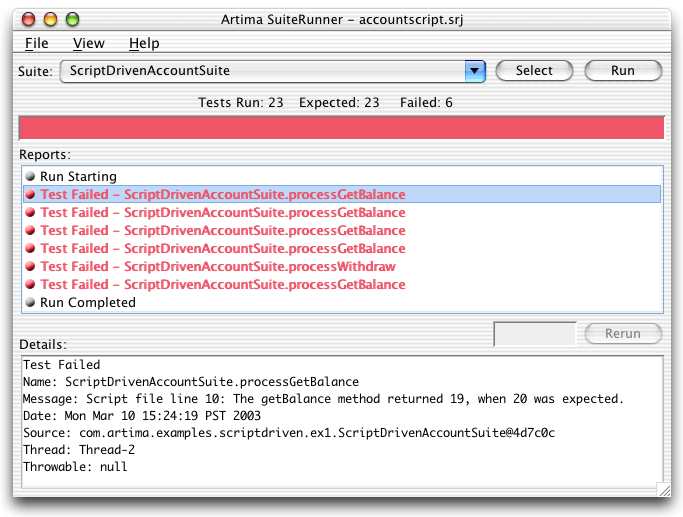
Figure 2. ScriptDrivenAccountSuite results for script script.txt
The ScriptGenerator Application
As mentioned previously, one reason to drive tests via scripts, tables, XML documents, and so on, is that you can more easily automate the generation of script- or data-based tests than tests written by hand in Java. The ScriptGenerator application, for example, automatically generates a script that can be fed to ScriptDrivenAccountSuite.
ScriptGenerator accepts one optional command line argument, an integer number of tests commands to include in the generated script file. If no command line arguments are specified, ScriptGenerator generates 1000 test commands. ScriptGenerator writes its test script to the standard output stream.
ScriptGenerator first prints a comment indicating the script was automatically generated and specifying the number test commands it contains, and prints an initial newAccount command. Thereafter, ScriptGenerator pseudo-randomly decides whether to deposit to the Account, or withdraw from it. It pseudo-randomly selects a long amount to either deposit or withdraw, and figures out whether the action should result in an exception. It then prints an appropriate deposit or withdraw command to the standard output.
If the previously printed deposit or withdraw command is not supposed to result in an exception, ScriptGenerator prints a getBalance command to the standard output to ensure the balance is correct. If a deposit command is supposed to produce an ArithmeticException, ScriptGenerator prints a newAccount command to the standard output, because the Account contract does not promise an Account instance will still be usable after deposit throws ArithmeticException.
In this manner, ScriptGenerator generates a series of newAccount, getBalance, deposit, and withdraw commands at the standard output. As it goes, ScriptGenerator keeps track of the total number of test commands it has printed. Once it has printed the requested number of commands, the ScriptGenerator application exits.
Here is the ScriptGenerator class:
/*
 * Copyright (C) 2001-2003 Artima Software, Inc. All rights reserved.
 * Licensed under the Open Software License version 1.0.
 *
 * A copy of the Open Software License version 1.0 is available at:
 *     http://www.artima.com/suiterunner/osl10.html
 *
 * This software consists of voluntary contributions made by many
 * individuals on behalf of Artima Software, Inc. For more
 * information on Artima Software, Inc., please see:
 *     http://www.artima.com/
 */
package com.artima.examples.scriptdriven.ex1;

import com.artima.examples.account.ex6.Account;
import com.artima.examples.account.ex6.InsufficientFundsException;
import org.suiterunner.Suite;
import org.suiterunner.Reporter;
import org.suiterunner.Report;

import java.io.*;
import java.util.List;
import java.util.ArrayList;
import java.util.Iterator;

/**
 * An application that generates an <code>Account</code> test script
 * containing a specified number of test commands. The number of test
 * commands is specified as the first argument to the application. If
 * no test count is specified, 1000 will be used.
 */
public class ScriptGenerator {

    private static final int DEFAULT_TEST_COUNT_MAX = 1000;

    private ScriptGenerator() {
    }

    /**
     * Application that generates an <code>Account</code> test script
     * containing the number of test commands specified as the first
     * command line argument, or 1000 test commands, if no command line
     * arguments are specified.
     */
    public static void main(String[] args) {

        int testCountMax = DEFAULT_TEST_COUNT_MAX;
        if (args.length == 1) {

            try {
                testCountMax = Integer.parseInt(args[0]);
            }
            catch (NumberFormatException e) {
                System.out.println("Must specify no args or a single integer arg "
                    + "that specifies the number of test commands to generate.");
                System.exit(1);
            }
        }
        else if (args.length != 0) {
            System.out.println("Must specify no args or a single integer arg "
                + "that specifies the number of test commands to generate.");
            System.exit(1);
        }

        // Account's contract does not promise that the Account object is still
        // valid and usable after deposit throws an ArithmeticException. This
        // app will generate a script of commands that exercises an Account by
        // making random deposits and withdrawals and verifying the balance each
        // time. If a deposit causes an ArithmeticException, the script will
        // generate a newAccount command that will cause ScriptDrivenAccountSuite
        // to create a brand new Account object for subsequent tests.

        System.out.println("# Account test script with "
            + Integer.toString(testCountMax)
            + " tests, generated by ScriptGenerator.");

        System.out.println("newAccount");

        long balance = 0;
        int testCount = 1;
        while (testCount < testCountMax) {

            // I expect randomNum to be 0 about half the
            // time and 1 the other half. Attempting to
            // set printDeposit to true half the time, which
            // will generate deposit and getBalance commands.
            // The rest of the time, printDeposit will be set to
            // false, which will result in a withdraw and
            // getBalance commands.
            int zeroOrOne = (int)(Math.random() * 2.0d);
            boolean printDeposit = false;
            if (zeroOrOne == 0) {
                printDeposit = true;
            }

            // Select a random amount to deposit or withdraw
            long amount = (long)(Math.random() * ((double)Long.MAX_VALUE));

            if (printDeposit) {

                if (balance + amount < 0L) {

                    // Overflow, so expect an ArithmethicException
                    System.out.println("deposit " + Long.toString(amount)
                        + " java.lang.ArithmeticException");

                    ++testCount;
                    if (testCount < testCountMax) {
                        System.out.println("newAccount");
                        balance = 0;
                        ++testCount;
                    }
                }
                else {

                    balance += amount;
                    System.out.println("deposit " + Long.toString(amount));
                    ++testCount;

                    if (testCount < testCountMax) {
                        System.out.println("getBalance " + Long.toString(balance));
                        ++testCount;
                    }
                }
            }
            else {

                if (balance - amount < 0L) {

                    // Overflow, so expect an InsufficientFundsException
                    System.out.println("withdraw " + Long.toString(amount)
                        + " com.artima.examples.account.ex6."
                        + "InsufficientFundsException");

                    ++testCount;

                    if (testCount < testCountMax) {
                        System.out.println("getBalance "
                            + Long.toString(balance));
                        ++testCount;
                    }
                }
                else {

                    balance -= amount;
                    System.out.println("withdraw " + Long.toString(amount));
                    ++testCount;

                    if (testCount < testCountMax) {
                        System.out.println("getBalance "
                            + Long.toString(balance));
                        ++testCount;
                    }
                }
            }
        }
    }
}
To make it easy to try ScriptDrivenAccountSuite with a script generated by ScriptGenerator, I added a sample test script file, generatedscript.txt, to the Artima SuiteRunner distribution ZIP file in version 1.0beta6. If you have a release prior to 1.0beta6, please download the latest version of Artima SuiteRunner. Once you unzip the distribution ZIP file, you'll find generatedscript.txt in the suiterunner-[release] directory.
generatedscript.txt, which was generated by ScriptGenerator, contains 1000 test commands. Here are the first 25 lines of generatedscript.txt:
# Account test script with 1000 tests, generated by ScriptGenerator.
newAccount
deposit 2204897606719931392
getBalance 2204897606719931392
withdraw 6699598046204537856 com.artima.examples.account.ex6.InsufficientFundsException
getBalance 2204897606719931392
deposit 4194476087876486144
getBalance 6399373694596417536
withdraw 4864310293971913728
getBalance 1535063400624503808
deposit 1584119828864405504
getBalance 3119183229488909312
deposit 5104144951917947904
getBalance 8223328181406857216
deposit 6709782093051939840 java.lang.ArithmeticException
newAccount
withdraw 6341517708414168064 com.artima.examples.account.ex6.InsufficientFundsException
getBalance 0
withdraw 7335749506867528704 com.artima.examples.account.ex6.InsufficientFundsException
getBalance 0
withdraw 5993124522139121664 com.artima.examples.account.ex6.InsufficientFundsException
getBalance 0
deposit 2149650782832521216
getBalance 2149650782832521216
deposit 1414786779105710080
To execute ScriptDrivenAccountSuite using generatedscript.txt, run the following command from the suiterunner-[release] subdirectory of the directory in which you unzipped the Artima SuiteRunner distribution ZIP file:
java -DScriptFile=generatedscript.txt -jar suiterunner-1.0beta6.jar accountscript.srj
When you execute the previous command, you should see results similar to those shown in Figure 3. Because the previous command sets ScriptFile system property, ScriptDrivenAccountSuite will use the specified script file name, generatedscript.txt. This script file, which sits alongside scriptdriven.srj, contains 1000 tests, 331 of which fail. generatescript.txt's 331 failures, like the six failures produced by script.txt are caused by a bug introduced intentionally into class Account to demonstrate how Artima SuiteRunner reports failed tests. If you fix this bug and rerun the previous command, you should get 1000 successful tests and a green bar.
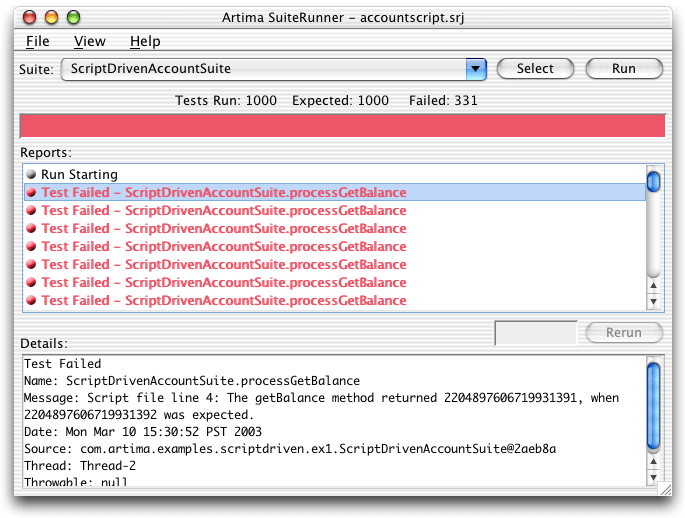
Figure 3. ScriptDrivenAccountSuite results for script generatedscript.txt
Get Help in the SuiteRunner Forum
For help with Artima SuiteRunner, please post to the SuiteRunner Forum.
Resources
For more information about defining test methods, see the Artima SuiteRunner Tutorial:
http://www.artima.com/suiterunner/tutorial.html
Why We Refactored JUnit
http://www.artima.com/suiterunner/why.html
Artima SuiteRunner Tutorial, Building Conformance and Unit Tests with Artima SuiteRunner:
http://www.artima.com/suiterunner/tutorial.html
Getting Started with Artima SuiteRunner, How to Run the Simple Example Included in the Distribution:
http://www.artima.com/suiterunner/start.html
Runnning JUnit Tests with Artima SuiteRunner, how to use Artima SuiteRunner as a JUnit runner to run your existing JUnit test suites:
http://www.artima.com/suiterunner/junit.html
Artima SuiteRunner home page:
http://www.artima.com/suiterunner/index.html
Artima SuiteRunner download page (You must log onto Artima.com to download the release):
http://www.artima.com/suiterunner/download.jsp
The SuiteRunner Forum:
http://www.artima.com/forums/forum.jsp?forum=61
Talk back!
Have an opinion? Be the first to post a comment about this article.
About the author
Bill Venners is president of Artima Software, Inc. and editor-in-chief of Artima.com. He is author of the book, Inside the Java Virtual Machine, a programmer-oriented survey of the Java platform's architecture and internals. His popular columns in JavaWorld magazine covered Java internals, object-oriented design, and Jini. Bill has been active in the Jini Community since its inception. He led the Jini Community's ServiceUI project that produced the ServiceUI API. The ServiceUI became the de facto standard way to associate user interfaces to Jini services, and was the first Jini community standard approved via the Jini Decision Process. Bill also serves as an elected member of the Jini Community's initial Technical Oversight Committee (TOC), and in this role helped to define the governance process for the community. He currently devotes most of his energy to building Artima.com into an ever more useful resource for developers.

Artima provides consulting and training services to help you make the most of Scala, reactive
and functional programming, enterprise systems, big data, and testing.
2070 N Broadway Unit 305
Walnut Creek CA 94597
USA
(925) 918-1769 (Phone)