This post originated from an RSS feed registered with Java Buzz
by Elliotte Rusty Harold.
Original Post: Converting to HTTPS Friction Log
Feed Title: Mokka mit Schlag
Feed URL: http://www.elharo.com/blog/feed/atom/?
Feed Description: Ranting and Raving
I’ve promised myself I am finally going to convert Mokka mit Schlag and my other sites to HTTPS this weekend. This is still way harder than it should be; and until now my host, pair.com, has been unhelpful at best. If I give up on them, anyone have suggestions? Best I’ve gotten so far is a GCE or AWS virtual server. I’m not sure what that would cost, and ideally I’d prefer a hosted solution where someone else handles updating Apache, Linux, MySQL, WordPress, etc. for me; but I do need the freedom to install my own PHP programs, WordPress extensions, and so forth; which rules out a lot of the simpler/cheaper solutions out there.
Anyway, let’s see how this goes.
10:00 AM:
I figure a static web site should be easiest so let’s start with xom.nu. I don’t remember where I’m actually hosting that, IBiblio or pair, so let’s log into the shell and find out:
$ ssh elharo@elharo.pairserver.com
The authenticity of host 'elharo.pairserver.com (209.68.5.151)' can't be established.
RSA key fingerprint is 59:af:97:23:de:61:51:5a:43:16:c3:6c:47:5c:11:ee.
Are you sure you want to continue connecting (yes/no)? no
OK, how do I verify the authenticity of that key? Near as I can tell, pair does not publish their keys on their website anywhere. First support request sent at 10:21 AM.
10:40 AM:
While waiting for pair to get back to me, I do some googling about hosting a static web site on AWS or GCP. AWS would be free for the first year, but might cost me $115 a month after that. (That’s probably a vast overestimate, but that’s the number I get from Amazon’s calculator.) Way too much. By contrast, dumping it all in a Google Cloud Storage Bucket seems likely to cost pennies a month.
OK, let’s register a new Google account for this since I don’t want to mix it up with my email.
(Disclaimer: Although this is a personal project, as some of you know, I work for Google on GCP in my day job, so please don’t treat any preferences I express here for one platform or another as authoritative or unbiased. They’re not.)
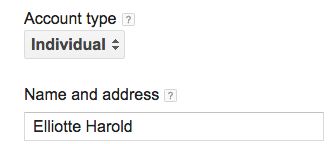
First stumbling block. Google wants me to choose a “Business” or “Individual” and I have no idea which I should pick. After Googling for the answer, and getting multiple unhelpful, unrelated web pages I finally notice the tiny light gray question mark next to the pop up:
After reading the help text, it looks like they want me to pick individual. Proceeding onward.
Oh joy. Google doesn’t like my credit card. I have no idea why. OK, looks like credit card autofill in Chrome picked the wrong expiration date. Onward.
Now I have to pick a domain. I don’t want to point xom.nu to the unready host yet, so let’s try xom.elharo.com for the moment. I assume I can change this later. I go to webmaster central to verify my ownership of the domain and am asked to sign in again for no obvious reason. (Isn’t avoiding this the reason for combining Google accounts across services?) Seriously, I logged in from this browser window minute ago, but whatever. I enter the password and:
The www.google.com page isn’t working
www.google.com redirected you too many times.
Try clearing your cookies.
OK, looks like Firefox blocked the cookies for some reason. Fix that, and we’re logged in. Now let’s verify that I own xom.elharo.com:
Um, nope. Looks like all the methods assume the web site already exists. I think my only option is “Sign in to your domain name provider.” only my domain name provider, EasyDNS, isn’t in the list. :-( Finally, I find “Other” way at the bottom of a popup that scrolls off the screen. Using that I login to easyDNS and create the relevant TXT record to verify I own elharo.com. I click verify and:
Verification failed for http://xom.elharo.com/ using the DNS TXT record method (less than a minute ago). Your verification DNS TXT record was not found. You might need to wait a few minutes before Google sees your changes to the TXT records.
Hmm, are they trying to verify elharo.com or xom.elharo.com? The previous page said elharo.com so that’s where I set the TEXT record but now it looks like they want xom.elharo.com again. Back to easyDNS to make that a wildcard record.
Nope, still won’t verify. Maybe it just needs more time? Meanwhile check back to see if pair has answered my support request yet. Nope, ticket is still open.
Time for lunch. I’ll try this again in an hour.
12:45 PM:
Back from lunch. Google still doesn’t see the TXT record so try using CNAME verification instead. OK, that actually worked. Onward.
And in the next step I see:
Caution: You can only use a CNAME redirect with HTTP and not with HTTPS, because SSL is not currently supported by the Cloud Storage webservers. We recommend that you don’t serve content that contains sensitive or private data from your CNAME aliased bucket.


 Previous Topic