The Artima Developer Community
Sponsored Link

Java Buzz Forum
How to get java source files from jar Using Eclipse

0 replies on 1 page.

Welcome Guest
  Sign In

Go back to the topic listing  Back to Topic List Click to reply to this topic  Reply to this Topic Click to search messages in this forum  Search Forum Click for a threaded view of the topic  Threaded View   
Previous Topic   Next Topic
Flat View: This topic has 0 replies on 1 page
instanceof java

Posts: 576
Nickname: instanceof
Registered: Jan, 2015

instanceof java is a java related one.
How to get java source files from jar Using Eclipse Posted: Nov 27, 2016 6:02 AM
Reply to this message Reply

This post originated from an RSS feed registered with Java Buzz by instanceof java.
Original Post: How to get java source files from jar Using Eclipse
Feed Title: Instance Of Java
Feed URL: http://feeds.feedburner.com/blogspot/TXghwE
Feed Description: Instance of Java. A place where you can learn java in simple way each and every topic covered with many points and sample programs.
Latest Java Buzz Posts
Latest Java Buzz Posts by instanceof java
Latest Posts From Instance Of Java

Advertisement
  • Jar : Java Archive is a group of .class files.
  • We can create a jar file using following commands
  • jar -cvf  example.jar test.class
  • jar -cvf example.jar *.*
  • To unzip from jar file we need to use following command.
  • jar -xvf  instanceofjava.jar


How to get source code from jar file using java De-compilers

how to get source code from jar file in eclipse


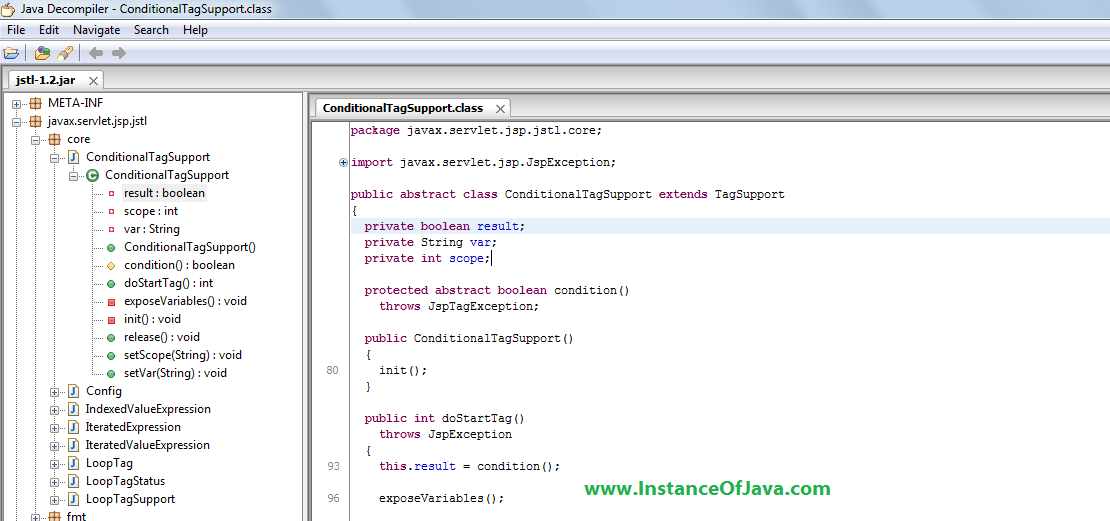
  • Open JD-GUI and File -> open -> open target jar file.
  • It will show java source code.

How to extract java files from jar in eclipse

  •  We can get java source files from jar file by using eclipse also for this we need to add a plugin.
  • Download jar file from https://sourceforge.net/projects/jadclipse/
  • And add this jar file to eclipse plugin folder.
  • And restart your eclipse.
  • Add target jar file to a project and now click on the file you will get source code.
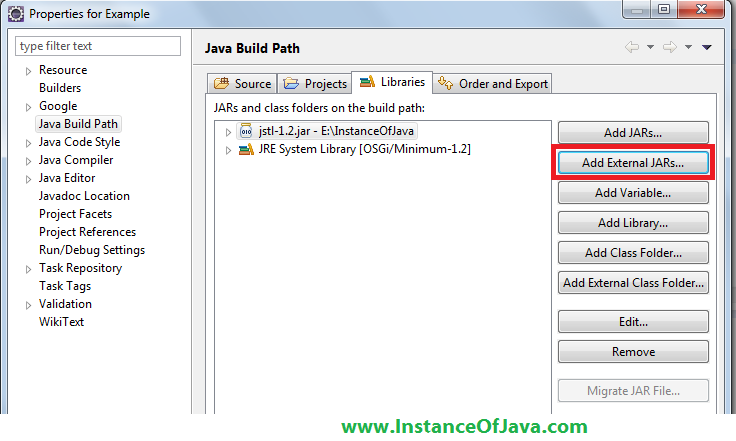
  • You can add target jar file using java project->java buildpath -> add external jars option


how to convert jar to java source in eclipse


  • Add your jar file
  • Click on the file now it will show source code

    Read: How to get java source files from jar Using Eclipse

    Topic: Using Selenium with Maven and Apache POI Previous Topic   Next Topic Topic: Save Big on Amazon Products Now Through 11/28 - Deal Alert

    Sponsored Links


    Google
      Web Artima.com   

    Copyright © 1996-2019 Artima, Inc. All Rights Reserved. - Privacy Policy - Terms of Use