The Artima Developer Community
Sponsored Link

Python Buzz Forum
Shortcuts to icons to shortcuts: what happens if you click that ?

0 replies on 1 page.

Welcome Guest
  Sign In

Go back to the topic listing  Back to Topic List Click to reply to this topic  Reply to this Topic Click to search messages in this forum  Search Forum Click for a threaded view of the topic  Threaded View   
Previous Topic   Next Topic
Flat View: This topic has 0 replies on 1 page
Dmitry Dvoinikov

Posts: 253
Nickname: targeted
Registered: Mar, 2006

Dmitry Dvoinikov is a software developer who believes that common sense is the best design guide
Shortcuts to icons to shortcuts: what happens if you click that ? Posted: Apr 19, 2006 3:42 AM
Reply to this message Reply

This post originated from an RSS feed registered with Python Buzz by Dmitry Dvoinikov.
Original Post: Shortcuts to icons to shortcuts: what happens if you click that ?
Feed Title: Things That Require Further Thinking
Feed URL: http://www.pythomnic.org:8000/atom2rss
Feed Description: The postings here are mostly random assorted thoughts on software development. As suggested by the blog title they almost always require further elaboration.
Latest Python Buzz Posts
Latest Python Buzz Posts by Dmitry Dvoinikov
Latest Posts From Things That Require Further Thinking

Advertisement
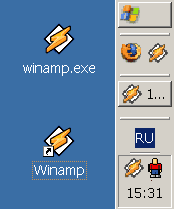
It seems that desktop icons have rather confusing nature. Let's say there is an object, e.g. executable file. Whenever it physically presents on the desktop, it appears as an icon. Whenever it's not on the desktop itself, which is a more frequent situation, but a shortcut, an object of different kin is, the shortcut appears as the same icon albeit with a little arrow in the lower left corner.

Hence problem #1. There are different icons on the desktop with and without arrows, but single-clicking on them reveals identical behaviour - the target object is invoked. What arrow is for then ? For the user to see which is "real thing" and which is a representation of a concept she can't quite grasp anyway ? Wouldn't it be more logical if non-shortcuts couldn't be placed on desktop at all ?
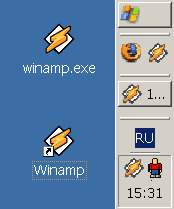


Next, surprisingly, there are other places on the desktop where icons appear - task bar, quick launch bar and system tray. Those add to the confusion, because although their icons look identical, their behaviour is even more different:

Icon on the quick launch bar represents a possibility to start an application, clicking it starts another instance. Icon on the task bar represents an already running application, clicking it brings it to front. Icon in the tray represents an application willing to talk, but what happens if you click it is not known beforehand.

Hence problem #2: wouldn't it be appropriate if all these icons were different to some degree, or behaved in more consistent fashion ?

Read: Shortcuts to icons to shortcuts: what happens if you click that ?

Topic: Python, Ruby, Rails and Readability Previous Topic   Next Topic Topic: Characters per line for technical documentations

Sponsored Links


Google
  Web Artima.com   

Copyright © 1996-2019 Artima, Inc. All Rights Reserved. - Privacy Policy - Terms of Use