|
Advertisement

|
My Custom CSS for Tumblr’s Dashboard:
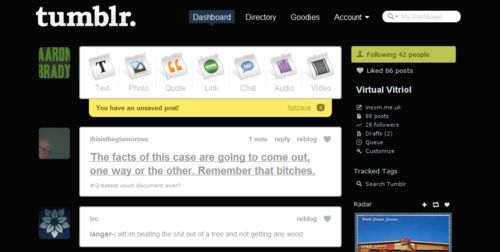
#dashboard_index { background: #050505 !important; }

#dashboard_index #content { background: #050505 !important }

#dashboard_switch_blog_arrow_current { background: none !important }

#dashboard_index #right_column .dashboard_nav_item { background: none !important }

#dashboard_index #right_column #dashboard_nav_following { background: #BBC552 !important }

#dashboard_index ol#posts img.arrow { display: none !important }

#dashboard_index div#right_column img.arrow { display: none !important }

#dashboard_index ol#posts li.post { background: #fff !important;
 color: #999 !important; border-radius: 5px !important;
 border: 2px solid #bbb !important}

#dashboard_index ol#posts li.post a { color: #999 !important }
For Chrome, just place this in:
C:\Users\You!\AppData\Local\Google\Chrome\User Data\Default\User StyleSheets\Custom.css

Read: My Custom CSS for Tumblr’s Dashboard: #dashboard_index { background: #050505 !important;...


 Previous Topic

