This post originated from an RSS feed registered with Agile Buzz
by Glenn Vanderburg.
Original Post: Textmate Footnotes
Feed Title: Glenn Vanderburg's Software Blog
Feed URL: http://www.vanderburg.org/cgi-bin/glv/blosxom/Software?flav=rss
Feed Description: Glenn Vanderburg's blog about software development
For a while now I've been using Duane Johnson's TextMate Footnotes plugin with my
Rails development. It's been the biggest boost to my productivity
since I started using Rails. I kind of assumed that most Rails
developers were using it, but apparently it's not as widely known as
it should be.
I first learned about footnotes from Geoff Grosenbach, when he
interviewed me last year for the Ruby on Rails Podcast.
Geoff mentioned that it links lines from a Rails stack trace
(displayed in the browser in development mode) so that clicking will
open the appropriate file in TextMate, positioned to the correct
line. Nice!
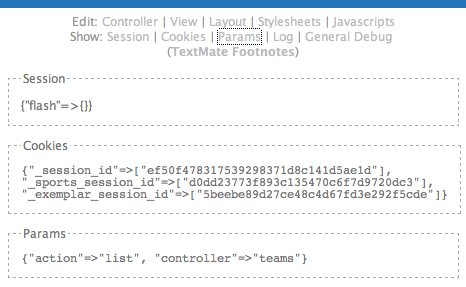
But it does more than that. When there is no error and your page
renders correctly, the plugin adds "footnotes" to it: a little div at
the bottom of the page with useful features for development and
diagnosis:
You can show the contents of the current session, current cookies, the
parameters passed to the controller, and the last 200 lines of the
Rails log. But the most useful things are the links that ask TextMate
to open the controller, view, layout, and other important files that
Rails used to build that page. (It only does all this when the app is
running in development mode, of course.)
If you're doing Rails development on OS X, install it this way:
If you aren't on OS X, I know there are ways to define URL schemes
like the "txmt" scheme TextMate defines on OS X. What are you waiting
for? Arrange for "txmt:" URLs to open your favorite editor
appropriately, install footnotes, modify it (to remove the "only on OS
X" code), and have fun!


 Previous Topic