This post originated from an RSS feed registered with Agile Buzz
by Martin Fowler.
Original Post: Bliki: FeatureToggle
Feed Title: Martin Fowler's Bliki
Feed URL: http://martinfowler.com/feed.atom
Feed Description: A cross between a blog and wiki of my partly-formed ideas on software development
One of the most common arguments in favor of
FeatureBranch is that it provides a mechanism for pending
features that take longer than a single release cycle. Imagine you are
releasing into production every two weeks, but need to build a
feature that's going to take three months to complete. How do you
use Continuous Integration to keep everyone working on the mainline
without revealing a half-implemented feature on your releases? We
run into this issue quite a lot and feature toggles are a handy tool
to deal with it.
(I've seen a lot of names for this concept tossed around: feature
bits, flags, flippers, switches and the like. There seems no generally
accepted name yet.)
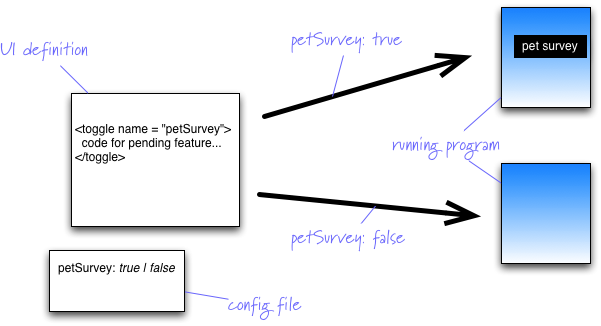
The basic idea is to have a configuration file that defines a
bunch of toggles for various features you have pending. The running
application then uses these toggles in order to decide whether or
not to show the new feature.
Most of these decisions occur in the user-interface of the
application. So if you are building a web application using jsp, you
may use a set of jsp tags to surround any user-interface parts of a
pending feature.
The implementation of the toggle tag then just passes through the
content if the toggle is set to on, and skips it otherwise. Other UI
technologies will use different details, but the basic notion of
wrapping the pending elements is the same.
This technique works best when the number of entry points to the
new feature are small. There could be many screens in the pet survey
feature, but if there's only one link on the home page that gets you
there, then that's the only element that needs to be protected with
the toggle tag. Therefore it's best to limit the entry points as
much as you can, but for some features that will be difficult and
you'll need lots of toggle tags.
Some features may be like introducing a new pricing algorithm,
where there might be no user-interface elements. Here the test of
the toggle would be in the application code, it could be as crude as
a conditional test, or something more sophisticated like a strategy
wired through dependency injection.
Most feature toggles I've heard about are set at run-time, but
I've also seen cases set at build time. The advantage of a build
time toggle is that none of the new feature's code gets compiled
into the released executable, although that's rarely much of an
advantage. Run-time toggles make it easier to set up your build
pipelines and to run tests with various configurations of
features. It also facilitates canary releasing, A/B testing, and
makes it easier to roll-back should a new feature misbehave in
production.
One danger with feature toggles is an accidental exposure, when
someone forgets to wrap the UI feature in a toggle tag. This is
awkward to test, since it's difficult to form a test that
nothing that should be hidden is visible without calling out the
individual elements - which are likely to be forgotten at the same
time.
A common question we hear about feature toggles concerns testing
- does using feature toggles mean a combinatorial
explosion of tests? I think this concern is a red herring. Using
feature toggles doesn't mean you have to do any more testing that
you need to do with feature branches, it just makes it easier to run
the alternatives. The key is to focus testing on the combination of
pending features that you expect to deploy together.
It's very important to retire the toggles once
the pending features have bedded down in production. This involves
removing the definitions on the configuration file and all the
code that uses them. Otherwise you will get a pile of toggles that
nobody can remember how to use. In one memorable example I heard of,
it required making a special recompilation of the linux kernel to
handle enough command line switches.
Feature toggles can be used for permanent variable configuration
too, such as different versions of a software for different
contexts. This is a different usage to handling pending features but
most of the implementation is the same. If you use feature toggles
for other scenarios too, it's wise to clearly separate the
pending feature case from the permanent cases.


 Previous Topic