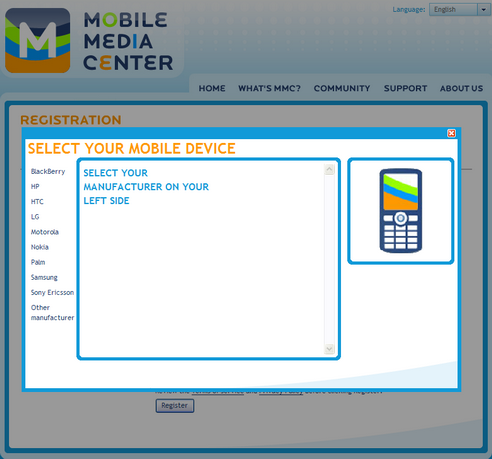
Click on the cell phone icon, there will be an in-line popup. I used GrayBox to do this. You can select the cell phone manufacturers on the left hand side, and choose your type of device in the middle frame. When the mouse hover the device image, product functionality and compatibility of the chosen device will be displayed on the right side under the device image.
All cell phone info is retrieved from database. After you selected the device, you will be linked back to the registration page and see which device you have chosen.
I have so far got some remarkable feedbacks: make the information popup only popup when it is clicked. (The i - image). Since an accidental hover may cause an unwanted popup. You could just use a tooltip saying, click for more info etc.
You may take this option to onClick event rather than OnMouseover, which will take more advantage as this icon is very nearby to text box which is sure an accident for many one. Also rather than closing the same window with onMouseOut keep the close button as people dont like mouse cursor on text or presentation where they are looking around. As far the concept is very nice and interactive.
First off, I think it works REALLY well! I can understand the criticism though because it does introduce inconsistency on your page. Sometimes you do expect the user to click, and in other parts of your interface you don't. I think the "i" would work just as well as clickable and would stop the "surprise" element just from scrolling the mouse over it. But it does all have a great look and feel.
Well, the original idea behind the auto-popup for the info button is to give the site viewers a simple and ease expression; they don't have to make the unnecessary click if they don't want to. It's also very true that viewers will get annoyed by accidentally hovering the INFO icon over and over.
modified the auto popup information button according to the feedbacks that I got. any better suggestions?


 Previous Topic