This post originated from an RSS feed registered with .NET Buzz
by Scott Hanselman.
Original Post: HOW TO: Debug into a .NET XmlSerializer Generated Assembly
Feed Title: Scott Hanselman's ComputerZen.com
Feed URL: http://radio-weblogs.com/0106747/rss.xml
Feed Description: Scott Hanselman's ComputerZen.com is a .NET/WebServices/XML Weblog. I offer details of obscurities (internals of ASP.NET, WebServices, XML, etc) and best practices from real world scenarios.
The XmlSerializer is a much maligned piece of software, but I have to tell you, it's
the bomb. We use it a lot here at Corillian. Recently we had to debug a
pretty funky problem where an enum was writing out to an XML file, but wasn't reading
back in. We suspected it was a namespace thing, but the XmlSerializer is such a black
box, a lot of people really have trouble dealing with it. It inspires a trial-and-error
style, while I prefer to debug and step around myself.
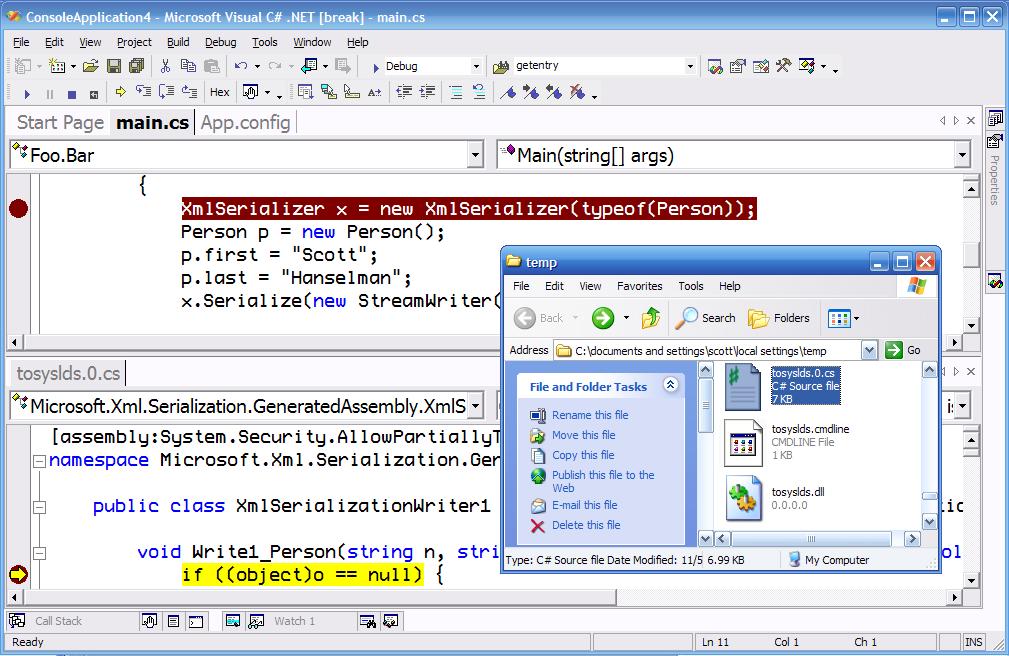
Here's how to debug into a generated assembly from the XmlSerializer.
1. Given an application like:
using System.Xml; using System.Xml.Serialization; using System.Text; using System.IO;
namespace Foo
{ publicclass Bar
{ publicstaticvoid Main(string[]
args)
{
XmlSerializer
x =new XmlSerializer(typeof(Person));
Person p =new Person();
p.first ="Scott";
p.last ="Hanselman";
x.Serialize(new StreamWriter("foo.xml"),p);
}
}
publicclass Person
{ publicstring first; publicstring last;
}
}
3. Compile and run and step up to the line where the XmlSerializer is constructed,
and step over that line.
4. Go to c:\documents and settings\[username]\local settings\temp and look at the
most recently created *.cs file. Open that file, it will have a name like asdasdfs.0.cs.
Note that there are *.pdbs in that folder as well.
5. Set a breakpoint anywhere in that generated file.


 Previous Topic