
Introduction
For years, the relative merits of a stateful vs. stateless architecture have been debated. For a long time, we have been told that, for example, stateful session beans in EJB are evil, and that in order to scale-out a Web application you can not keep state in the web tier, but have to persist state in some sort of Service of Record (database, filesystem, etc.).
With the recent advent of Web 2.0, we are faced with new possibilities and requirements. Today, we can write web-based applications with the feature set of a rich-client that, at the same time, is so highly responsive that it gives the impression of being run locally. That brings back the importance of statefulness. We now have a new generation of Web frameworks such as RIFE, SEAM, Spring Web Flow, GWT, and DWR, that all focus on managing conversational state that can be bound to a variety of different scopes. In short, stateful web applications are back.
Still, the question remains: how can we scale-out, and ensure the high availability of a stateful application while also preserving the application's simplicity and semantics?
In this article, we will answer that question. We start out by explaining what RIFE's Web continuations are all about, the concept behind them, and how you can use them to implement clean, stateful conversational Web applications with minimal effort. Then we will discuss the challenges in scaling out a Web 2.0 stateful application, introduce you to Terracotta's JVM-level clustering technology, and show how you can use Terracotta in practice to scale out RIFE applications.
What are Continuations?
A continuation encapsulates the state and program location of an execution thread so that the execution state associated with the thread may be paused and then resumed at some arbitrary time later, and in any thread.
The easiest way to explain the concept is to draw an analogy with saving and loading a computer game. Most computer games let you store your progress while playing a game. Your location and possessions in the game will be saved. You can load this saved game as many times as you want and even create other ones based on that state later on. If you notice that you took a wrong turn, you can go back and start playing again from an earlier saved game.
You can think of continuations as saved games: anywhere in the middle of executing code, you can pause and resume your code afterwards.
Continuations that capture the entire program execution aren't very useful in practice, since they require that you shut down the running application before you can resume a previous continuation. In this multi-user world with lots of concurrency, this is clearly not acceptable. Undoubtedly, this is one of the reasons why continuations remained mostly an academic topic for the past thirty years. It was only when partial continuations started being used in web application development that the true power of the concept emerged for developers.
Partial continuations work by setting up a well-known barrier where the capture of program execution starts. Anything that executes before this barrier works independently of the continuation and always continues running. That independent context can, for example, be a servlet container. The partial continuation contains only the state built up from the barrier onwards - for example, a web framework action or component.
In practice, a partial continuation corresponds to what one particular user is doing in the application. By capturing that action in a partial continuation, the execution for that user can be paused when additional input is required. When the user submits the data, the execution can be resumed. The chain of continuations created this way builds up a one-to-one conversation between the application and the user, in effect providing the simplicity of single-user application development inside a multi-user execution environment.
Introduction to RIFE Continuations
The barrier for partial continuations in RIFE is set at the start of the execution of RIFE's reusable components, called elements. These combine both the benefits of actions and components by abstracting the public interface around the access path (URL) and data provision (query string and form parameters). This means that when an element is a single page, the data provision comes straight from the HTTP layer. However, when an element is nested inside another element, the data can be sent by any of the elements that are higher up on the hierarchy. This allows you to start out writing pages in an action-based approach and as you detect that you have reusable functionality, elements can be embedded inside others, turning them into components without having to code to another API.
When the element classes are loaded, they are analyzed, and when continuation instructions are detected in the code, the byte-code is modified to provide the continuation functionality. The most basic instruction is the pause() method call. This essentially corresponds to a "save game" command, to continue our earlier analogy.
The continuation created when this instruction is reached, will receive a unique ID and will be stored into a continuation manager. To make it possible for the user to interact with the application when his conversation has been paused, the user interface has to be setup beforehand. In a web application this means that all the HTML required to build the page has to be sent through the response to the browser. By using specialized tags with forms and links, RIFE automatically inserts the required parameters to remember the ID of the continuation.
When a user submits a form or clicks on a link that contains the ID of the continuation, this ID will be sent to the framework through a HTTP request. The framework then interacts with the continuation manager to retrieve the corresponding continuation. If a corresponding continuation is found, the entire continuation, including its state, is cloned, and that clone resumes the program execution with its own ID. The previous version of the continuation still exists: when a user presses the back button in his browser or uses the links or forms to return him to a previous state in the web conversation, the previous continuation will be resumed. This gracefully solves the typical back-button or multi-window problems of stateful web applications.
Let's now look at a trivial example that shows what the code looks like in practice. We will create a simple counter that remembers how many times the user has pressed a button. If the button has been pressed ten times, we'll print out a message saying so. This is the Counter.java source file that does what we just explained:
import com.uwyn.rife.engine.Element;
import com.uwyn.rife.engine.annotations.*;
import com.uwyn.rife.template.Template;

@Elem(submissions = {@Submission(name = "count")})
public class Counter extends Element {
  public void processElement() {
    int counter = 0;
    Template t = getHtmlTemplate("counter");

    while (counter < 10) {
      t.setValue("counter", counter);
      print(t);
      pause();
      counter++;
    }

    t.setBlock("content", "done");
    print(t);
  }
}
Before actually explaining what goes on, we will first provide the source code for counter.html:
<html>
<body>
  <r:v name="content"></r:v>

  <r:bv name="content">
    <p>Current count: <r:v name="counter"/></p>
    <form action="${v SUBMISSION:FORM:count/}" method="post">
      <r:v name="SUBMISSION:PARAMS:count"/>
      <input type="submit" value=" + " />
    </form>
  </r:bv>

  <r:b name="done">You pressed the button ten times.</r:b>
<body>
<html>
We won't go into the details of RIFE's template engine, and will simply highlight some of the important aspects so that this example makes more sense to you:
- The most important difference between RIFE and other template engines is that RIFE templates are "Plain Old Content", solely comprised of value placeholders that can be filled in, and blocks of content that can be used to build the final result. This, RIFE templates contain only pure content, in a way quite similar to PowerPoint templates. Instead of using the PowerPoint application to manipulate the template's content, you use Java code to that end.
- Blocks are delimited by
btags, like<r:b name="done">above. Such blocks will be automatically stripped away from the final content unless you use abvtag, as in<r:bv name="content">. Abvtag automatically puts a block's text in the value placeholder with the same name, as in<r:v name="content">above. - RIFE supports a collection of standard value tag names. The web engine automatically fills in values for such tags. Examples of such tags are
SUBMISSION:PARAMS:count, which will be replaced by the parameters required to preserve state during a particular data submission, andSUBMISSION:FORM:count, which will be replaced by the URL needed for the form to work. - It's worth noting that RIFE supports several syntaxes for the template tags. Such tag syntaxes can be useful to preserve the validity of the HTML file when, for example, templating the attributes of XML tags. An alternative syntax used above is
${v SUBMISSION:FORM:count/}.
Let us now return to the Java implementation of the RIFE element. We're creating a counter that prints out a message when its value reached the number 10. The user is able to press a button that increases the counter by one. This has to be hooked up to the RIFE element through a form submission.
The class annotations declare that there is one piece of data submitted: count. We've shown how count is used in the template. Since this the only submission in the element, we don't need to detect which submission has been sent. The simple fact that one arrived at the element, will make RIFE use the default one.
In RIFE, submissions are always handled by the element they belong to. In the code above, the submission will simply cause the active continuation to be resumed. This happens since the SUBMISSION:PARAMS:count template tag automatically generates a hidden form parameter with the continuation ID. When the request with that ID is handled by RIFE, the corresponding continuation is looked up and resumed.
The above example uses a regular Java while loop to create the 'flow' of the application. With the pause() method call, the execution stops on the server side; meanwhile the user can interact through the browser with the HTML page that was generated before the pause(). When the execution is resumed on the server, the while loop continues, stopping only when the local counter variable reaches the value 10.
The advantage of this approach is that you can use regular Java statements to write the flow of your web application. You don't have to externalize application flow through a dedicated language. An additional benefit is that you can use all the Java tools to write and debug the entirety of your application. You can set breakpoints and watches to analyze the behavior of complex flows and step through to easily identify bugs or unexpected behavior. All the local state is also automatically captured and properly scoped and restored for one particular user.
To make state-handling easy, we don't impose serialization requirements on objects: objects are simply kept in the heap. This can present a problem when your application needs to be fault tolerant and scalable over multiple nodes. As we describe in the next three sections, the integration of Terracotta and RIFE brings enterprise scalability and high availability to native Java continuations, and to RIFE.
The Need for Scale-Out and High Availability
Predictable capacity and high availability are operational characteristics that an application in production must exhibit in order to support business. This basically means that an application has to remain operational for as long as the Service-Level Agreements require it to. The problem is that developing applications that operate in this predictable manner is just as hard at the 99.9% uptime level as it is at 99.9999%.
One common approach to address scalability has been by "scale-up": adding more power in terms of CPU and memory to one single machine. Today most data centers are running cheap commodity hardware and this fact, paired with increased demand for high availability and failover, instead implies an architecture that allows you to "scale-out:" add more power by adding more machines. And that implies the use of some sort of clustering technology.
Clustering has been a hard problem to solve. In the context of Web and enterprise applications, such as like RIFE, this in particular means ensuring high-availability and fail-over of the user state in a performant and reliable fashion. In case of a node failure - due to application server, JVM or hardware crash - enabling the use of "sticky session" in the load balancer won't help much. (Sticky sessions means that the load balancer always redirects requests from a particular user session to the same node.) Instead, an efficient way of migrating user state from one node to another node in a seamless fashion is needed.
Let us now take a look at a solution that solves these problems in an elegant and non-intrusive way.
Introducing Terracotta
Terracotta is appliance-like infrastructure software that stores and shares object-oriented data between application servers. Terracotta is open-source and can be freely downloaded from the project website, http://www.terracotta.org
Terracotta allows multiple JVMs to communicate with each other as if they were the same JVM by transparently extending the memory and locking semantics of Java - as specified in the Java Language Specification - to encompass the heap and threads of multiple JVMs. Java's natural semantics of, for example, pass-by-reference, thread coordination, and garbage collection are maintained correctly in a distributed environment. It also functions as a virtual heap in which objects can be paged in and out of on an on-demand basis, meaning that the size of the clustered data is not constrained by the physical heap size (RAM).
Terracotta provides true POJO clustering and distribution transparency. It does not require any classes to implement Serializable or any other interface. Rather, the heap sharing and thread coordination is "plugged directly into the JMM (Java Memory Model)." As a result, Terracotta knows exactly what data changed in the application, and replicates only the object field data that has changed (object deltas), only to the nodes that need it, and only when those nodes need it.
Terracotta effectively uses fine-grained field-level replication instead of Java Serialization's course-grained, full object graph replication. This is all enabled by transparent instrumentation of the target application at class load time, based on a declarative XML configuration. True POJO clustering ensures that minimal to zero changes to existing code are required, and that even those changes are made at that source-code level.
Terracotta's Architecture
Terracotta uses a client-server architecture: there is a central Terracotta server to which any number of instances of your application may connect. The client-server interactions are injected transparently at runtime into your application.
The Terracotta server performs two basic functions:
- It manages the storage of object data and,
- Serves as a traffic cop between threads on all of the client JVMs to coordinate object changes and thread communication.
In its capacity as the object store, the Terracotta server stores only object data and IDs. This capacity is itself clusterable, either through the use of a shared filesystem or a network-based failover mechanism. In its capacity as a traffic cop, the Terracotta server keeps track of things like which thread in which client JVM is holding which lock, which nodes are referencing which part of the shared object state, which objects have not been used for a specific time period and can, therefore, be paged out, etc. Keeping all this knowledge in a single place is very valuable and allows for some very interesting optimizations. It is possible to scale-out the Terracotta server and at the same time keep the concerns of clustered heap management and thread coordination separate from the business concerns of your application. Terracotta also avoids the infamous "split-brain" problem of many other distributed computing architectures where there is no clear owner of object data and is, therefore, easy to accidentally wipe out an object entirely, or for multiple nodes to think they are the owner of an object's data.
Since the Terracotta server cluster keeps track of things - such as who is referencing who on each node, who is holding which lock, who are contending for a specific lock, etc - it can do some very interesting runtime optimizations. For example, it can work in a lazy manner and only send the changes to the node(s) that are referencing objects that are "dirty" and need those changes. That will make good use of Locality of Reference, and will be even more effective if the front-end HTTP load-balancer is configured to use sticky sessions, since some data will never have to leave its session (read node) and, therefore, will never have to be replicated to another node. Other optimizations include lock optimizations, such as "greedy locking," whereby the ownership of a particular lock can be transferred to a local JVM until that lock is requested by another node in the cluster; this runtime feature can give significant performance advantages by awarding "greedy locks" locally, avoiding a network-bound operation.
RIFE and Terracotta: a Match Made In Heaven
If we look at characteristics and the core values of RIFE and Terracotta, we can see many similarities:
- No serialization
- True POJO-based development
- Non-intrusiveness enabled through extensive run-time code generation
- Seamless integration through load time byte code instrumentation
Building the integration on this shared value proposition ensures that the use of Terracotta clustering will be almost completely transparent. RIFE users can enjoy the simplicity and power of continuation-based Web development, and still feel confident that they will meet their SLAs in terms of scalability and high-availability.
Deploying the RIFE Sample
The rest of this article takes you through a simple RIFE application, and shows each step in clustering that application with Terracotta.
The easiest way to deploy the small sample application is to start from the RIFE/Jumpstart distribution that can be obtained from the project site (http://rifers.org/downloads). It contains a project structure recommendation that allows you to get started quickly, everything is setup for interactive development and painless deployment. The only requirement is to have a working JDK 1.5 installation.
After un-archiving the RIFE/Jumpstart zip file, we just need to drop in our two example files: (note: it's best to not have a space in the path in which you un-archive the jumpstart, since this confuses Ant)
Counter.javagoes into thesrcdirectorycounter.htmlgoes into theresources/templatesdirectory
Finally, we edit the file resources/sites/pub.xml to tell RIFE about the class name of this new element by adding the following line inside the <site> tag:
<element implementation="Counter"/>
If everything goes well, you should be able to try this example out by typing the following lines in a console window (you need to have Ant installed for this, http://ant.apache.org):
$ cd rife-jumpstart-1.6.1
$ ant run
The example will be available at the URL http://localhost:8080/counter, which you can visit in your browser of choice. To stop the example, simply press the ctrl+c key inside the console window.
To create a deployable war file, use the following Ant target:
$ ant war
You will find the created war file in the build/dist directory, it can be used with any standard servlet container.
Cluster the Application Using Terracotta
We have seen how to implement a conversational web application using RIFE and the concept of Web continuations. Let's now take a look at how we can enable high-availability and failover for our sample application by clustering it with Terracotta.
Sounds hard? Well, it actually turns out to be quite simple.
Declarative Configuration
The RIFE integration is all wrapped inside a Terracotta Configuration Module. That means that the only thing you need to do in order to cluster RIFE is to write a Terracotta configuration file that looks something like this:
<tc:tc-config xmlns:tc="http://www.terracotta.org/config">
  <!-- ...system and server stuff... -->
  <clients>
    <modules>
      <module name="clustered-rife-1.6.0" version="1.0.0"/>
    </modules>
  <!-- ... other config ... -->
 </client>
</tc:tc-config>
Put this snippet in an XML file named tc-config.xml (actually, you can name it anything you like, but this is the naming convention), and then feed it to the Terracotta runtime as explained in the next section.
Enable Terracotta
The only thing left that at this point is to enable the Terracotta runtime for our application. This is done by modifying the Tomcat application server's - or one of the other supported application servers, such as WebLogic, JBoss and Geronimo - startup script. Add the following environment variables at the top of the script:
set TC_INSTALL_DIR="<path to terracotta installation>" ("C:\Program Files\Terracotta\terracotta-<version>" by default)
set TC_CONFIG_PATH="localhost:9510"
call "%TC_INSTALL_DIR%\bin\dso-env.bat" -q
set JAVA_OPTS=%TC_JAVA_OPTS% %JAVA_OPTS%
In which:
TC_INSTALL_DIRenvironment variable is set to the Terracotta installation root directory.TC_CONFIG_PATHis IP adress of the Terracotta server that holds thetc-config.xml
Two useful tools that you should know about is dso-env script, which helps you setup your environment to run a Terracotta client application, using existing environment variables and setting TC_JAVA_OPTS to a value you can pass to Java. dso-env expects JAVA_HOME, TC_INSTALL_DIR, and TC_CONFIG_PATH to be set prior to invocation. It is meant to be executed via your custom startup scripts, and is also used by each Terracotta demo script:
call "%TC_INSTALL_DIR%\bin\dso-env.bat" -q
Second one is make-boot-jar . It allows you to rebuild the Terracotta boot jar for a JVM of your choice (if you switch JVM then you always have to rebuild the boot jar).
%TC_INSTALL_DIR%\bin\make-boot-jar.bat -o %TC_INSTALL_DIR%\lib\dso-boot\
A Quick Way to Run it All
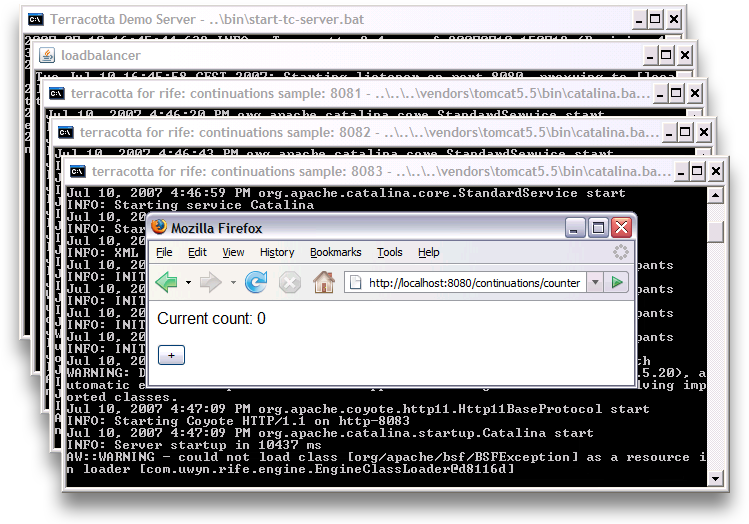
If you want to easily play with what you learned in this article, you can use the Terracotta 2.4 distribution which contains useful examples that are set up for running on your own workstation. The architecture is basically a Terracotta server and a simple round-robin load balancer that distributes the load to three Tomcat servers that run on their own dedicated ports.
The Terracotta 2.4 distribution already contains a RIFE sample setup in the %TC_INSTALL_DIR%\samples\rife\continuations directory. You can replace the target\continuations.war file with the one you generated through RIFE/Jumpstart. Just make sure you preserve the continuations.war name , since the Tomcat configurations expect that file name.
You now only need to adapt the tc-config.xml file in the sample directory to include the element class you wrote:
<tc:tc-config xmlns:tc="http://www.terracotta.org/config">
  <!-- ...system, server and clients stuff... -->
 <application>
  <dso>
   <instrumented-classes>
    <include>
     <class-expression>Counter</class-expression>
    </include>
   </instrumented-classes>
  </dso>
 </application>
</tc:tc-config>
Starting the demo is simply a matter of double-clicking on each one of these:
    %TC_INSTALL_DIR%\samples\start-demo-server.bat
    %TC_INSTALL_DIR%\samples\rife\continuations\start-load-balancer.bat
    %TC_INSTALL_DIR%\samples\rife\continuations\start-tomcat1.bat
    %TC_INSTALL_DIR%\samples\rife\continuations\start-tomcat2.bat
    %TC_INSTALL_DIR%\samples\rife\continuations\start-tomcat3.bat
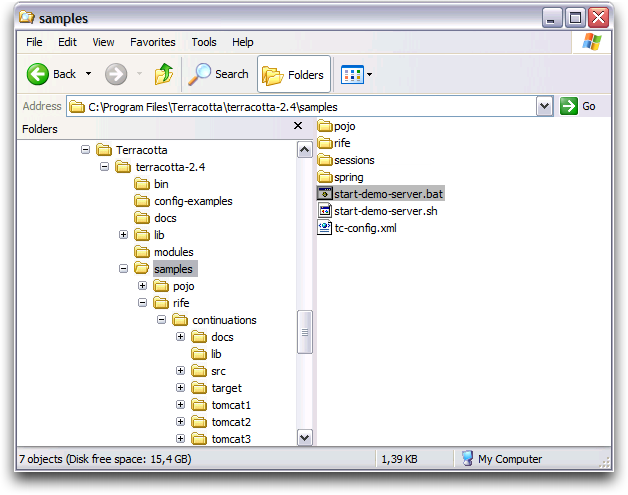
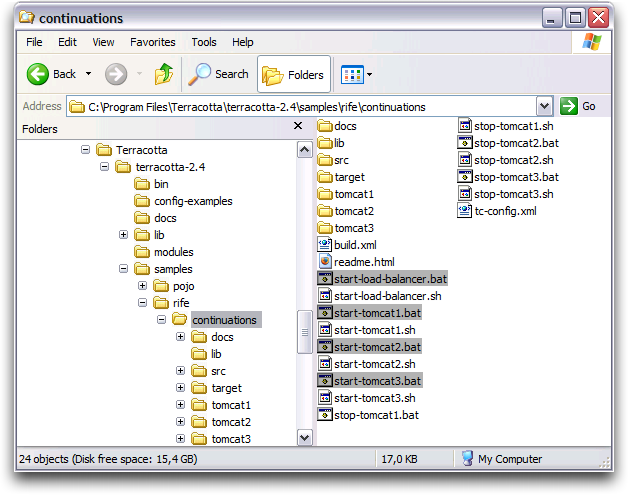
Now you can visit the application at the URL http://localhost:8080/continuations/counter (the war file is deployed at the continuations path):
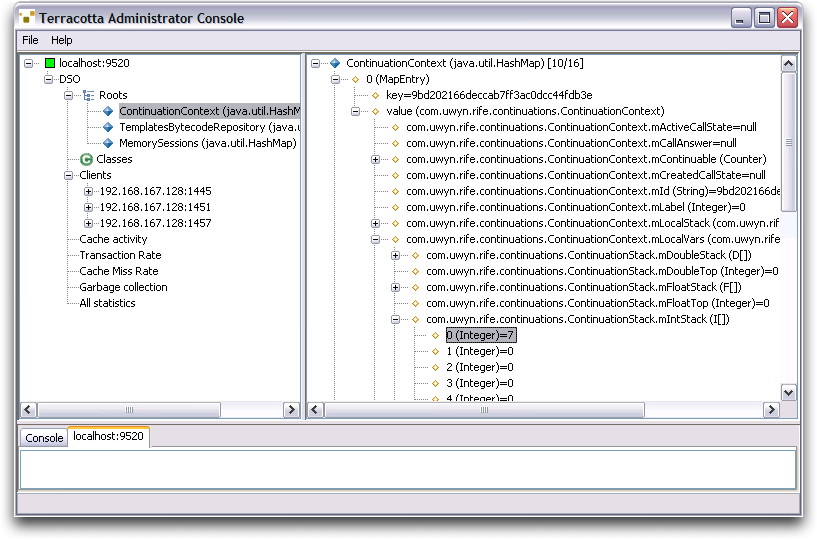
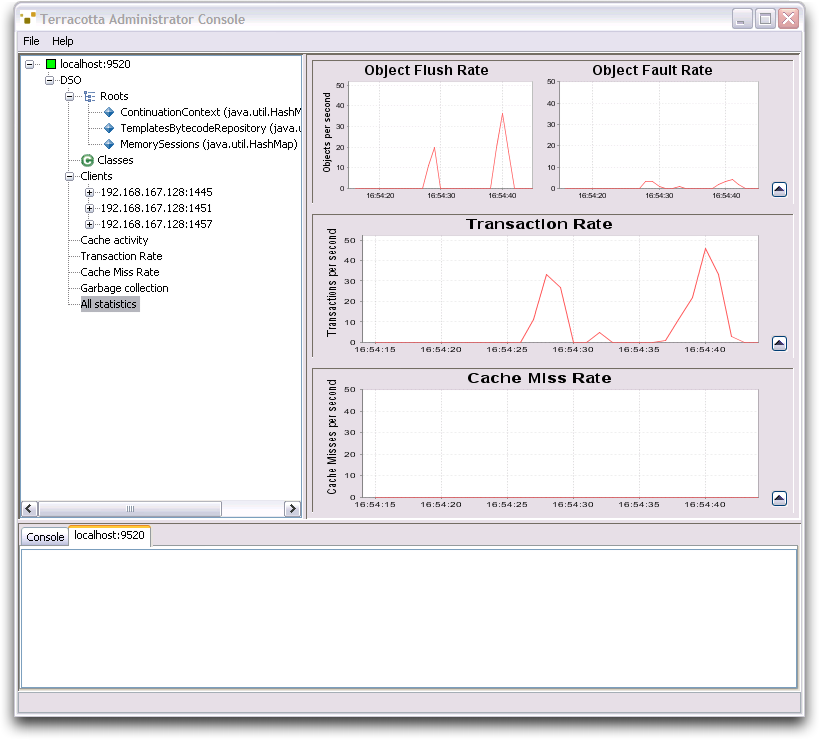
When you click the application a number of times, it's worthwhile to launch the Terracotta administration console by double-clicking on %TC_INSTALL_DIR%\bin\admin.bat and connecting to the server with the default parameters. You can for example browse through the active continuations and inspect their state, look at the server statistics and much more:
Wrap-Up
That's all there's to it. We hope that you have gained an understanding of what RIFE and Terracotta can do for you and how you can use them seamlessly together to create a solid application stack that allows you to scale. With this combination, you can scale out and ensure high-availability for your applications without sacrificing simplicity and productivity. That means working with true POJOs with minimal
Have an Opinion about Distributed Continuations, RIFE, or Terracotta?
Discuss this article in the Articles Forum topic, Distributed Web Continuations with RIFE and Terracotta.
Resources
Terracotta - Scalable High-Availability for Java
http://terracotta.org
RIFE - Full-stack component framework for quickly building maintainable applications
http://rifers.org
The Java Memory Model
http://java.sun.com/docs/books/jls/third_edition/html/memory.html
Overview of the Terracotta Architecture
http://www.terracotta.org/confluence/display/docs1/Terracotta+Scalability#TerracottaScalability-THEARCHITECTURE
Description of "locality of reference" from Wikipedia
http://en.wikipedia.org/wiki/Locality_of_reference
Fine-grained Updates in Terracotta
http://www.terracotta.org/confluence/display/docs1/Terracotta+Scalability#TerracottaScalability-FINEGRAINEDUPDATES
Talk back!
Have an opinion? Readers have already posted 2 comments about this article. Why not add yours?
About the authors
-
Geert Bevin is a senior developer and advocate at Terracotta Inc.. He is the CEO and founder of Uwyn bvba/sprl, and created the RIFE project. He started or contributed to open-source projects like Bla-bla List, OpenLaszlo, Drone, JavaPaste and Gentoo Linux. Geert is also an official Sun Java Champion.

Artima provides consulting and training services to help you make the most of Scala, reactive
and functional programming, enterprise systems, big data, and testing.
2070 N Broadway Unit 305
Walnut Creek CA 94597
USA
(925) 918-1769 (Phone)