
End-user applications often require some customization and enhancement for effective deployment. A modular architecture is one where the user can create modules that conform to well-described APIs and plug them into the application to extend the functionality. It’s a way of leaving the door open for advanced users or consultants who want to extend the functionality without modifying the source.
One example of a popular modular application is the Apache web server[0]. Apache defines a set of processing steps in building a web page and allows programmers to write modules that may hook into one or more of these steps. Another example is the JavaDoc[1] comment processing system for Java. JavaDoc has a flexible Doclet back end. The basic Doclet produces HTML help files. But the interface has also been used in wide variety of applications including the popular XDoclet code generator.
Perhaps the best example of a modular API is Eclipse[2]. Eclipse is really just a modular framework that handles sets of interlocking modules that build IDEs, thick client applications, even portable device applications. If you want a reference work for how modular APIs are done, check out Eclipse.
I find that there are design smells that suggest when a modular architecture would be a good solution. Some of these are:
- Builders
- Any time the Builder design pattern is followed the builders could be implemented using modular architecture. The builder pattern has the code that builds some output using a builder object to do the actual construction work. It’s often used for building portable UIs where one builder can build text while another builds HTML, and so on.
- Adapters
- When systems interface with each other there is always a slot for a modular architecture. If modules are used then the adapter interface can be used to connect to one of many services as opposed to one particular service.
- Math libraries and functions
- Graphing and spreadsheet applications can extend their function libraries using a modular architecture.
- Processing strategies
- As with Apache, any time you have a complicated transaction it’s possible to use a modular architecture. This allows the user to define exactly how a transaction is processed. This can work for business logic at almost any level; for example, the validation of a customer record, or the sending out of notifications.
- Graphic objects and filters
- Applications like Photoshop and The GIMP extend their graphics system using modular APIs so people can create custom commands, graphic objects, and effects.
For the article I’m going to create a simple modular system for reading subscription sources, such as RSS, RDF, and Atom. One can then extend the system to handle new subscription formats in the field without having to change the main code.
Specin’ Out the API
Instead of starting with a complete example I’ll work through building a modular interface just like I did in practice. That starts with some simple test code and a small set of parsers. In fact, I don’t even break out the modules to start with. I start with everything in just two files just to make sure the API is right, then move to a modular architecture so that I’m not trying to solve multiple problems simultaneously.
Here is the test code. It creates a new RSS parser and then gets the types of feeds that it will handle. It also iterates through all of the available parsers and prints them out.
require "parse_mods.rb"

# Create new factory and instantiate a new parser
a = RSSParser.new
print "Building an RSS parser:\n"
p a.get_type()
print "\n"

# Iterate through all of the available types
print "Available parser types:\n"
Parser.parsers.each { |parser_class|
  p parser_class
}
Here is what it looks like when I run it:
% ruby test.rb
Building an RSS parser:
"RSS"

Available parser types:
RSSParser
RDFParser
%
And here is the code for the parsers.
class Parser
  @@parsers = []

  def get_type()
    return ""
  end
  def parse( xml )
    return nil
  end

  def Parser.add_parser( p )
    @@parsers.push( p )
  end
  def Parser.parsers()
    return @@parsers
  end
end

class RSSParser < Parser
  def get_type()
    return "RSS"
  end
  def parse( xml )
    # Parse the XML up and return some known format
    return nil
  end
end

Parser.add_parser( RSSParser )

class RDFParser < Parser
  def get_type()
    return "RDF"
  end
  def parse( xml )
    # Parse the XML up and return some known format
    return nil
  end
end

Parser.add_parser( RDFParser )
There are two parsers that descend from the base Parser class. One parser handles RSS and the other handles RDF. Actually, they don’t handle anything at the moment, but I’ll fix that by the end of the article.
The base Parser class acts as both an interface for all of the descendant parsers, as well as a repository for the list of all parsers. In addition each type of parsers adds itself to the list of all parsers.
In UML the system looks like Figure 1 so far.
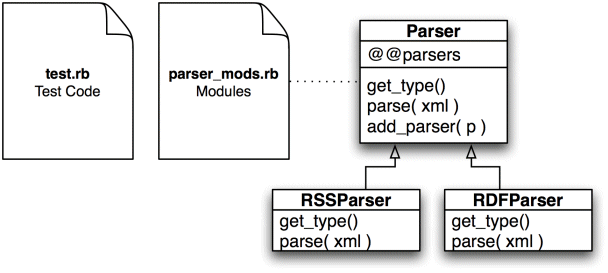
The test code is contained in test.rb, and the parsers in parser_mods.rb. The two parsers derive from the base class Parser.
Factoring to Factories
The next step is to refactor the code to use the Factory pattern. In that pattern each parser will have two classes. The first is the parser itself, and the second is a factory that creates parsers of that type. Why factories? Because the code should be able to get the types of feeds the parser can handle without creating a parser.
The newly refactored code looks like this:
class ParserFactory
  def get_type()
    return ""
  end
  def create()
    return nil
  end

  @@factories = []

  def ParserFactory.add_factory( p )
    @@factories.push( p )
  end

  def ParserFactory.factories()
    return @@factories
  end

  def ParserFactory.parser_for( type )
    @@factories.each { |pfc|
      pf = pfc.new()
      if pf.get_type() == type
        return pf.create()
      end
    }
    return nil
  end
end

class Parser
  def parse( xml )
    return nil
  end
end

class RSSParser < Parser
  def parse( xml )
    # Parse the XML up and return some known format
    return nil
  end
end

class RSSFactory < ParserFactory
  def get_type()
    return "RSS"
  end
  def create()
    return RSSParser.new()
  end
end

ParserFactory.add_factory( RSSFactory )

class RDFParser < Parser
  def parse( xml )
    # Parse the XML up and return some known format
    return nil
  end
end

class RDFFactory < ParserFactory
  def get_type()
    return "RDF"
  end
  def create()
    return RDFParser.new()
  end
end

ParserFactory.add_factory( RDFFactory )
Now the factories register themselves with a factory base class. This class has the helpful parser_for method which returns a parser for a given input type.
The nice thing about this refactoring is that the Parser classes do just what they should, take XML and returns a list of articles.
The test code needs to be changed around a little bit to handle this new factory system:
require "parse_mods.rb"

# Create new factory and instantiate a new parser
af = RSSFactory.new
a = af.create()
print "Building an RSS parser:\n"
p a
print "\n"

# Iterate through all of the available types
print "Available parser types:\n"
ParserFactory.factories.each { |factory_class|
  a = factory_class.new()
  p a.get_type()
}
print "\n"

# Check the new parser_for method
print "Request a parser for RDF:\n"
pf = ParserFactory.parser_for( "RDF" );
p pf
And I run it like this:
% ruby test.rb
Building an RSS parser:
#<RSSParser:0x27b53d8>

Available parser types:
"RSS"
"RDF"

Request a parser for RDF:
#<RDFParser:0x27b4da8>
%
The first part of the code creates the RSS parser directly. The second section walks through all of the available parsers. And the third section selects a parser by name.
The UML for the refactored code looks like Figure 2.
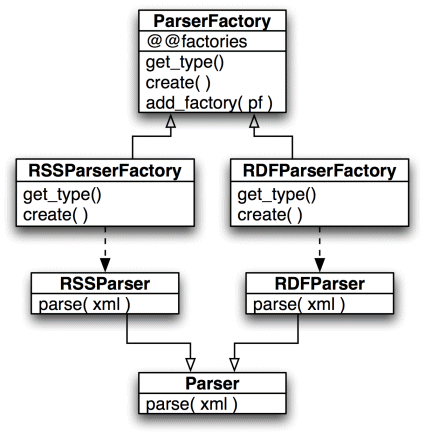
The list of what parsers are available is now in ParserFactory. And each parser has it’s corresponding parser factory which creates it.
Making It Modular
All right, enough playing around with what the API should look like. It’s time to make it modular by creating a mods directory and taking parts of the original large file and chopping it up into a module for each format type.
Shown below is the source for the RDF module. It contains both the parser and the parser factory.
class RDFParser < Parser
  def parse( xml )
    # Parse the XML up and return some known format
    return nil
  end
end

class RDFFactory < ParserFactory
  def get_type()
    return "RDF"
  end
  def create()
    return RDFParser.new()
  end
end

ParserFactory.add_factory( RDFFactory )
The second file is the RSS parser.
class RSSParser < Parser
  def parse( xml )
    # Parse the XML up and return some known format
    return nil
  end
end

class RSSFactory < ParserFactory
  def get_type()
    return "RSS"
  end
  def create()
    return RSSParser.new()
  end
end

ParserFactory.add_factory( RSSFactory )
Then comes the updated modules library.
class ParserFactory
  def get_type()
    return ""
  end
  def create()
    return nil
  end

  @@factories = []

  def ParserFactory.add_factory( p )
    @@factories.push( p )
  end

  def ParserFactory.factories()
    return @@factories
  end

  def ParserFactory.parser_for( type )
    @@factories.each { |pfc|
      pf = pfc.new()
      if pf.get_type() == type
        return pf.create()
      end
    }
    return nil
  end

  def ParserFactory.load( dirname )
    Dir.open( dirname ).each { |fn|
      next unless ( fn =~ /[.]rb$/ )
      require "#{dirname}/#{fn}"
    }
  end
end

class Parser
  def parse( xml )
    return nil
  end
end
The important part comes with the load class method which loads the modules from a specified directory. The loading is done with the require function that reads the code in from the module.
Figure 3 shows the relationship between the module files and the classes they contain and the classes in the host application.
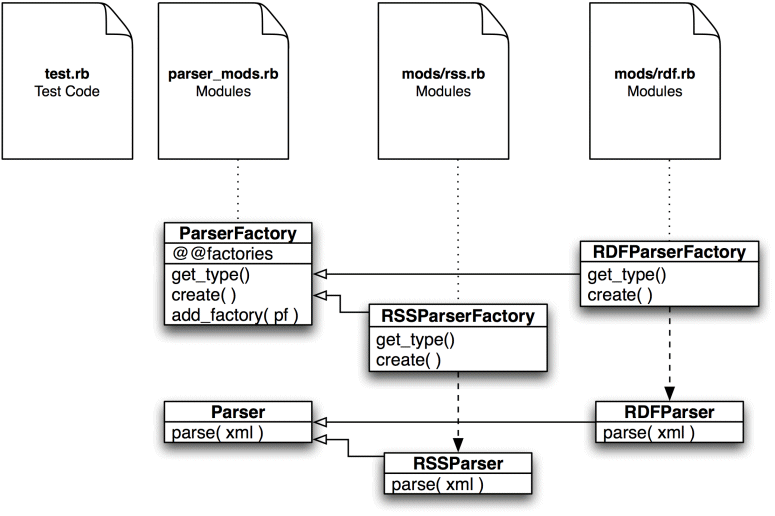
One thing that does trouble me is this statement to register each factory:
ParserFactory.add_factory( RDFFactory )
In Ruby we can do better because classes actually get notified when they are subclassed. No kidding. The code that follows replaces the add_factory method with a method called inherited which is a Ruby standard method.
class ParserFactory
  ...
  def ParserFactory.inherited( pf )
    @@factories.push( pf )
  end
  ...
end
The inherited method is called when one class inherits from another. The super class’s inherited function is called with the object for the subclass.
With that change the calls to add_factory can be removed.
Adding More Biographic Detail
I also have a problem with the get_type method on the factory. I think that in the long run I’m going to want more biographical information on each module. For example, the author, the module version, the description, inputs, outputs, etc.
Perhaps the easiest way to add biographical information to each module would be with a YAML encoded constant string attached to each factory class. This is shown on the RDF module below:
class RDFParser < Parser
  def parse( xml )
    # Parse the XML up and return some known format
    return nil
  end
end

class RDFFactory < ParserFactory
INFO=<<INFO
type: RDF
author: Jack
description: An RDF parser
INFO

  def create()
    return RDFParser.new()
  end
end
I then add some code to the Parser base class that reads the YAML and implements not only get_type but also get_author, get_description and anything else I want:
require 'yaml'

class ParserFactory
  ...
  def get_info()
    return YAML.load( self.class::INFO )
  end

  def get_type()
    return get_info()['type']
  end

  def get_author()
    return get_info()['author']
  end

  def get_description()
    return get_info()['description']
  end
  ...
end
The code to get the constant from the subclass is pretty simple. The get_info method gets the class of the current object and gets the INFO method.
Getting the Job Done
Having gone through all of the effort to build a modular architecture that reads various feed formats, it only seems fitting to actually implement one of them.
First the test code needs to actually get some RSS data:
require "net/http"
require "parse_mods.rb"
require "REXML/Document"

ParserFactory.load( "mods" )

rssp = ParserFactory.parser_for( "RSS" );

items = []

Net::HTTP.start( 'rss.cnn.com' ) { |http|
  rss = http.get( '/rss/cnn_topstories.rss' )
  doc = REXML::Document.new( rss.body )
  items = rssp.parse( doc )
}

items.each { |i|
  print "#{i.title}\n";
  print "#{i.link}\n\n";
}
This code starts with loading the modules. The code then gets a parser for RSS. It loads the RSS from CNN and creates an REXML DOM model from it. That DOM model goes to the parser which creates an array of object structures that hold the title, link, and description.
The code for the real parser module is below:
require 'ostruct'

class RSSParser < Parser
  def parse( xml )
    items = []
    xml.each_element( '//item' ) { |item|
      link = ""
      description = ""
      title = ""
      item.each_element( 'link' ) { |l| link = l.text.to_s; }
      item.each_element( 'description' ) { |l| description = l.text.to_s; }
      item.each_element( 'title' ) { |l| title = l.text.to_s; }
     items << OpenStruct.new(
        :link => link,
        :description => description,
        :title => title )
    }

    return items
  end
end

class RSSFactory < ParserFactory
INFO=<<INFO
type: RSS
author: Jack
description: An RDF parser
INFO

  def create()
    return RSSParser.new()
  end
end
It’s pretty simple. The code first iterates through all of the item tags, then within each item tag it finds the link, title, and description tags. With each of these it creates an OpenStruct object (part of the standard Ruby installation) and adds it to an array of articles which it returns.
The output on the day I wrote this article looks like this:
% ruby test.rb
Pumps begin draining New Orleans
http://www.cnn.com/rssclick/2005/US/09/05/katrina.impact/index.html?section=cnn_topstories

Violence rages in Iraq hotspots
http://www.cnn.com/rssclick/2005/WORLD/meast/09/05/iraq.main/index.html?section=cnn_topstories

Rehnquist to lie in repose at Supreme Court
http://www.cnn.com/rssclick/2005/POLITICS/09/05/rehnquist.funeral.ap/index.html?section=cnn_topstories

Castro: U.S. hasn't answered aid offer
http://www.cnn.com/rssclick/2005/WORLD/americas/09/05/katrina.cuba/index.html?section=cnn_topstories

Indonesia jet crash kills 147
http://www.cnn.com/rssclick/2005/WORLD/asiapcf/09/05/indonesia.plane.update.ap/index.html?section=cnn_topstories

Copter drops concrete on cable car in Austria
http://www.cnn.com/rssclick/2005/WORLD/europe/09/05/austria.cablecar/index.html?section=cnn_topstories
There are several ways you could extend this code. One option would be to have a two-phase pass with the modules. In the first pass you hand the REXML document to each parser to see if it wanted to handle it. Then in the second pass it’s handed to the one that thinks that it can handle the document properly. That way the application doesn’t actually have to know what the format is of any particular feed.
Recommendations
Here are some tips for potential modular architecture builders:
- Use the architecture for the application itself
- Don’t just reserve the modular architecture for user-contributed modules. If the modular architecture extends user notifications, write all of the notification code as modules. This ensures that the API is thorough and tested.
- For complex modules, use directories
- If you expect that modules are going to be complex or have lots of associated assets, put the modules into their own directories. This will make it easier to maintain and version them.
- Handle pathing
- With dynamic languages pathing can be a problem. I recommend altering the path to add the directory that contains the module code before loading the module. That will allow the module to require in its own code. The module writer should never be expected to write all of their code in one file, or to handle their own include path.
- Provide a callback object
- If the relationship between the module and the host application is bi-directional then the host application should pass in a proxy object that provides access to the functionality required by the module. This will allow the application code to change form as long as the proxy object API remains the same. It also provides a clear contract between the module and the application which will allow other applications to re-use the same modules.
- Version
- Version both the modules and the API. The code shown here doesn’t do that since I wanted to keep it simple. But for any production code you should support version numbers and only attempt to work with modules that support the current version number or earlier versions.
- Host applications should handle portability and pathing
- The host application should handle any path manipulation or portability work for the modules. This will ensure that modules can run on any operating system or environment without additional code.
- Keep it simple
- The role and life-cycle of a module should be very well defined within the system. And that role should be fairly well constrained. It’s far better to have several module standards that work with various portions of the system rather than one über module that has access to everything. Such modules are too easily broken when the host application changes it’s functionality during an upgrade.
- Be aware of the complexity cost
- Creating a modular application opens up a world of possibility for your application. But that flexibility always comes at a complexity cost. Creating a full-featured module development environment means building quality APIs that are easy to understand and are flexible enough to handle most potential use cases. It also means putting in enough debugging and error handling support to make it easy to develop modules. All of that is time and effort and it’s worth ensuring that the system will be used before going through what it takes to develop it completely.
I could easily write several articles with just recommendations for modular architectures alone. I’ve written a few and they have been more or less successful. I have also written to various modular architectures and have seen what works and what doesn’t. The common element in all successful modular architectures is thoughtfulness. Thoughtfulness in the design of the API, as well as in the care used in creating it and in mentoring those that use the API.
Conclusion
Modular architectures provide an opportunity for your customers to extend your application for their environment. For complex or highly customizable applications this can be a primary requirement. Ruby's facilities for dynamic code loading makes modular APIs convenient to write.
Resources
[0] The Apache Web server:
http://apache.org
[1] JavaDoc, Sun's comment processing system for Java:
http://javadoc.sun.com
[2] The Eclipse IDE:
http://eclipse.org
Talk back!
Have an opinion? Readers have already posted 15 comments about this article. Why not add yours?
About the author
Austin Ziegler has been programming for twenty years, starting on a TRS-80 Model III computer. He discovered Ruby three years ago and has since developed, ported, or extended several different packages, including PDF::Writer, Ruwiki, Text::Format, MIME::Types, and Diff::LCS. He lives in Toronto, Canada.

Artima provides consulting and training services to help you make the most of Scala, reactive
and functional programming, enterprise systems, big data, and testing.
2070 N Broadway Unit 305
Walnut Creek CA 94597
USA
(925) 918-1769 (Phone)