
Building Conformance and Unit Tests with Artima SuiteRunner
Artima SuiteRunner is a free, open source tool that can help you build unit and conformance tests. A unit test verifies that a piece of an application's functionality is working correctly. Writing unit tests help you achieve a robust application by improving the robustness of the parts (the small units) out of which you build the application. Conformance tests are an important aspect of publicly specified APIs. If someone implements an API directly from the specification, or makes changes to an existing implementation of the API, a conformance test may point out areas where the new implementation of the API doesn't conform to the specification.
I created Artima SuiteRunner with the help of Matt Gerrans and Franks Sommers while developing a conformance test kit for the ServiceUI API. The ServiceUI API, which defines a standard way to attach user interfaces to Jini services, arose out of an open design process within the Jini Community. I initially wrote the ServiceUI CTK with JUnit, a popular open source unit testing tool written by Kent Beck and Eric Gamma. In the process of developing the CTK, however, I ended up essentially refactoring the design of JUnit into what is now Artima SuiteRunner.
If you are familiar with JUnit, you will recognize many of the same concepts in Artima SuiteRunner. (You can also use Artima SuiteRunner to run your existing JUnit tests.) Open source projects are occasionally forked, and you can consider Artima SuiteRunner a "fork" of JUnit. But Artima SuiteRunner is a design fork of JUnit, not a code fork, because we didn't reuse any of the JUnit code. We refactored the JUnit design and wrote the code from scratch.
Throughout this tutorial, I will show code from the account example included in the example directory of Artima SuiteRunner's distribution ZIP file. If you do not already have it, you can download Artima SuiteRunner free of charge.
Artima SuiteRunner: The Main Concepts
Artima SuiteRunner is both an API and an application. You can use the API to create tests and the application to run them. The Artima SuiteRunner API consists of one package, org.suiterunner. The main concepts in this API are represented by these three types:
Suite- a class whose instances represent test suites (one to many tests)Reporter- an interface implemented by objects that collect test results and present them to the userRunner- a Java application that runs test suites
To create a test suite, you subclass org.suiterunner.Suite (Suite) and define test methods. A test method is public, returns void, and has a name that starts with "test". For example, class AccountSuite from the account example is a subclass of Suite. Its test methods include testDeposit and testWithdraw.
A Suite can hold references to other Suites. I call the referenced Suites sub-Suites of the referencing Suite. You organize a large test by building a tree of Suites. The base Suite in the tree has sub-Suites, each of which may have sub-Suites, and so on. When you execute the base Suite, it makes sure all Suites in the tree are executed.
Executing a suite of tests involves the three methods shown in Table 1, which are declared in class Suite:
Table 1. Methods used to execute a suite of tests.
Suite Method |
The Method's Contract |
|---|---|
public void execute(Reporter) |
Execute this suite object. |
protected void executeTestMethods(Reporter) |
Execute zero to many of this suite object's test methods. |
protected void executeSubSuites(Reporter) |
Execute zero to many of this suite object's sub-suites. |
Each of the three methods listed in Table 1 accept a org.suiterunner.Reporter (Reporter) as a parameter. Information about the executing suite of tests will be sent to the specified Reporter. Suite.execute simply invokes two other methods declared in Suite: executeTestMethods and executeSubSuites, passing along the specified Reporter. Suite.executeTestMethods discovers test methods with reflection, invokes them, and sends results to the specified Reporter. Suite.executeSubSuites invokes execute on each sub-Suite. The three methods shown in Table 1 can be overridden in Suite subclasses if different behavior is desired.
The Reporter interface declares several methods that are used to report information about a running test. Classes that implement Reporter decide how to present reported information to the user. For example, reported information could be displayed in a graphical user interface, written to a file, printed to the standard output or error streams, inserted into a database, organized into web pages, and so on. Table 2 shows the methods declared in interface Reporter that are used to report information about a running suite of tests.
Table 2. Methods used to report information about a running suite of tests.
Reporter Method |
The Method's Contract |
|---|---|
void runStarting(int) |
Indicates a runner is about run a suite of tests, passing in the expected number of tests. |
void suiteStarting(Report) |
Indicates a suite of tests is about to start executing. |
void testStarting(Report) |
Indicates a suite (or other entity) is about to start a test. |
void testFailed(Report) |
Indicates a suite (or other entity) has completed running a test that failed. |
void testSucceeded(Report) |
Indicates a suite (or other entity) has completed running a test that succeeded. |
void suiteAborted(Report) |
Indicates the execution of a suite of tests has aborted, likely because of an error, prior to completion. |
void suiteCompleted(Report) |
Indicates a suite of tests has completed executing. |
void infoProvided(Report) |
Provides information that is not appropriate to report via any other Reporter method. |
void runAborted(Report) |
Indicates a runner encountered an error while attempting to run a suite of tests. |
void runStopped(Report) |
Indicates a runner has stopped running a suite of tests prior to completion, likely because of a stop request. |
void runCompleted(Report) |
Indicates a runner has completed running a suite of tests. |
Most of the Reporter methods shown in Table 3 accept an instance of class org.suiterunner.Report. Class Report is a bundle of information including an Object source, a String name, a String message, a Date, a Thread, and an optional Throwable. You can subclass Report if you wish to send additional information to custom Reporter classes that know how to use the additional information.
By simply invoking execute on the base Suite in a tree of Suites, you cause all test methods in all Suites in the tree to be invoked. (This default behavior can be modified by overriding the execute methods shown in Table 1.) Since the Reporter is passed along to all execute methods, the results of all the test methods will be sent to the Reporter. You can inspect the test results presented by the Reporter.
To run a Suite, you specify the class name of the Suite to the org.suiterunner.Runner (Runner) application. Runner loads the class, instantiates it, and invokes execute on the resulting Suite object, passing in a Reporter. Runner decides which Suite or Suites to execute and which Reporter or Reporters to pass based on either command line parameters or a recipe file. A recipe file contains properties that define information that describes a single run of a particular suite of tests. If you specify multiple Suites, Runner executes them sequentially. If you specify multiple Reporters, Runner adds them to a single dispatch Reporter that forwards all method invocations to each specified Reporter. Runner then passes the dispatch Reporter to the specified Suite's execute method. Runner also provides a graphical user interface that gives you many more ways to run suites of tests and inspect their results.
Creating a Suite
To create a test suite, you simply subclass Suite and define test methods. For example, for the account exampleI CTK I created class AccountSuite and gave it three test methods. As shown in Figure 1, AccountSuite is a subclass of Suite. Its three test methods are testConstructor, testDeposit, and testWithdraw.
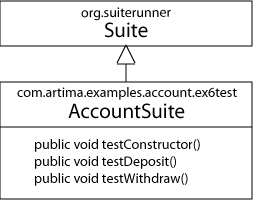
Figure 1. AccountSuite extends Suite and defines test methods.
If your are familiar with JUnit, you can think of class Suite as the JUnit types TestCase, TestSuite, Assert, and Test all collapsed into one type. Whereas JUnit uses the composite pattern to combine test cases into test suites, Artima SuiteRunner uses plain old composition. Any Artima SuiteRunner Suite can hold references to other Suites.
Creating a Fixture
A fixture consists of objects and anything else needed to perform a test. In general, all test methods in a Suite share the same fixture, which is usually composed of objects stored in private instance variables of the Suite. You can create fixtures in either of two ways, via the constructor of your Suite subclass or via Suite's setupFixture method.
Suite.executeTestMethods calls setupFixture before invoking each test method, and cleanupFixture after each test method completes. These methods can be used to create a fresh fixture before each test method, and destroy it afterwards. The setupFixture and cleanupFixture methods are useful when your test methods destroy or change the fixture. If you are certain your test methods won't destroy the fixture, and you don't need to perform any fixture cleanup, you can simply initialize the private variables that represent your fixture in a constructor of your Suite subclass.
Class Suite's setupFixture and cleanupFixture methods are similar to setup and teardown methods of JUnit's class TestCase. Unlike JUnit, however, Artima SuiteRunner's Suite.executeTestMethods invokes all test methods on the same Suite instance. (JUnit generally creates a different TestCase instance for each test method.) If any of your test methods destroy its fixture such that the fixture can't be used by sibling test methods invoked later on the same Suite object, you should use setupFixture to create the fixture. In setupFixture, you create the necessary objects and perform any other tasks to ready the fixture, such as opening a file or socket. In cleanupFixture, you can release the objects to the whims of the garbage collector and perform any other necessary cleanup, such as closing the file or socket.
Writing Test Methods
Test methods may have one of two signatures:
public void test...()public void test...(Reporter reporter)
The "..." in "test..." represents any non-zero length string. Some example test method names are testFest, testimonial, and testOfCharacter.
Test methods indicate success by returning, failure by throwing an exception. The Artima SuiteRunner API includes one exception, TestFailedException, whose purpose is to indicate a failed test. Suite.executeTestMethods interprets any exception thrown from a test method, not just TestFailedException, as an indication of failure.
In the body of test methods, you can take advantage of these six methods declared in superclass Suite:
public static void verify(boolean condition)public static void verify(boolean condition, String message)public static void fail()public static void fail(String message)public static void fail(Throwable cause)public static void fail(String message, Throwable cause)
The verify methods check the specified Boolean condition. If the condition is true, verify returns quietly. Else, verify throws TestFailedException. The verify method that takes a String message parameter uses that String for the detail message of the thrown exception.
The fail methods always throw TestFailedException. If a String message or Throwable cause is provided, the fail method uses these as the detail message and cause for the thrown TestFailedException.
Test methods generally do not catch TestFailedException. Instead, they complete abruptly with the exception, thereby indicating failure. The calling method, usually Suite.executeTestMethods, catches the exception and reports the failure to the Reporter. The Reporter in turn passes the information in some manner along to the user.
As an example, here's the testDeposit method of class AccountSuite from the account example:
public void testDeposit() {

    Account account = new Account();

    account.deposit(20);
    long bal = account.getBalance();
    verify(bal == 20,  "Account.deposit() didn't deposit 20 correctly. "
            + "Resulting balance should have been 20, but was " + bal + ".");

    account.deposit(20);
    bal = account.getBalance();
    verify(bal == 40,  "Account.deposit() didn't deposit 20 twice correctly. "
            + "Resulting balance should have been 40, but was " + bal + ".");

    try {
        account.deposit(-1);
        fail("Account.deposit() didn't throw IllegalArgumentException when "
            + "negative value passed");
    }
    catch (IllegalArgumentException e) {
        // This is supposed to happen, so just keep going
    }

    account = new Account();
    account.deposit(Long.MAX_VALUE);
    verify(account.getBalance() == Long.MAX_VALUE, "account.deposit() "
            + "couldn't handle Long.MAX_VALUE");

    account = new Account();
    account.deposit(1);
    try {
        account.deposit(Long.MAX_VALUE);
        fail("Account.deposit() didn't throw ArithmenticException when a "
            + "value passed that would cause overflow");
    }
    catch (ArithmeticException e) {
        // This is supposed to happen, so just keep going
    }
}
Inside the testDeposit method, I call deposit (the target of this test method) several times on various Account objects, making sure it either performs the correct action or throws the expected exception. For example, after you deposit 20 into an Account, that Account's getBalance method should return 20. The first verify statement in the method checks to make sure that getBalance returns the expected value of 20:
    account.deposit(20);
    long bal = account.getBalance();
    verify(bal == 20,  "Account.deposit() didn't deposit 20 correctly. "
            + "Resulting balance should have been 20, but was " + bal + ".");
In addition, the contract of Account.deposit states that the method should throw IllegalArgumentException if the requested deposit is less than or equal to zero. The following code ensures this behavior works according to the contract:
    try {
        account.deposit(-1);
        fail("Account.deposit() didn't throw IllegalArgumentException when "
            + "negative value passed");
    }
    catch (IllegalArgumentException e) {
        // This is supposed to happen, so just keep going
    }
The previous code snippet shows one use of the fail method. If account.deposit(-1) throws IllegalArgumentException as expected, it will be caught by the empty catch clause and the test method will continue. But if account.deposit(-1) returns normally, instead of throwing a IllegalArgumentException as required, the fail method will be invoked resulting in a TestFailedException. If account.deposit(-1) throws a different exception besides IllegalArgumentException, then the entire testDeposit method will complete abruptly with that exception. The calling method (normally executeTestMethods) will catch any exception and report the failure to the Reporter.
Artima SuiteRunner's TestFailedException corresponds to JUnit's AssertionFailedError. Artima SuiteRunner's two verify methods correspond to the JUnit's multitudinous assert methods declared in class Assert. Unlike JUnit, Artima SuiteRunner does not differentiate between "failures" and "errors." JUnit calls any thrown AssertionFailedError a failure, any other thrown exception an error. In Artima SuiteRunner, a test either succeeds or fails. If the test fails, the user can inspect information about the failure to better understand how to correct the problem.
Using Sub-Suites to Build a Tree of Suites
A Suite consists of zero to many test methods and zero to many sub-Suites. As mentioned previously, a sub-Suite is merely a Suite that is held in a composition relationship by another Suite. The referenced Suite is called a sub-Suite of the referencing Suite. The customary manner to create larger tests is to define focused Suite classes, then aggregate them together as sub-Suites of other Suite classes. An entire test suite is then represented in memory by a tree of Suite objects, starting at a base Suite whose execute method kicks off a run of the entire suite of tests.
The account example has a main Suite, called AccountTestKit, that has no test methods, only sub-Suites. Its constructor instantiates two Suite objects and adds them as sub-Suites to itself via the addSubSuite method. AccountTestKit represents the full conformance test kit for the com.artima.examples.account.ex6 package. Here is the entire AccountTestKit class:
package com.artima.examples.account.ex6test;

import org.suiterunner.Suite;

public class AccountTestKit extends Suite {

    public AccountTestKit() {

        addSubSuite(new AccountSuite());
        addSubSuite(new InsufficientFundsExceptionSuite());
    }
}
Figure 2 shows the structure of the AccountTestKit in memory. AccountTestKit, the base Suite in the tree, holds references to two sub-Suites. These two sub-Suites, AccountSuite and InsufficientFundsExceptionSuite, declare test methods but do not themselves contain sub-Suites.
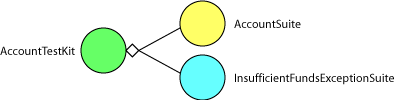
Figure 2. The AccountTestKit is a tree of Suite objects.
When the Runner invokes execute on the AccountTestKit object, execute first invokes executeTestMethods on itself. executeTestMethods uses reflection to discover that AccountTestKit has no test methods, and returns. execute then invokes executeSubSuites, which invokes execute on each of its two sub-Suites. The execute methods of each of those Suites ensures that all test methods executed.
Running a Suite
To run a suite of tests, you use the Artima SuiteRunner application. The Artima SuiteRunner application is distributed as an executable JAR file with the name suiterunner-[release].jar, where the [release] is the release name. For example, the name of the executable JAR file for the 1.0beta2 release of Artima SuiteRunner is: suiterunner-1.0beta2.jar. In this section, I'll refer to the executable JAR file without a release name: suiterunner.jar.
The Artima SuiteRunner application is embodied in the main method of org.suiterunner.Runner (Runner). The Runner application accepts command line arguments that specify an optional recipe file, runpath, zero to many Reporters, and zero to many Suite classes. Runner can be started in either of two ways. If suiterunner.jar is available on the classpath, then the command line takes the following form:
java [-cp <classpath>] org.suiterunner.Runner [<recipefile>] [-p <runpath>] [reporter [...]] [-s <suiteclass> [...]]
If Runner is started using the executable jar file, the command line takes the following form:
java -jar suiterunner.jar [<recipefile>] [-p <runpath>] [reporter [...]] [-s <suiteclass> [...]]
A recipe file contains properties that define runpath, Reporters, and Suites. If a recipe file is specified, it must be the first argument. Any other arguments following the recipe file are ignored. The standard file extension for Artima SuiteRunner recipe files is ".srj".
Specifying a Runpath
A runpath is the list of filenames, directory paths, and/or URLs that Artima SuiteRunner uses to load classes for the running test. If runpath is specified, Artima SuiteRunner creates a java.net.URLClassLoader to load classes available on the runpath. The graphical user interface can optionally reload the test classes for each run by creating a new URLClassLoader for each run. If the executable JAR file is available on the Java classpath, then the classes that comprise the test may also be made available on the classpath and no runpath need be specified.
The runpath is specified with the -p option. The -p must be followed by a space, a double quote ("), a white-space-separated list of paths and URLs, and a double quote. For example:
-p "serviceuitest-1.1beta4.jar myjini http://myhost:9998/myfile.jar"
Specifying Reporters
Reporters can be specified on the command line in any of the following ways:
-g[configs...]- causes display of a graphical user interface that allows tests to be run and results to be investigated-f[configs...] <filename>- causes test results to be written to the named file-o[configs...]- causes test results to be written to the standard output-e[configs...]- causes test results to be written to the standard error-r[configs...] <reporterclass>- causes test results to be reported to an instance of the specified fully qualifiedReporterclass name
The [configs...] parameter, which is used to configure reporters, is described in the next section.
The -r option causes the Reporter specified in <reporterclass> to be instantiated. Each Reporter class specified with a -r option must be public, implement org.suiterunner.Reporter, and have a public no-arg constructor. Reporter classes must be specified with fully qualified names. If the Artima SuiteRunner JAR file is available on the classpath, not run directly as an executable JAR file, the specified Reporter classes can also be deployed on the classpath. If a runpath is specified with the -p option, specified Reporter classes may also be loaded from the runpath. All specified Reporter classes will be loaded and instantiated via their no-arg constructor.
For example, to run a Suite using two Reporters, the graphical Reporter and a print Reporter writing to a file named "testresults.txt", you would type:
-g -f testresults.txt
The -g, -o, or -e options can appear at most once each in any single command line. Multiple appearances of -f and -r result in multiple reporters unless the specified <filename> or <reporterclass> is repeated. If any of -g, -o, -e, <filename> or <reporterclass> are repeated on the command line, the Runner will print an error message and not run the tests.
Runner adds the reporters specified on the command line to a dispatch reporter, which will dispatch each method invocation on itself to each contained reporter. Runner will pass the dispatch reporter to executed Suites. As a result, every specified reporter will receive every report generated by the running suite of tests. If no reporters are specified, a graphical Runner will be displayed that provides a graphical report of executed Suites.
Configuring Reporters
Each reporter specification on the command line can include configuration parameters. Configuration parameters are specified immediately following the -g, -o, -e, -f, or -r. Valid configuration parameters are:
Y- reportrunStartingmethod invocationsZ- reporttestStartingmethod invocationsT- reporttestSucceededmethod invocationsF- reporttestFailedmethod invocationsU- reportsuiteStartingmethod invocationsP- reportsuiteCompletedmethod invocationsB- reportsuiteAbortedmethod invocationsI- reportinfoProvidedmethod invocationsS- reportrunStoppedmethod invocationsA- reportrunAbortedmethod invocationsR- reportrunCompletedmethod invocations
Each reporter has a default configuration. If no configuration is specified on the command line for a particular reporter, that reporter uses its default configuration. Runner will configure each reporter for which configuration parameters are specified via the reporter's setConfiguration method.
For example, to run a Suite using two reporters, the graphical reporter (using its default configuration) and a print reporter configured to print only test failures, suite aborts, and run aborts, you would type:
-g -eFBA
Note that no white space is allowed between the reporter option and the initial configuration parameters. So "-e FBA" will not work, and must be changed to "-eFBA".
Specifying Suites
Suites are specified on the command line with a -s followed by the fully qualified name of a Suite subclass, as in:
-s com.artima.serviceuitest.ServiceUITestkit
Each specified Suite class must be public, a subclass of org.suiterunner.Suite, and contain a public no-arg constructor. Suite classes must be specified with fully qualified names. If the Artima SuiteRunner JAR file is available on the classpath, not run directly as an executable JAR file, the specified Suite classes can be loaded from the classpath. If a runpath is specified with the -p option, specified Suite classes may also be loaded from the runpath. All specified Suite classes will be loaded and instantiated via their no-arg constructor.
The Runner will invoke execute on each instantiated org.suiterunner.Suite, passing in the dispatch reporter to each execute method.
You can also use the -s parameter to specify JUnit test cases. To run JUnit tests from Artima SuiteRunner, junit.jar and the test cases you wish to run must be available via the runpath. Or, if you run Artima SuiteRunner from the class path, you may put junit.jar and your test cases on the class path. Each JUnit test case specified must be a subclass of junit.framework.TestCase, and contain a public constructor that takes a single String parameter. JUnit is not included in the Artima SuiteRunner distribution. If you do not already have junit.jar, you can download it from junit.org
Customizing Artima SuiteRunner
The Artima SuiteRunner API is designed to give client programmers much room to customize its behavior. For example, the contracts of the classes and interfaces in the Artima SuiteRunner API use the words "test" and "suite" generically to allow subclasses and implementation classes maximum flexibility. A org.suiterunner.Suite is one kind of suite. A test method in a org.suiterunner.Suite subclass is one kind of test. But you can define other kinds of suites and tests if you wish. For example, JUnitSuite, a package-access subclass of Suite in the org.suiterunner package, defines a "test" as a test method in a JUnit test case.
Aside from just declaring test methods in your Suite subclasses, you can override many methods declared in Suite. Of particularly usefulness is overriding executeTestMethods, executeSubSuites, or execute itself. For example, JUnitSuite overrides execute so that it runs a suite of JUnit test cases. JUnitSuite overrides getTestCount so that it returns the expected number of JUnit test cases to be run.
Artima SuiteRunner comes with several Reporters built in: a graphical Reporter that presents test results via a graphical user interface; a print Reporter that writes results to the standard output, standard error, or a file; and a dispatch Reporter that forwards results to multiple Reporters. You can make your own Reporters to customize the way test results are presented simply by creating classes that implement Reporter. Some ideas for custom Reporters are:
- an XML
Reporterthat writes results to XML - a database
Reporterthat puts results into a database - a log
Reporterthat posts results to a log using the Java SDK 1.4 logging mechanism - a web page
Reporterthat writes results to one or more web pages - an email
Reporterthat send a summary email at the end of a run - An enthusiastic
Reporterthat blows a fog horn when a test fails and fires a cannon when a test succeeds
For example, if as part of your nightly build process you automatically run a full test suite on your software, you could define Reporters that email a summary of the results each night to team members and place detailed results on a set of web pages.
Most Reporter methods take a single parameter of type Report. Report includes many pieces of information, such as a Thread that can help you understand multi-threaded tests. If you wish to pass more information than you can with a standard Report, you can create a subclass of Report that has extra information. You can then override any of the execute, executeTestMethods, or executeSubSuites methods, and create test methods in your Suite subclasses. These methods can fire instances of your Report subclass which include the extra information you desire to have reported. You can then create custom Reporters that downcast the Report to your new Report subclass, extract the extra information, and report it to the user.
Summary
Artima SuiteRunner is an API and application that can help you build and run unit and conformance tests. The main concepts of the API are represented by the types Suite, Reporter, and Runner. You define test methods in subclasses of Suite. You use Reporters to present test results. And you use Runner to run the Suites. Runner uses recipe files, which contain settings that describe how to perform a particular run. You can create recipe files to reuse later, to share among the members of a team, or to distribute to the public as part of a conformance test kit.
Artima SuiteRunner is to a great extent JUnit refactored. If you have existing JUnit tests, you can use Artima SuiteRunner to run them. In JUnit, runners are a separate concept from the framework API. The JUnit distribution includes three runners: a text runner, which write test results to the standard output; an AWT runner, which presents test results via an AWT graphical user interface; and a Swing runner, which presents test results via a Swing graphical user interface. One way to think of Artima SuiteRunner, therefore, is simply as another JUnit runner. Using Artima SuiteRunner to run your JUnit tests allows you to enjoy features not present in the three standard JUnit runners, such as recipes, Reporters, runpaths, and full stack traces in reported results.
Get Help in the SuiteRunner Forum
For help with Artima SuiteRunner, please post to the SuiteRunner Forum.
Resources
JUnit is available at:
http://www.junit.org
Why We Refactored JUnit
http://www.artima.com/suiterunner/why.html
Getting Started with Artima SuiteRunner, How to Run the Simple Example Included in the Distribution:
http://www.artima.com/suiterunner/start.html
Runnning JUnit Tests with Artima SuiteRunner, how to use Artima SuiteRunner as a JUnit runner to run your existing JUnit test suites:
http://www.artima.com/suiterunner/junit.html
Create an XML Reporter for Your Unit Tests, how to create a customer reporter for Artima SuiteRunner that formats unit test results in XML:
http://www.artima.com/suiterunner/xmlreporter.html
Artima SuiteRunner home page:
http://www.artima.com/suiterunner/index.html
Artima SuiteRunner download page (You must log onto Artima.com to download the release):
http://www.artima.com/suiterunner/download.jsp
The SuiteRunner Forum:
http://www.artima.com/forums/forum.jsp?forum=61
Talk back!
Have an opinion? Be the first to post a comment about this article.
About the author
Bill Venners is president of Artima Software, Inc. and editor-in-chief of Artima.com. He is author of the book, Inside the Java Virtual Machine, a programmer-oriented survey of the Java platform's architecture and internals. His popular columns in JavaWorld magazine covered Java internals, object-oriented design, and Jini. Bill has been active in the Jini Community since its inception. He led the Jini Community's ServiceUI project that produced the ServiceUI API. The ServiceUI became the de facto standard way to associate user interfaces to Jini services, and was the first Jini community standard approved via the Jini Decision Process. Bill also serves as an elected member of the Jini Community's initial Technical Oversight Committee (TOC), and in this role helped to define the governance process for the community. He currently devotes most of his energy to building Artima.com into an ever more useful resource for developers.

Artima provides consulting and training services to help you make the most of Scala, reactive
and functional programming, enterprise systems, big data, and testing.
2070 N Broadway Unit 305
Walnut Creek CA 94597
USA
(925) 918-1769 (Phone)