
How to Keep Fields Focused and Methods Decoupled
First published in JavaWorld, March 1998
This month's installment of Design Techniques is the second in a mini-series of columns about designing objects. In last month's column, which covered designing objects for proper initialization, I talked about how to design constructors and initializers. This month and next month I'll discuss design principles for the actual fields and methods of the class. After that, I'll write about finalizers and show how to design objects for proper cleanup at the end of their lives.
The material for this article (avoiding special data values, using constants, minimizing coupling) and the next article (maximizing cohesion) may be familiar to many readers, as the material is based on general design principles that are quite independent of the Java programming language. Nevertheless, because I have encountered so much code over the years that doesn't take advantage of these principles, I think they deserve to be restated from time to time. In addition, in this article I attempt to show how these general principles apply to the Java language in particular.
Designing fields
In designing fields, the main rule of thumb is to avoid using one variable to represent multiple attributes of a class. You can violate this rule by denoting special values within a variable, each with its own special meaning.
As used here, an attribute is a distinguishing characteristic of an object or class. Two attributes of a CoffeeCup object, for example, could be:
- The amount of coffee the cup contains
- Whether the cup is clean or dirty
To take a closer look at this rule, imagine you are designing a CoffeeCup class for the virtual café described in last month's Design Techniques column. Assume you want to model whether or not a coffee cup in your virtual café has been washed and is ready for use by the next customer. With this information on hand, you can ensure that you don't reuse a coffee cup before it has been washed.
If you decide you only care whether or not a cup has been washed if it is empty, you could use a special value of the innerCoffee field, which normally is used to keep track of the amount of coffee in the cup, to represent an unwashed cup. If 473 milliliters (16 fluid ounces) is the maximum amount of coffee in your largest cup, then the maximum value of innerCoffee normally would be 473. Thus, you could use an innerCoffee value of, say, 500 (a special value) to indicate an empty cup that is unwashed:
// In source packet in file fields/ex1/CoffeeCup.java
class CoffeeCup {

    private int innerCoffee;

    public boolean isReadyForNextUse() {

        // If coffee cup isn't washed, then it's
        // not ready for next use
        if (innerCoffee == 500) {
            return false;
        }
        return true;
    }

    public void setCustomerDone() {
        innerCoffee = 500;
        //...
    }

    public void wash() {
        innerCoffee = 0;
        //...
    }
    // ...
}
This code will give CoffeeCup objects the desired behavior. The trouble with this approach is that special values aren't readily understood, and they make code harder to change. Even if you describe special values in a comment, it may take other programmers longer to understand what your code is doing. Moreover, they may never understand your code. They may use your class incorrectly or change it such that they introduce a bug.
For example, if later someone adds a 20 ounce cup to the offerings of the virtual café, it would then be possible to hold up to 592 milliliters (ml) of coffee in a cup. If a programmer adds the new cup size without realizing you are using 500 ml to indicate that a cup needs washing, it is likely that a bug will be introduced. If a customer in your virtual café bought a 20 ounce cup, then took a big 92-ml gulp, he or she would then have exactly 500 ml remaining in the cup. The customer would be shocked and dissatisfied when, after drinking only 92 ml, the cup disappeared from his or her hand and appeared in the sink, ready to be washed. And, even if the programmer making the change realized that you were using a special value, another special value for the unwashed attribute would have to be chosen.
A better approach to this situation is to have a separate field to model the separate attribute:
// In source packet in file fields/ex2/CoffeeCup.java
class CoffeeCup {

    private int innerCoffee;
    private boolean needsWashing;

    public boolean isReadyForNextUse() {

        // If coffee cup isn't washed, then it's
        // not ready for next use
        return !needsWashing;
    }

    public void setCustomerDone() {
        needsWashing = true;
        //...
    }

    public void wash() {
        needsWashing = false;
        //...
    }
    // ...
}
Here the innerCoffee field is used only to model the amount of coffee in the cup attribute. The cup-needs-washing attribute is modeled by the needsWashing field. This scheme is more easily understood than the previous scheme, which used a special value of innerCoffee and wouldn't prevent someone from expanding the maximum value for innerCoffee.
Using constants
Another rule of thumb to follow when creating fields is to use constants (static final variables) for constant values that are passed to, returned from, or used within methods. If a method expects one of a finite set of constant values in one of its parameters, defining constants helps make it more obvious to client programmers what needs to be passed in that parameter. Likewise, if a method returns one of a finite set of values, declaring constants makes it more obvious to client programmers what to expect as output. For example, it is easier to understand this:
if (cup.getSize() == CoffeeCup.TALL) {
}
than it is to understand this:
if (cup.getSize() == 1) {
}
You should also define constants for internal use by the methods of a class -- even if those constants aren't used outside the class -- so they are easier to understand and change. Using constants makes code more flexible. If you realize you miscalculated a value and you didn't use a constant, you'll have to go through your code and change every occurrence of the hard-coded value. If you did use a constant, however, you'll only need to change it where it is defined as a constant.
Constants and the Java compiler
A useful thing to know about the Java compiler is that it treats static final fields (constants) differently than other kinds of fields. References to static final variables initialized to a compile-time constant are resolved at compile-time to a local copy of the constant value. This is true for constants of all the primitive types and of type java.lang.String.
Normally, when your class refers to another class -- say, class java.lang.Math -- the Java compiler places symbolic references to class Math into the class file for your class. For example, if a method of your class invokes Math.sin(), your class file will contain two symbolic references to Math:
- One symbolic reference to class
Math - One symbolic reference to
Math'ssin()method
To execute the code contained in your class that refers to Math.sin(), the JVM would need to load class Math to resolve the symbolic references.
If, on the other hand, your code only referred to the static final class variable PI declared in class Math, the Java compiler would not place any symbolic reference to Math in the class file for your class. Instead, it would simply place a copy of the literal value of Math.PI into your class's class file. To execute the code contained in your class that uses the Math.PI constant, the JVM would not need to load class Math.
The upshot of this feature of the Java compiler is that the JVM doesn't have to work any harder to use constants than it does to use literals. Preferring constants over literals is one of the few design guidelines that enhances program flexibility without risking any degradation of program performance.
Three kinds of methods
The remainder of this article will discuss method design techniques that are concerned with the data a method uses or modifies. In this context, I'd like to identify and name three basic types of methods in Java programs: the utility method the state-view method, and the state-change method.
The utility method
A utility method is a class method that doesn't use or modify the state (class variables) of its class. This kind of method simply provides a useful service related to its class of object.
Some examples of utility methods from the Java API are:
- (In class
Integer)public static int toString(int i)-- returns a newStringobject representing the specified integer in radix 10 - (In class
Math)public static native double cos(double a)-- returns the trigonometric cosine of an angle
The state-view method
A state-view method is a class or instance method that returns some view of the internal state of the class or object, without changing that state. (This kind of method brazenly disregards the Heisenberg Uncertainty Principle -- see Resources if you need a refresher on this principle.) A state-view method may simply return the value of a class or instance variable, or it may return a value calculated from several class or instance variables.
Some examples of state-view methods from the Java API are:
- (In class
Object)public String toString()-- returns a string representation of the object - (In class
Integer)public byte byteValue()-- returns the value of theIntegerobject as a byte - (In class
String)public int indexOf(int ch)-- returns the index within the string of the first occurrence of the specified character
The state-change method
The state-change method is a method that may transform the state of the class in which the method is declared, or, if an instance method, the object upon which it is invoked. When a state-change method is invoked, it represents an "event" to a class or object. The code of the method "handles" the event, potentially changing the state of the class or object.
Some examples of state-change methods from the Java API are:
- (In class
StringBuffer)public StringBuffer append(int i)-- appends the string representation of theintargument to theStringBuffer - (In class
Hashtable)public synchronized void clear()-- clears theHashtableso that it contains no keys - (In class
Vector)public final synchronized void addElement(Object obj)-- adds the specified component to the end of theVector, increasing its size by one
Minimizing method coupling
Armed with these definitions of utility, state-view, and state-change methods, you are ready for the discussion of method coupling.
As you design methods, one of your goals should be to minimize coupling -- the degree of interdependence between a method and its environment (other methods, objects, and classes). The less coupling there is between a method and its environment, the more independent that method is, and the more flexible the design is.
Methods as data transformers
To understand coupling, it helps to think of methods purely as transformers of data. Methods accept data as input, perform operations on that data, and generate data as output. A method's degree of coupling is determined primarily by where it gets its input data and where it puts its output data.
Figure 1 shows a graphical depiction of the method as data transformer: A data flow diagram from structured (not object-oriented) design.
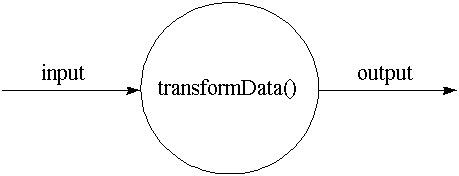 Figure 1. The method as data transformer |
Input and output
A method in Java can get input data from many sources:
- It can require that the caller specify its input data as parameters when it is invoked
- It can grab data from any accessible class variables, such as the class's own class variables or any accessible class variables of another class
- If it is an instance method, it can grab instance variables from the object upon which it was invoked
Likewise, a method can express its output in many places:
- It can return a value, either a primitive type or an object reference
- It can alter objects referred to by references passed in as parameters
- It can alter any class variables of its own class or any accessible class variables of another class
- If it is an instance method, it can alter any instance variables of the object upon which it was invoked
- It can throw an exception
Note that parameters, return values, and thrown exceptions are not the only kinds of method inputs and outputs mentioned in the above lists. Instance and class variables also are treated as input and output. This may seem non-intuitive from an object-oriented perspective, because access to instance and class variables in Java is "automatic" (you don't have to pass anything explicitly to the method). When attempting to gauge a method's coupling, however, you must look at the kind and amount of data used and modified by the code, regardless of whether or not the code's access to that data was "automatic."
Minimally coupled utility methods
The least coupled method that is possible in Java is a utility method that:
- Takes input only from its parameters
- Expresses its output only through its parameters or its return value (or by throwing an exception)
- Accepts as input only data that is actually needed by the method
- Returns as output only data that is actually produced by the method
A good utility method
For example, the method convertOzToMl() shown below accepts an int as its only input and returns an int as its only output:
// In source packet in file coupling/ex1/Liquid.java
class Liquid {

    private static final double FL_OUNCES_PER_ML = 12.0/355.0;
    private static final double ML_PER_FL_OUNCE = 355.0/12.0;

    /**
    * Converts fluid ounces to milliliters
    */
    public static int convertOzToMl(int ounces) {

        double d = ounces * ML_PER_FL_OUNCE;
        d += 0.5;       // Must add .5 because (int) truncates
        return (int) d; // Result now rounded up if fraction >= .5
    }
}
Note that even though the above method makes use of a constant value, the constant value doesn't increase the method's coupling. (This is not only true conceptually, but also in how Java programs are compiled. As mentioned previously in this article, if a class uses a constant, even if it is from another class, its class file gets its own local copy of that constant value.)
To use this method, another method simply passes in the number of ounces and stores the returned number of milliliters:
// In source packet in file coupling/ex1/Liquid.java
class Example1 {

    public static void main(String[] args) {

        int mlFor8Oz = Liquid.convertOzToMl(8);
        int mlFor12Oz = Liquid.convertOzToMl(12);
        int mlFor16Oz = Liquid.convertOzToMl(16);

        System.out.println("Ml for 8 oz is: " + mlFor8Oz);
        System.out.println("Ml for 12 oz is: " + mlFor12Oz);
        System.out.println("Ml for 16 oz is: " + mlFor16Oz);
    }
}
Your aim when you write a utility method, such as convertOzToML(), should be to take input only from parameters and express output only through parameters or a return value or exception. In Figure 2, you can see a graphical depiction of this kind of method.
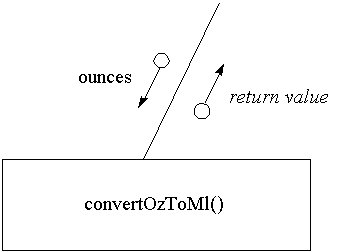 Figure 2. A good (minimally-coupled) utility method |
Figure 2 shows a structure chart, from structured (not object-oriented) design. Although structure charts are not generally useful in an object-oriented design process, they are useful for graphically depicting the input and output to methods. For this reason, I'll be using structure charts in this article to help you visualize the coupling of methods.
A bad utility method
One way to increase the coupling of a utility method (or any other kind of method) is to pass objects that contain input data or are the recipient of output data, when the objects are not vital to the performance of the method. For example, perhaps when you first write convertOzToMl(), you plan always to put its output into a CoffeeCup object, as in:
// In source packet in file coupling/ex2/Example2.java
class Example2 {

    public static void main(String[] args) {

        CoffeeCup cup = new CoffeeCup();
        int amount = Liquid.convertOzToMl(16);
        cup.add(amount);
        //...
    }
}
If so, you might be tempted to write the convertOzToMl() method like this:
// In source packet in file coupling/ex3/Liquid.java
class Liquid {

    private static final double FL_OUNCES_PER_ML = 12.0/355.0;
    private static final double ML_PER_FL_OUNCE = 355.0/12.0;

    /**
    * Converts fluid ounces to milliliters
    */
    public static void convertOzToMl(int ounces, CoffeeCup cup) {

        double d = ounces * ML_PER_FL_OUNCE;
        d += 0.5;
        cup.add((int) d);
    }
}
So you could use it like this:
// In source packet in file coupling/ex3/Example3.java
class Example3 {

    public static void main(String[] args) {

        CoffeeCup cup = new CoffeeCup();
        Liquid.convertOzToMl(16, cup);
        //...
    }
}
The problem here is that convertOzToMl() is now coupled to the CoffeeCup class. This is less flexible than the first version of convertOzToMl(), which returned the milliliters as an int. If later, someone wanted to convert ounces to milliliters for some purpose that didn't involve a coffee cup, they would have to rewrite the method, write a different method, or create a CoffeeCup object just to hold the output.
In Figure 3 you can see a graphical depiction of this kind of method.
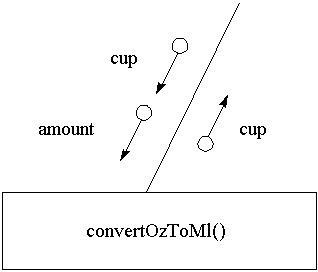 Figure 3. A bad utility method |
A truly ugly utility method
The worst way to write the convertOzToMl() method (the way that yields the maximum coupling) is to take an input from a public static variable and put the output in another public static variable. A public static (but not final) variable in Java is equivalent in functionality and danger to global variables of C or C++. Here's an example:
// In source packet in file coupling/ex4/Liquid.java
// THIS APPROACH WORKS, BUT MAKES THE CODE HARD TO UNDERSTAND
// AND HARD TO CHANGE
class Liquid {

    private static final double FL_OUNCES_PER_ML = 12.0/355.0;
    private static final double ML_PER_FL_OUNCE = 355.0/12.0;

    /**
    * Converts fluid ounces to milliliters
    */
    public static void convertOzToMl() {

        double d = PurpleZebra.k * ML_PER_FL_OUNCE;
        d += 0.5;
        FlyingSaucer.q = (int) d;
    }
}

// In source packet in file coupling/ex4/FlyingSaucer.java
class FlyingSaucer {
        public static int q;
        //...
}

// In source packet in file coupling/ex4/PurpleZebra.java
class PurpleZebra {
    public static int k;
    //...
}
To use the above version of convertOzToMl(), a programmer would have to do the following:
// In source packet in file coupling/ex4/Example4.java
class Example4 {

    public static void main(String[] args) {

        PurpleZebra.k = 16;
        Liquid.convertOzToMl();
        int mlFor16Oz = FlyingSaucer.q;

        System.out.println("Ml for 16 oz is: " + mlFor16Oz);
    }
}
To use this version of convertOzToMl(), client programmers would have to know a lot about the internal implementation of the method. They would have to know they must put their ounces into the static variable PurpleZebra.k and grab the milliliters out of FlyingSaucer.q. By contrast, the "good" version of convertOzToMl() shown earlier in this article enabled programmers to understand how to use it simply by looking at the method's signature and return type. This "ugly" version, because its signature and return type don't reveal all its inputs and outputs, is harder to understand than the good version.
What's more, someone working on FlyingSaucer, not realizing that q was being used elsewhere, might delete the variable or use it for some other purpose. If q does get used for some other purpose and the program is multithreaded, the value of q could get trampled by a different thread after it is assigned the ounces but before convertOzToMl() gets a chance to use it.
This style of programming yields code that is difficult to change because changes can have unforeseen side-effects. In this example, the convertOzToMl() method has a high degree of coupling. It is coupled to two classes, FlyingSaucer and PurpleZebra, which are required for passing data to and from the method. In Figure 4, you can see a graphical depiction of this kind of programming:
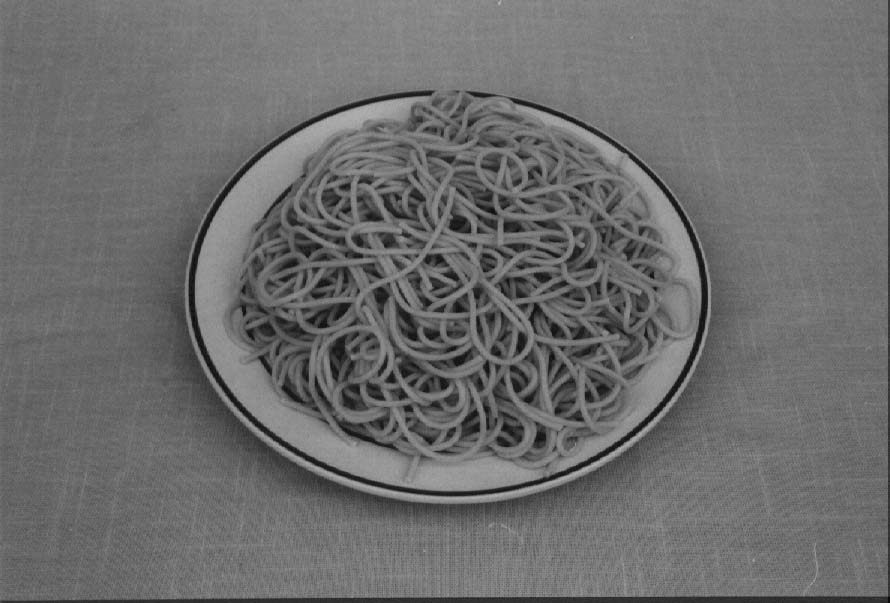 Photo: Tom Prionas Figure 4. Please don't put spaghetti in your computer |
Minimally coupled state-view methods
A minimally coupled state-view method:
- Uses as input only parameters and the class variables of the class that declares method, plus (if an instance method) the instance variables of the object upon which the method is invoked
- Expresses its output only through its return value, parameters, by throwing an exception
The input rule could alternatively be put like this: The input to a minimally coupled state-view method can come from anywhere except directly from non-constant class variables declared in other classes.
The isReadyForNextUse() method of the CoffeeCup class shown previously in this article is an example of a minimally coupled state-view method. This method takes input only from the needsWashing instance variable and expresses output only through its return value.
Figure 5 shows a graphical depiction of isReadyForNextUse().
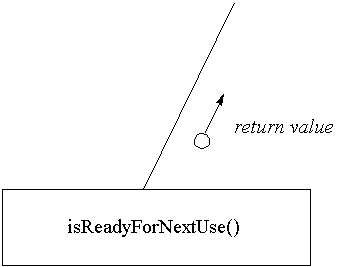 Figure 5. A minimally coupled state-view method |
Minimally coupled state-change methods
A minimally coupled state-change method:
- Uses as input only parameters and the class variables of the class that declares the method, plus (if an instance method) the instance variables of the object upon which the method is invoked
- Expresses its output only through its return value, parameters, by throwing an exception, through the class variables of the class that declares the method, or (if an instance method) through the instance variables of the object upon which the method is invoked
The input requirements of a minimally coupled state-change method are just like those of a minimally coupled state-view method: the input can come from anywhere except directly from non-constant class variables declared in other classes. Similarly, the output of a minimally coupled state-change method can be expressed in any fashion except by directly modifying data declared as or referenced from class variables declared in other classes.
The add() method of the CoffeeCup class shown below is an example of a minimally coupled state-change method:
// In source packet in file coupling/ex5/CoffeeCup.java
class CoffeeCup {

    private int innerCoffee;

    public void add(int amount) {
        innerCoffee += amount;
    }
    //...
}
The add() method takes as input one parameter, amount, and one instance variable, innerCoffee. It expresses its output by changing the innerCoffee instance variable. Figure 6 shows a graphical depiction of the add() method.
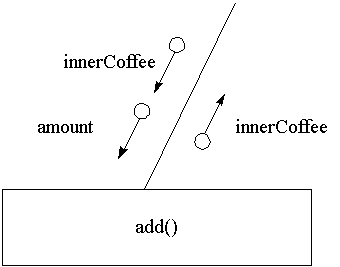 Figure 6. An instance method of the CoffeeCup class |
The hidden this reference
Note that in Figure 5, the needsWashing instance variable is shown as input to the isReadyForNextUse() method. In Figure 6, the innerCoffee instance variable is shown being passed down as input and passed back as output. Although the purpose of treating instance variables as input and output to methods is to help you visualize method coupling, this treatment is also representative of how instance methods work in the Java virtual machine.
Instance methods are able to access instance variables because the methods receive a hidden this reference as their first parameter. The Java compiler inserts a reference to this at the beginning of the parameter list for every instance method it compiles. Because an instance method receives a reference to the instance variables, those instance variables can serve as input, output, or both. A hidden this reference is not passed to class methods, which is why you don't need an instance to invoke them and why they can't access any instance variables.
Conclusion
This article covered some very fundamental territory, which can be summarized as three guidelines:
- The especially valuable guideline for fields
Don't assign a special meaning to special values of a field in an effort to represent multiple attributes with the single field. Instead, use a separate field to represent each separate attribute of a class or object. - The constant corollary
Prefer constants (static final fields) over hard-coded literals (1.5, "Hi there!"), especially if you need to use the same constant value in multiple places. - The minimize-coupling mantra
Always strive to minimize the coupling of methods: Take as input only data needed by the method; express as output only data produced by the method.
Next month
In next month's Design Techniques I'll continue the mini-series of articles that focus on designing classes and objects. Next month's article, the third of this mini-series, will discuss cohesion, the degree of relatedness between the various functions performed within a method body.
I imagine that some readers will find they already know all about the guidelines presented in this and next month's articles. I hope that such readers will forgive me for being obvious and bear with me while I get through the basics. As I said at the start, I think it's important to reiterate the basics from time to time. After next month's article, I'll be writing about design guidelines that are more specific to Java.
A request for reader participation
Software design is subjective. Your idea of a well-designed program may be your colleague's maintenance nightmare. In light of this fact, I am trying to make this column as interactive as possible.
I encourage your comments, criticisms, suggestions, flames -- all kinds of feedback -- about the material presented in this column. If you disagree with something, or have something to add, please let me know.
You can either participate in a discussion forum devoted to this material or e-mail me directly at bv@artima.com.
- The Heisenberg Uncertainty Principle states that we can't know both the position and the momentum of elementary particles, because the act of measuring one of these values changes the other. Put another way, if elementary particles were objects, they wouldn't have any state-view methods, because you couldn't determine their state (in this case, position and momentum) without changing that state.
- Recommended books on Java Design
http://www.artima.com/designtechniques/booklist.html - Source packet that contains the example code used in this article
http://www.artima.com/flexiblejava/coupling.html - The discussion forum devoted to the material presented in this article.
http://www.artima.com/flexiblejava/fjf/fieldsmethods/index.html - Object Orientation FAQ
http://www.cyberdyne-object-sys.com/oofaq/ - 7237 Links on Object Orientation
http://www.rhein-neckar.de/~cetus/software.html - The Object-Oriented Page
http://www.well.com/user/ritchie/oo.html - Collection of information on OO approach
http://arkhp1.kek.jp:80/managers/computing/activities/OO_CollectInfor/OO_CollectInfo.html - Design Patterns Home Page
http://hillside.net/patterns/patterns.html - A Comparison of OOA and OOD Methods
http://www.iconcomp.com/papers/comp/comp_1.html - Object-Oriented Analysis and Design Methods: A Comparative Review
http://wwwis.cs.utwente.nl:8080/dmrg/OODOC/oodoc/oo.html - Patterns discussion FAQ
http://gee.cs.oswego.edu/dl/pd-FAQ/pd-FAQ.html - Implementing Basic Design Patterns in Java (Doug Lea)
http://g.oswego.edu/dl/pats/ifc.html - Patterns in Java AWT
http://mordor.cs.hut.fi/tik-76.278/group6/awtpat.html - Software Technology's Design Patterns Page
http://www.sw-technologies.com/dpattern/ - Synchronization of Java Threads Using Rendezvous
http://www-cad.eecs.berkeley.edu/~jimy/classes/rendezvous/ - Design Patterns: Elements of Reusable Object-Oriented Software, In Java
http://www.zeh.com/local/jfd/dp/design_patterns.html - Another example of obvious content from Bill Venners
http://www.artima.com/bv/music/obvioussong.html
This article was first published under the name Designing Fields and Methods in JavaWorld, a division of Web Publishing, Inc., March 1998.
Talk back!
Have an opinion? Be the first to post a comment about this article.
About the author
Bill Venners has been writing software professionally for 12 years. Based in Silicon Valley, he provides software consulting and training services under the name Artima Software Company. Over the years he has developed software for the consumer electronics, education, semiconductor, and life insurance industries. He has programmed in many languages on many platforms: assembly language on various microprocessors, C on Unix, C++ on Windows, Java on the Web. He is author of the book: Inside the Java Virtual Machine, published by McGraw-Hill.

Artima provides consulting and training services to help you make the most of Scala, reactive
and functional programming, enterprise systems, big data, and testing.
2070 N Broadway Unit 305
Walnut Creek CA 94597
USA
(925) 918-1769 (Phone)