
When developing software, you often pull out certain parameters from the source code and make them configurable. This way when those parameters need to be changed, you (or perhaps a field-service engineer or user) can modify a configuration file. You need not go in and change hard-coded values and recompile the source code to modify those parameters. The software reads the configuration file and sets the parameters dynamically.
This need to make software configurable can also be true for tests. If your tests use certain parameters that change often, or that need to assume different values for different runs, you may feel the urge to make your tests configurable. Just like any other software, for certain parameters used by your tests, you may prefer to specify the values in a configuration file or on the command line instead of in the source code. For example, when testing with a database, you may want to make configurable the database name, the user and password for accessing the database, and the port and server on which the database is running, rather than hard-coding these values in the source code.
As of version 1.0beta7, Artima SuiteRunner allows you to specify configuration parameters called "settings" for individual runs. These settings, which may be specified on the command line or in a recipe file, can be accessed and used by your test classes. This article will show you how to supply settings to Artima SuiteRunner and access them from your test classes.
Specifying Settings in Recipes
Prior to version 1.0beta7, every Artima SuiteRunner recipe file contained three properties that defined the runpath, reporters, and suites for one run. A runpath is a list of directories, JAR files, and URL code bases from which to load classes during the run. Using the runpath, SuiteRunner executes the specified suite classes, employing the specified reporter classes to collect test results during the run. Here's the contents of an example recipe file:
org.suiterunner.Runpath=-p "dir1 dir2"
org.suiterunner.Suites=-s MySuite -s MyTestCase
org.suiterunner.Reporters=-g -f test.out -eFAB
As of version 1.0beta7, you can now specify any number of other properties in the recipe file. These other properties are settings. Settings can be named anything so long the name does not begin with "org.suiterunner.", which is reserved for SuiteRunner itself. For example, you could specify a database name in the recipe file like this:
org.suiterunner.Runpath=-p "dir1 dir2"
org.suiterunner.Suites=-s MySuite -s MyTestCase
org.suiterunner.Reporters=-g -f test.out -eFAB
dbname=testdb
In this example, the dbname property is a setting.
Accessing and Using Settings
In version 1.0beta7, we added two methods to class Suite that allow you to access and use the settings in your test classes:
public void setUpSuite(Map context)
public void tearDownSuite()
Similar to the way setUpFixture is called prior to invoking each test method, and tearDownFixture after, setUpSuite is called prior to executing each Suite, and tearDownSuite after. When the runner invokes setUpSuite on each Suite class listed in the recipe file, the Map it passes to setUpSuite contains the settings as key value pairs. For example, if the recipe file contained the setting property dbname=testdb, the Map passed to setUpSuite would contain the key "dbname" mapped to the value "testdb". To access this setting, you must override setUpSuite in your Suite subclass. In your implementation of setUpSuite, you can retrieve the database name from the context Map, and set up the database connection for the test. Because you are opening a database connection in setUpSuite, you will likely want to override tearDownSuite and close the database connection.
PythagoreanSuite: An Example
To demonstrate the process of overriding setUpSuite, we added class PythagoreanSuite to the examples in the Artima SuiteRunner distribution zip file in version 1.0beta7. If you have a release prior to 1.0beta7, please download the latest version of Artima SuiteRunner. One you unzip the distribution zip file, you'll find the source code for PythagoreanSuite in the suiterunner-[release]/example/com/artima/examples/settings/ex1 directory. Here's the source:
package com.artima.examples.settings.ex1;

import org.suiterunner.Suite;
import java.util.Map;

public class PythagoreanSuite extends Suite {

    private long a;
    private long b;
    private long c;

    public void setUpSuite(Map context) {

        String aString = (String) context.get("a");
        if (aString == null) {
            throw new NullPointerException("a not specified in context");
        }

        String bString = (String) context.get("b");
        if (bString == null) {
            throw new NullPointerException("b not specified in context");
        }

        String cString = (String) context.get("c");
        if (cString == null) {
            throw new NullPointerException("c not specified in context");
        }

        // Long.parseLong will throw number format exception if the specified
        // String cannot be parsed into a long value. This will cause the Suite
        // to abort, and none of its test methods will be executed.
        a = Long.parseLong(aString);
        b = Long.parseLong(bString);
        c = Long.parseLong(cString);

        super.setUpSuite(context);
    }

    public void testRightTriangle() {

        verify (a * a + b * b == c * c);
    }
}
PythagoreanSuite's implementation of setUpSuite expects three settings to be passed in the context Map, named a, b, and c. setUpSuite first ensures that the Map contains values for each of these keys. If any expected key is not mapped to a non-null value, it throws NullPointerException. If it obtains String values for each of the keys, it attempts to parse the three values into longs and place the result into private instance variables named a, b, and c. If any of the values cannot be parsed as a long, NumberFormatException will be thrown. Otherwise, the final statement in the method will be executed, which merely invokes setUpSuite on the superclass, passing along the context Map.
If setUpSuite completes abruptly with an exception, the Suite will not be executed—neither execute or tearDownSuite will be invoked on the Suite—and suiteAborted will be invoked on the reporters. If setUpSuite returns normally, however, both execute and tearDownSuite will be invoked.
When overriding setUpSuite in your Suite subclass, it is generally important to call super.setUpSuite and pass a non-null Map as the context. Class Suite saves the Map passed to its setUpSuite implementation in a private instance variable. Suite's implementation of executeSubSuites then passes along this saved context Map to the setUpSuite method of all its sub-Suites. If you don't invoke Suite's implementation of setUpSuite, then the setUpSuite method of your sub-Suites will receive a null Map.
The distribution zip file contains two recipe files in the suiterunner-[release] directory, righttriangle.srj and wrongtriangle.srj. The righttriangle.srj recipe contains:
org.suiterunner.Runpath=-p "example"
org.suiterunner.Suites=-s
com.artima.examples.settings.ex1.PythagoreanSuite
org.suiterunner.Reporters=-g
a=3
b=4
c=5
To use this recipe, run the following command from the directory in which you unzipped the Artima SuiteRunner distribution zip file:
java -jar suiterunner-[release].jar righttriangle.srj
Because this recipe contains settings that describe a right triangle, the Pythagorean theorem holds, the testRightTriangle method will succeed, and you will get a green bar.
By contrast, the wrongtriangle.srj recipe contains:
org.suiterunner.Runpath=-p "example"
org.suiterunner.Reporters=-g
org.suiterunner.Suites=-s
com.artima.examples.settings.ex1.PythagoreanSuite
a=2
b=3
c=4
To use this recipe, run the following command from the directory in which you unzipped the Artima SuiteRunner distribution zip file:
java -jar suiterunner-[release].jar wrongtriangle.srj
Because the triangle described by the settings in this recipe is not a right triangle, the Pythagorean theorem doesn't hold, the testRightTriangle method will throw a TestFailedException, and you will get a red bar.
Specifying Settings on the Command Line
In addition to placing settings in a recipe file, you can also provide settings to your tests on the command line or via the graphical user interface. To specify settings on the command line, place-D<key>=<value> arguments before specifying the runpath, reporters, or suites. For example, you can run the right triangle test like this:
java -jar suiterunner.jar -Da=3 -Db=4 -Dc=5 -p "example" -g -s com.artima.examples.settings.ex1.PythagoreanSuite
Executing this command should give you the same result as executing the righttriangle.srj recipe file, a passed test, a green bar.
Specifying Settings via the Graphical User Interface
Finally, if you are using Artima SuiteRunner's graphical user interface, you can view, add, remove, and edit settings by selecting Edit Recipe on the File menu, then clicking on the Settings tab. This approach to specifying settings is shown in Figure 1.
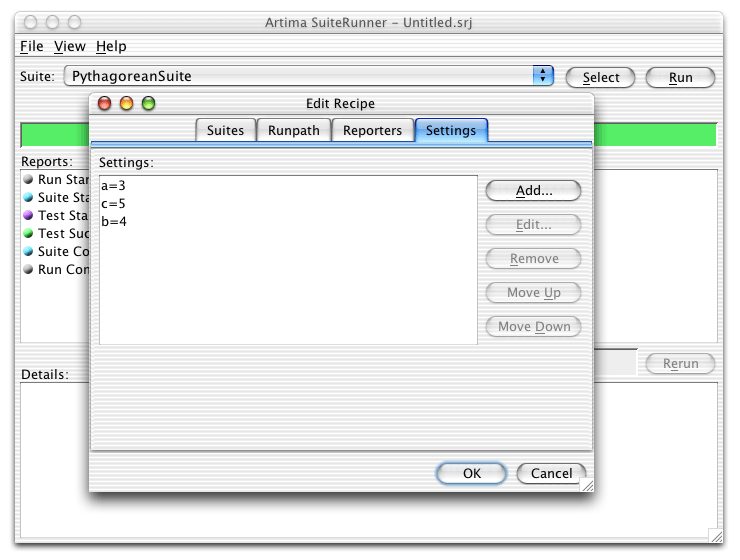
Figure 1. Specifying Settings via the Edit Recipe Dialog.
Passing Context to JUnit Tests
Artima SuiteRunner is a JUnit runner. You can use it to drive JUnit test suites. If you choose to use Artima SuiteRunner as your JUnit runner, you gain the advantages of runpath, recipes, and reporters. As of the 1.0beta7 release, there is no direct support for passing the settings parameters to JUnit test cases. It isn't clear what the best approach would be, and to our knowledge, everyone who has adopted Artima SuiteRunner has used it standalone, not in conjunction with JUnit. So for the time being we haven't solved that problem, and currently plan to do so only if users ask for it. If you desire such functionality, please post to the SuiteRunner Forum.
Resources
1. The ServiceUI API defines a standard way to attach user interfaces to Jini services:
http://www.artima.com/jini/serviceui/index.html
2. Daniel Steinberg is currently the Editor-In-Chief of Java.NET:
http://www.java.net/
3. Artima SuiteRunner is a free open source testing toolkit and JUnit runner:
http://www.artima.com/suiterunner/index.html
4.JUnit FAQ question about testing private methods:
http://junit.sourceforge.net/doc/faq/faq.htm#tests_10
5. Testing Private Methods (Don't Do It), a weblog post by Charles Miller:
http://fishbowl.pastiche.org/2003/03/28/testing_private_methods_dont_do_it
6. Andy Hunt and Dave Thomas are the authors of Pragmatic Unit Testing, which is available at The Pragmatic Store.
7. JUnit Addons is a collection of helper classes for JUnit created by Vladimar R. Bossicard:
http://sourceforge.net/projects/junit-addons
8. PrivateAccessor is the class from JUnit Addons that facilates testing private members:
http://junit-addons.sourceforge.net/junitx/util/PrivateAccessor.html
9.PrivilegedAccessor class, which you can use to access private members:
http://groups.yahoo.com/group/junit/files/src/PrivilegedAccessor.java
10. Test Driven Development by Example, by Kent Beck, describes the test-first technique:
http://www.amazon.com/exec/obidos/ASIN/0321146530/
11. Test Infected, by Kent Beck and Erich Gamma, introduced JUnit to the world:
http://junit.sourceforge.net/doc/testinfected/testing.htm
Unit Testing Private Methods, a weblog post about nUnit by Ted Graham:
http://weblogs.asp.net/tgraham/archive/2003/12/31/46984.aspx
Subverting Java's Access Protection for Unit Testing, an O'Reilly OnJava.com article by Ross Burton:
http://www.onjava.com/pub/a/onjava/2003/11/12/reflection.html
Class RunnerSuite, from which the code snippets in this article were taken, appears in its entirety here:
http://www.artima.com/suiterunner/privateExample.html
Why We Refactored JUnit
http://www.artima.com/suiterunner/why.html
Artima SuiteRunner Tutorial, Building Conformance and Unit Tests with Artima SuiteRunner:
http://www.artima.com/suiterunner/tutorial.html
Getting Started with Artima SuiteRunner, How to Run the Simple Example Included in the Distribution:
http://www.artima.com/suiterunner/start.html
Runnning JUnit Tests with Artima SuiteRunner, how to use Artima SuiteRunner as a JUnit runner to run your existing JUnit test suites:
http://www.artima.com/suiterunner/junit.html
Artima SuiteRunner home page:
http://www.artima.com/suiterunner/index.html
Artima SuiteRunner download page (You must log onto Artima.com to download the release):
http://www.artima.com/suiterunner/download.jsp
The SuiteRunner Forum:
http://www.artima.com/forums/forum.jsp?forum=61
Talk back!
Have an opinion? Readers have already posted 1 comment about this article. Why not add yours?
About the author
Bill
Venners is President of Artima Software, Inc. and
Editor-In-Chief of Artima.com. He is the author of Inside the Java Virtual
Machine (Computing McGraw-Hill), a programmer-oriented
survey of the Java platform's architecture and internals. His
popular columns in JavaWorld magazine covered Java internals, object-oriented design, and Jini. Bill has been active in
the Jini Community since its
inception. He led the Jini Community's ServiceUI project, whose
ServiceUI API became the de facto standard for associating user
interfaces to Jini services. Bill also serves as an elected
member of the Jini Community's initial Technical Oversight
Committee (TOC), and in this role helped to define the governance
process for the community.

Artima provides consulting and training services to help you make the most of Scala, reactive
and functional programming, enterprise systems, big data, and testing.
2070 N Broadway Unit 305
Walnut Creek CA 94597
USA
(925) 918-1769 (Phone)